- Subscribe to RSS Feed
- Mark Topic as New
- Mark Topic as Read
- Float this Topic for Current User
- Bookmark
- Subscribe
- Mute
- Printer Friendly Page
Q Control Datagrid

 Joe_H
Joe_H

03-27-2024 12:29 PM
- Mark as New
- Bookmark
- Subscribe
- Mute
- Subscribe to RSS Feed
- Permalink
- Report to a Moderator
I am having issues using the Datagrid control from QSI. The configuration editor does not show up. I have installed all of the libraries through VIPM but still cannot get it to work. I could not find a page for submitting an issue with the toolkit so I thought I would reach out here and see if anyone could help out.
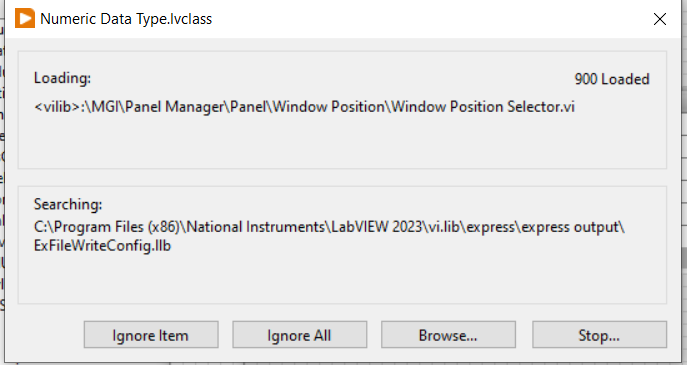
When I drop a MCL on the front panel and right click i get the option to convert to datagrid. When I click on convert to datagrid I get this search box that runs for several minutes and then goes away.
I can then click on convert to datagrid AGAIN and I get this dialog
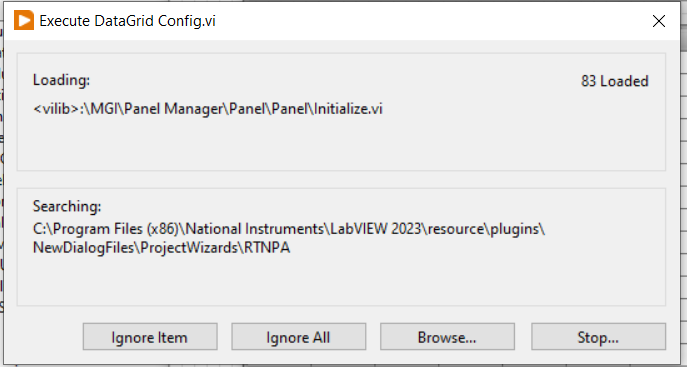
This just goes back and forth forever and the configuration tool never appears. I have uninstalled and reinstalled everything QSI, restarted LabVIEW ETC...
Anyone have any ideas or a forum I can go to for issues with this control.
Joe.
"NOTHING IS EVER EASY"

03-27-2024 12:38 PM
- Mark as New
- Bookmark
- Subscribe
- Mute
- Subscribe to RSS Feed
- Permalink
- Report to a Moderator
Another point is that with the control installed, anytime I right click on the MCL I get the first dialog box and then when I click on the convert to datagrid I get the second box.
Joe.
"NOTHING IS EVER EASY"

 Darren
03-27-2024 12:52 PM
- Mark as New
- Bookmark
- Subscribe
- Mute
- Subscribe to RSS Feed
- Permalink
- Report to a Moderator
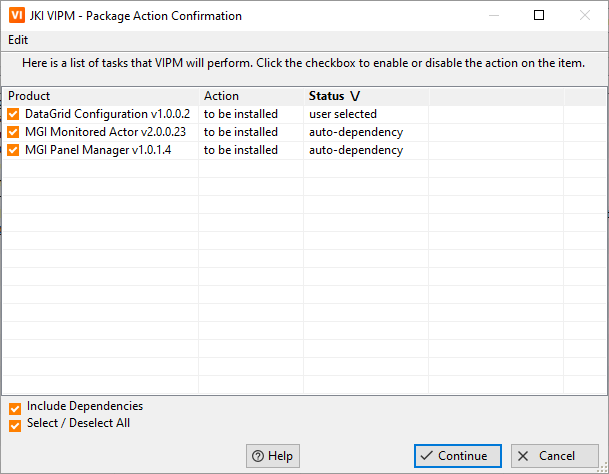
It looks like the DataGrid package depends on MGI Monitored Actor and MGI Panel Manager. Does your VIPM show that those packages are also installed?
03-27-2024 12:55 PM
- Mark as New
- Bookmark
- Subscribe
- Mute
- Subscribe to RSS Feed
- Permalink
- Report to a Moderator
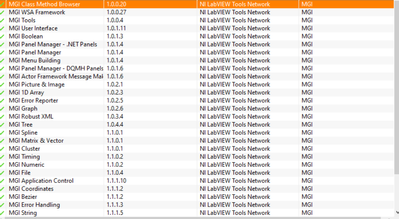
Yes it is. I actually use this a lot.
Joe.
"NOTHING IS EVER EASY"
Darren
03-27-2024 12:57 PM
- Mark as New
- Bookmark
- Subscribe
- Mute
- Subscribe to RSS Feed
- Permalink
- Report to a Moderator
Are those MGI files that are shown in the search dialog actually present in those locations on disk?
Darren
03-27-2024 12:58 PM - edited 03-27-2024 12:59 PM
- Mark as New
- Bookmark
- Subscribe
- Mute
- Subscribe to RSS Feed
- Permalink
- Report to a Moderator
Oh, and I just looked at your screenshot... MGI Monitored Actor doesn't appear in the list.
03-27-2024 01:07 PM
- Mark as New
- Bookmark
- Subscribe
- Mute
- Subscribe to RSS Feed
- Permalink
- Report to a Moderator
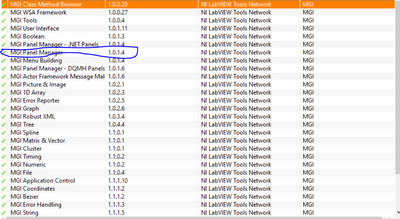

Its there.
Joe.
"NOTHING IS EVER EASY"
Darren
03-27-2024 01:09 PM
- Mark as New
- Bookmark
- Subscribe
- Mute
- Subscribe to RSS Feed
- Permalink
- Report to a Moderator
Are those MGI files that are shown in the search dialog actually present in those locations on disk?
03-27-2024 01:11 PM
- Mark as New
- Bookmark
- Subscribe
- Mute
- Subscribe to RSS Feed
- Permalink
- Report to a Moderator
Yes they are present on the system.
Joe.
"NOTHING IS EVER EASY"
Darren
03-27-2024 01:12 PM
- Mark as New
- Bookmark
- Subscribe
- Mute
- Subscribe to RSS Feed
- Permalink
- Report to a Moderator
Then my best guess is that the compiled object cache is messed up. I suggest clearing it, then mass compiling relevant subfolders in vi.lib.
