- Subscribe to RSS Feed
- Mark Topic as New
- Mark Topic as Read
- Float this Topic for Current User
- Bookmark
- Subscribe
- Mute
- Printer Friendly Page
Python Node in LV2018

 Initial_Red
12-03-2019 08:19 PM
- Mark as New
- Bookmark
- Subscribe
- Mute
- Subscribe to RSS Feed
- Permalink
- Report to a Moderator
Okay, and i try reinstalling the LabVIEW, then i find everything is ok. It works well. However, something still confuse me. When i use Python integrate toolkit, function call and module import can be divided. However, the Python node can't.
 Bimx
Bimx
01-07-2020 04:48 AM
- Mark as New
- Bookmark
- Subscribe
- Mute
- Subscribe to RSS Feed
- Permalink
- Report to a Moderator
Hi Aurelien,
Thanks for the comprehensive guide. The python node amd ML libraries are working fine together.
I'm creating a python function that defines a deep learning model and load pretrained weights in it, and returns the loaded model. However, we need to specify the 'return type' in the python node, but LabVIEW only supports numeric, string, boolean, and clusters as "return data type", and the model's datatype doesn't fit under any of the supported types. When I check the datatype of model in python, it shows 'tflearn.models.dnn.DNN'. Is there anyway to define a custom return type in python node? or any other way to get around this problem?
On the other hand, when I define a python function which loads the weights into the model and then make prediction on a test example, the return variable is an array of predictions whose return type is an array of float32, which is supported by python node. Hence, this works well. The downside to this is that every time this python node runs in a loop, it loads the weights into the model from scratch and then makes prediction, which is quite a time extensive process.
To avoid reloading the weights every time, I planned to define a separate function outside the loop for loading the model only once , and another function inside the loop for making predictions only using the preloaded model. However, due to the ambiguity in specifying the return type of the loaded model in python node, i'm unable to execute it.
Any suggestions and help would be greatly appreciated. Thanks

 ChuckS
02-28-2020 12:01 PM
- Mark as New
- Bookmark
- Subscribe
- Mute
- Subscribe to RSS Feed
- Permalink
- Report to a Moderator
can someone down convert from 2018 to 2015. thank you

 Gregory
02-28-2020 03:00 PM
- Mark as New
- Bookmark
- Subscribe
- Mute
- Subscribe to RSS Feed
- Permalink
- Report to a Moderator
@ChuckS wrote:
can someone down convert from 2018 to 2015. thank you
Hi Chuck, the python node was introduced in LabVIEW 2018.
 Theatom
05-28-2020 06:33 AM
- Mark as New
- Bookmark
- Subscribe
- Mute
- Subscribe to RSS Feed
- Permalink
- Report to a Moderator
Hi Chad,
Whenever I try to use any python packages such as numpy, I get a "ModuleNotFoundError: No module named 'numpy'" error. However, I have numpy installed and my path variables are properly defined. I got the same error when I tried to run your example. But, your program runs perfectly fine from python shell.
I am using python 3.6.1 on a windows 8 machine and I don't have any other version installed.
Thanks in advance.
-theAtom

 Aurelien_A
05-28-2020 07:31 AM
- Mark as New
- Bookmark
- Subscribe
- Mute
- Subscribe to RSS Feed
- Permalink
- Report to a Moderator
Hi Theatom,
Do you have anaconda installed ?
are you running labview 32 bits or 64 bits ?
Did you install Python 3.6-32bits or Python 3.6-64bits ?
Did you try to follow this steps :
1. in the command prompt write "cd C:\Users\user\AppData\Python36-32\Scripts" so all the other command will occur in this folder.
2. type "pip install numpy" and the other libraries that you want.
Theatom
05-29-2020 02:50 AM
- Mark as New
- Bookmark
- Subscribe
- Mute
- Subscribe to RSS Feed
- Permalink
- Report to a Moderator
Hi Chad,
I do not have anaconda installed.
I am running both LabView and python3.6.1 in 32 bits.
And my python installation path is c:\python36
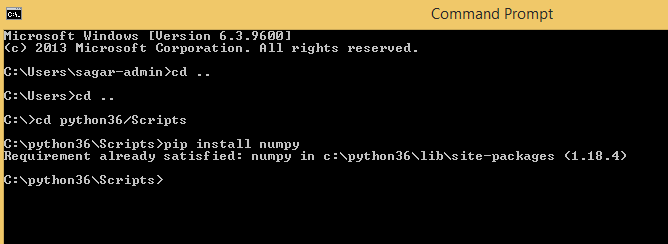
If I try to install numpy, I get a message "Requirement already satisfied". I have attached a screenshot.
Regards.
theAtom
 gb119
gb119
05-29-2020 05:10 AM
- Mark as New
- Bookmark
- Subscribe
- Mute
- Subscribe to RSS Feed
- Permalink
- Report to a Moderator
It's probably worth checking that the python that LabVIEW finds is the one that you're expecting and that there isn't another dll further up the system path that's been installed by some other application. The snippet attached will query where the site package directories are - you can then check that numpy is actually installed in there.
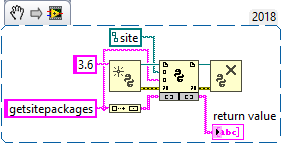
(It's remarkably difficult to use the Python node if you don't know what the sys.path looks like, and it's tricky to use the Python nodes to tell you what sys.path is if you don't know it already!)
Gavin Burnell
Condensed Matter Physics Group, University of Leeds, UK
http://www.stoner.leeds.ac.uk/
Aurelien_A
05-29-2020 08:05 AM
- Mark as New
- Bookmark
- Subscribe
- Mute
- Subscribe to RSS Feed
- Permalink
- Report to a Moderator
Did you try to uninstall python and reinstall it in the default directory and check the box "add Python36 to Path" ?
I made a test by installing Python 3.6.8rc1 and run the example PythonNode_AddTwoDoubles.vi, all works perfectly.
My default directory is : C:\Users\"name of user"\AppData\Local\Programs\Python\Python36-32
If there is no error running the example then you should try to install the module numpy in C:\Users\"name of user"\AppData\Local\Programs\Python\Python36-32\Scripts then run your code.
 jonroth
09-08-2020 12:23 PM
- Mark as New
- Bookmark
- Subscribe
- Mute
- Subscribe to RSS Feed
- Permalink
- Report to a Moderator
To anyone finding cheriks's example of the Python node now (>=9/2020), I stumbled for a while on making multiple figures in matplotlib using the backend agg, with Labview. I was calling plt.figure(1), plt.figure(2), etc. It worked in Python on its own, but threw an error in labview. To solve the error, after "import matplotlb.pyplot as plt" add the line "plt.ioff()". Then it works fine to call plt.figure(x).
