- Subscribe to RSS Feed
- Mark Topic as New
- Mark Topic as Read
- Float this Topic for Current User
- Bookmark
- Subscribe
- Mute
- Printer Friendly Page
Python Node in LV2018

 Steve_555
05-25-2018 03:48 PM
- Mark as New
- Bookmark
- Subscribe
- Mute
- Subscribe to RSS Feed
- Permalink
- Report to a Moderator
I am trying to use the new native support for Python in LV2018. I have Python 3.6 installed and have added the corresponding DLL to the path as indicated in the LV documentation. I am able to open a Python session using the "Open Python Session Function" node and close that same session using the "Close Python Session Function" node, all without errors, which feels like a big enough accomplishment at the moment.
When I try and actually use the session with a Python Node to run a function that is built-in to Python (print) I get an error:
Error 1667 occurred at Python Node in pythonTest.vi
Possible reason(s):
LabVIEW: (Hex 0x683) The specified Python module could not be imported.
Module Path: C:\Python36\python36.dll
Function Name: print
Python returned the following error: <class 'ModuleNotFoundError'>
No module named 'python36'
In the example above I set the module to the Python DLL. In the end, I'm not really sure what to set the module so that I can print "hello world!"
I'm effectively trying to run:
print("Hello World!")
Just to so that I know I have a decent starting point.
Does anyone have any advice?
Thanks,
Steve

 Gregory
05-25-2018 05:09 PM
- Mark as New
- Bookmark
- Subscribe
- Mute
- Subscribe to RSS Feed
- Permalink
- Report to a Moderator
@Steve_555 wrote:
Module Path: C:\Python36\python36.dll
Function Name: print
Python returned the following error: <class 'ModuleNotFoundError'>
No module named 'python36'
Do you have a file at that path?

 chericks
05-25-2018 09:35 PM - edited 05-25-2018 09:54 PM
- Mark as New
- Bookmark
- Subscribe
- Mute
- Subscribe to RSS Feed
- Permalink
- Report to a Moderator
Hi Steve,
I defined a simple function that returned the string "hello world!", saved the function in a .py file, and provided the file path to the Python Node.
Hope this helps!
Chad

05-26-2018 05:33 PM
- Mark as New
- Bookmark
- Subscribe
- Mute
- Subscribe to RSS Feed
- Permalink
- Report to a Moderator
Hi Chad,
I realize my mistake now. I was thinking that I could pass individual lines of Python script to the Python node and it would run them. I see now that it can only execute functions from within a module.
Thank you for the detailed answer,
Steve
 luboss333
07-13-2018 03:38 AM
- Mark as New
- Bookmark
- Subscribe
- Mute
- Subscribe to RSS Feed
- Permalink
- Report to a Moderator
Hello
Did you try to run external libraries like numpy, scipy or matplotlib. I have libraries installed in the sys path and I tried to import them into a file that is defined in the path of Python node. Labview responded with the 'ModuleNotFoundError' error No module named 'numpy'. Can I ask for a simple example VI of how to use external Python libraries.
Thank you
chericks
07-13-2018 04:10 PM
- Mark as New
- Bookmark
- Subscribe
- Mute
- Subscribe to RSS Feed
- Permalink
- Report to a Moderator
Hi luboss333,
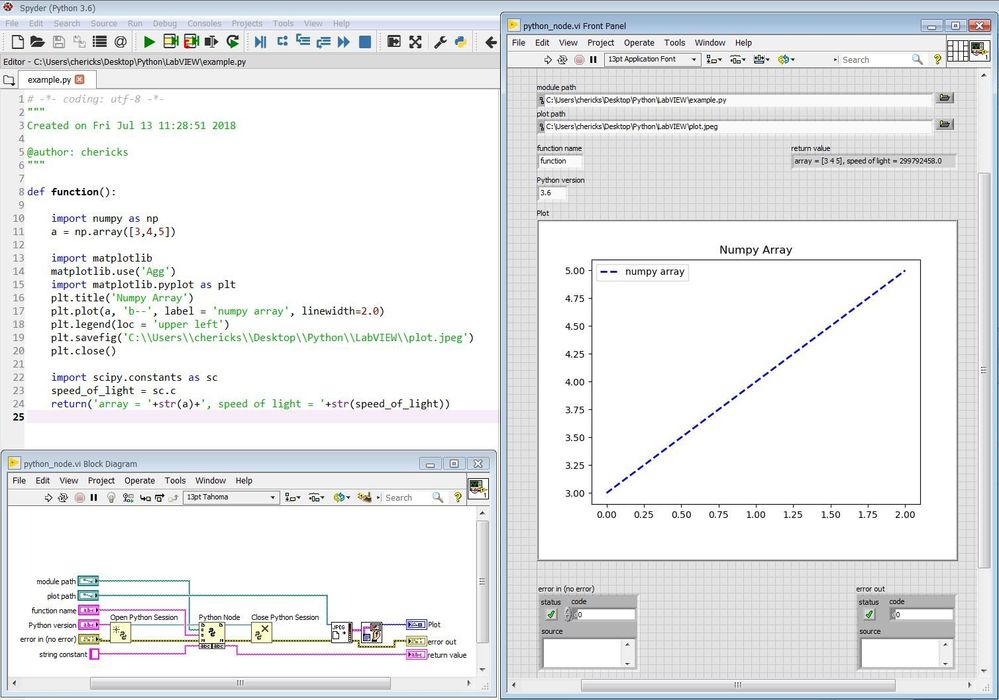
I was able to use numpy, scipy, and matplotlib. I've attached a simple example. Does it work for you?
Hope this helps!
Chad
chericks
07-13-2018 06:22 PM
- Mark as New
- Bookmark
- Subscribe
- Mute
- Subscribe to RSS Feed
- Permalink
- Report to a Moderator
I probably should have explained the two additional LabVIEW VIs. As described in this forum thread, one way to embed a matplotlib graph within LabVIEW is the following:
1) In Python: write the plot to a file using matplotlib's savefig()
2) In LabVIEW: display the plot using Read JPEG File.vi (or Bitmap/PNG) and Draw Flattened Pixmap.vi
Best regards!
Chad
luboss333
07-16-2018 02:25 AM
- Mark as New
- Bookmark
- Subscribe
- Mute
- Subscribe to RSS Feed
- Permalink
- Report to a Moderator
Thank you very much for the answer
I understand the idea of VI and Py file. I've also tried this, and it's interesting that Labview still writes the same error -> import numpy as np, "ModuleNotFoundError: No module named 'numpy'. It looks like Labview can not find the numpy in system path. I have installed Anaconda (ver 3.6, 32 bit) in the system path. I do not know if there is any setting in Labview to change of interpreter of Python.
chericks
07-16-2018 09:43 AM - edited 07-16-2018 09:44 AM
- Mark as New
- Bookmark
- Subscribe
- Mute
- Subscribe to RSS Feed
- Permalink
- Report to a Moderator
Hi luboss333,
I think you're close to solving the problem. On my computer the package for numpy is installed in the following Anaconda3 directory:
C:\Users\chericks\Anaconda3\pkgs\numpy-1.14.0-py36h4a99626_1\Lib\site-packages\numpy
LabVIEW should be able to find the module by searching the system path. Looking at my Environment Variables, I placed the Anaconda3 directory in both User variables and System variables.
Variable: Path
Value: C:\Users\chericks\Anaconda3;
Do you have the Anaconda directory shown there?
Attached below are stackoverflow forum posts related to calling Python and getting an import error:
https://stackoverflow.com/questions/15514593/importerror-no-module-named-when-trying-to-run-python-s...
https://stackoverflow.com/questions/3701646/how-to-add-to-the-pythonpath-in-windows
Hope this helps!
Chad
luboss333
07-19-2018 04:49 AM
- Mark as New
- Bookmark
- Subscribe
- Mute
- Subscribe to RSS Feed
- Permalink
- Report to a Moderator
Thank you
I changed the path in the windows variable and now it works. I have next problem with matlplot lib :).
You used the command matplotlib.use('Agg') in py file generating image without having a window appear.
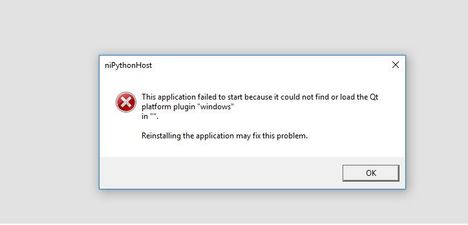
When running a program without this command, Labview generates a QT plugin error in windows.
I need to open graphs in external window like in the python interpreter.
Do you have any idea how to solve it ?
Thank you