- Subscribe to RSS Feed
- Mark Topic as New
- Mark Topic as Read
- Float this Topic for Current User
- Bookmark
- Subscribe
- Mute
- Printer Friendly Page
Python Node Function Name
Solved!
 SabariSaravanan
04-29-2019 04:45 AM
- Mark as New
- Bookmark
- Subscribe
- Mute
- Subscribe to RSS Feed
- Permalink
- Report to a Moderator
Hello all,
How do I assign function name for python node in LabVIEW?
list = [8,10,1,8519,26,959]
result = []
max = [0]
# Start from first index
j = 0
# Indexing one by one element
for i in range(len(list)):
    #Find greater than elemnet from list
    while j < (len(list)):
        if list[j] > (max[0]):
            del max[0]
            max.append(list[j])
        j += 1
    result.append(max[0])
    index = list.index(max[0])
    # delete an element
    del list[index]
    del max[0]
    max.append(0)
    j = 0
print("Ascending Order:",result)
result.reverse()
print("Descending Order:",result)
Solved! Go to Solution.
- Tags:
- LabVIEW + Python

 cbutcher

05-05-2019
09:20 AM
- last edited on
05-08-2026
01:37 PM
by
 Content Cleaner
- Mark as New
- Bookmark
- Subscribe
- Mute
- Subscribe to RSS Feed
- Permalink
- Report to a Moderator
With LabVIEW 2018, you can call Python code using the Python Node. The documentation is available here. That would allow you to call a particular script with some arguments/parameters (which could be connected to Controls in LabVIEW). An overview of Python in LabVIEW can be found at this article: Can I Integrate Python Code in LabVIEW?
If you want to call the same script/Python function many times, creating a SubVI would be the appropriate method in LabVIEW. Does that help you?
If you mean something else, perhaps you can try explaining it differently, and I or others might be able to give a better explanation.
05-08-2019 12:31 AM - edited 05-08-2019 12:32 AM
- Mark as New
- Bookmark
- Subscribe
- Mute
- Subscribe to RSS Feed
- Permalink
- Report to a Moderator
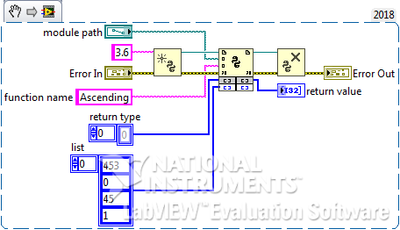
This what I was expected as a solution in python where can give as function name in LabVIEW python node. And this code(*args) arguments are calling from LabVIEW(python node - as an array).
The function name is Ascending
def Ascending(*args):
    result = []
    s = args
    list = s[0]
    max = [0]
    # Start from 0th index
    j = 0
    # Indexing one by one element
    for i in range(len(list)):
        #Find greater than element from list
        while j < (len(list)):
            if list[j] > (max[0]):
                del max[0]
                max.append(list[j])
            j += 1
        result.append(max[0])
        index = list.index(max[0])
        # delete an element from list
        del list[index]
        del max[0]
        max.append(0)
        j = 0
    return result