- Subscribe to RSS Feed
- Mark Topic as New
- Mark Topic as Read
- Float this Topic for Current User
- Bookmark
- Subscribe
- Mute
- Printer Friendly Page
Programmatically trigger cursor release?
Solved!
 mkabatek
08-20-2013 04:04 PM
- Mark as New
- Bookmark
- Subscribe
- Mute
- Subscribe to RSS Feed
- Permalink
- Report to a Moderator
Hello,
I am using the Actor Framework to develop a large application in LabVIEW. I have cursors on a graph that trigger data to be populated into actors using an event structure and a cursor release event. The data is also populated (initialized) when the program starts.
I currently accomplish this initialization using a structure below, and a value change event on the 'Init' Boolean:
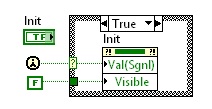
also described here:
The problem with using the "init" Boolean is that I duplicate the same code within two events: "init":Value Change and "graph":Cursor Release events (the two event do the exact same thing). Does anyone know a slick way combine these the Init event with the cursor release event so that the cursor release event fires on startup? This way I would not have to duplicate my code in two places...
I have searched and didn't find exactly what I needed, Sorry if this has been covered somewhere in the forum.
Solved! Go to Solution.
 Todd_Lesher
08-20-2013 07:31 PM
- Mark as New
- Bookmark
- Subscribe
- Mute
- Subscribe to RSS Feed
- Permalink
- Report to a Moderator
Where will your common code run? In the Event Structure? Could you just register for both events:
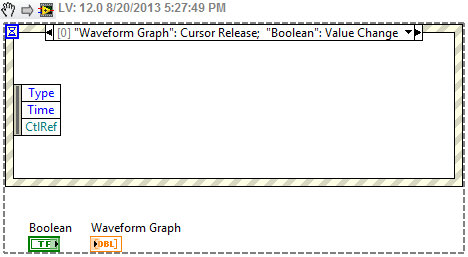
Or register the event separately to send it to the nested actor:
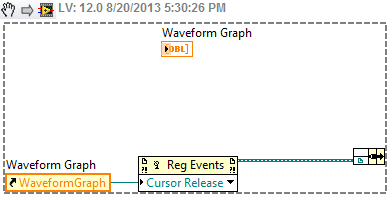
08-20-2013 10:05 PM
- Mark as New
- Bookmark
- Subscribe
- Mute
- Subscribe to RSS Feed
- Permalink
- Report to a Moderator
Hi Todd,
The code will run in the event structure. Thank you very much!! I didn't realize you could register multiple events to call the same code!
Todd_Lesher
08-20-2013 11:39 PM
- Mark as New
- Bookmark
- Subscribe
- Mute
- Subscribe to RSS Feed
- Permalink
- Report to a Moderator
There are a few other things to learn about events here:
