- Subscribe to RSS Feed
- Mark Topic as New
- Mark Topic as Read
- Float this Topic for Current User
- Bookmark
- Subscribe
- Mute
- Printer Friendly Page
Problem with displaying image after image processing
Solved!
 aaa_aaa
10-06-2016 11:31 AM
- Mark as New
- Bookmark
- Subscribe
- Mute
- Subscribe to RSS Feed
- Permalink
- Report to a Moderator
I need to do an image process(to get some info) but after I do it original i can't print the original image.
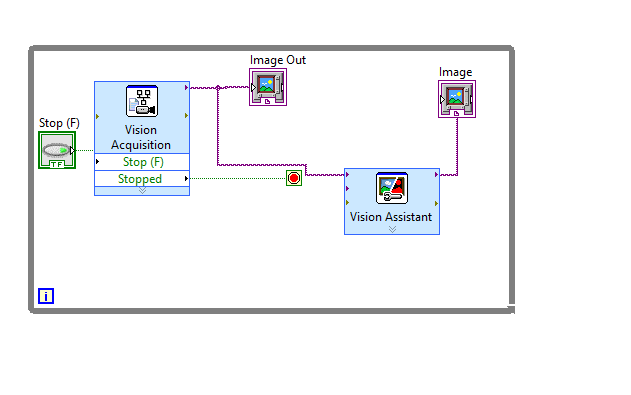
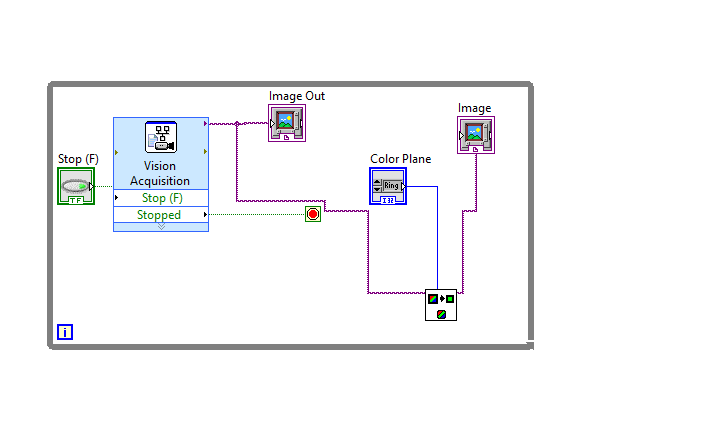
Solved! Go to Solution.

 udka
udka
10-06-2016
11:54 AM
- last edited on
06-22-2025
05:20 PM
by
 Content Cleaner
- Mark as New
- Bookmark
- Subscribe
- Mute
- Subscribe to RSS Feed
- Permalink
- Report to a Moderator
If you want to preserve original image without being changed, You should copy(IMAQ Copy) the original image to another buffer by creating user buffer( IMAQ create).
uday
10-06-2016 12:32 PM - edited 10-06-2016 12:33 PM
- Mark as New
- Bookmark
- Subscribe
- Mute
- Subscribe to RSS Feed
- Permalink
- Report to a Moderator
I still have the same problem

 udka
udka
10-06-2016
12:59 PM
- last edited on
06-22-2025
05:21 PM
by
Content Cleaner
- Mark as New
- Bookmark
- Subscribe
- Mute
- Subscribe to RSS Feed
- Permalink
- Report to a Moderator
The default Image Type is grayscale. You need to create RGB(U32) type buffer.
-The code is not at all following DATA FLOW principle on which LabVIEW works.
-Please refrain from using Express VIs and start using Low-level VIs.
-Please go through below links to start learning about LabVIEW
3 Hour LabVIEW Introduction
6 Hour LabVIEW Introduction
LabVIEW Graphical Programming Course
uday

 OEM_Dev
10-06-2016 01:07 PM
- Mark as New
- Bookmark
- Subscribe
- Mute
- Subscribe to RSS Feed
- Permalink
- Report to a Moderator
You aren't making the copy until after the loop is finished and the image is already modified
10-06-2016 02:28 PM - edited 10-06-2016 02:35 PM
- Mark as New
- Bookmark
- Subscribe
- Mute
- Subscribe to RSS Feed
- Permalink
- Report to a Moderator
thank you I solved my changing name I know I have to go through some tutorials I don't have time right now. I will keep using the Image acqusition But I won't use vision asistan as an express.
Why the "untitled" didn't work
 NguyenHoi
07-01-2023 01:10 AM
- Mark as New
- Bookmark
- Subscribe
- Mute
- Subscribe to RSS Feed
- Permalink
- Report to a Moderator

