- Subscribe to RSS Feed
- Mark Topic as New
- Mark Topic as Read
- Float this Topic for Current User
- Bookmark
- Subscribe
- Mute
- Printer Friendly Page
Problem making a 1 bit picture
Solved!
 alang1
03-31-2011 04:44 AM
- Mark as New
- Bookmark
- Subscribe
- Mute
- Subscribe to RSS Feed
- Permalink
- Report to a Moderator
I have being trying to make a 1 bit image and I've tried a few ways to do this but have gotten nowhere with it. I hoping someone will see the mistakes I'm making and show me how to fix it, I've attached the program I was working on, the picture I was using is also been attached it might be handy I don't know.
Solved! Go to Solution.

 GerdW
GerdW

03-31-2011 06:50 AM
- Mark as New
- Bookmark
- Subscribe
- Mute
- Subscribe to RSS Feed
- Permalink
- Report to a Moderator
Hi alang,
why do you attach a weird office document when you want to attach a picture?
You could try that to convert a grayscale pic to a "1 bit" picture:

GerdW
using LV2016/2019/2021 on Win10/11+cRIO, TestStand2016/2019
03-31-2011 07:44 AM
- Mark as New
- Bookmark
- Subscribe
- Mute
- Subscribe to RSS Feed
- Permalink
- Report to a Moderator
I've tried doing it your way and it only giving me a white picture. It dosen't matter what value I put in the comparitor , any ideas what I should do?
GerdW
03-31-2011 07:52 AM
- Mark as New
- Bookmark
- Subscribe
- Mute
- Subscribe to RSS Feed
- Permalink
- Report to a Moderator
Hi alang,
at first you could attach your picture (after converting it to PNG)!
GerdW
using LV2016/2019/2021 on Win10/11+cRIO, TestStand2016/2019
03-31-2011 08:10 AM
- Mark as New
- Bookmark
- Subscribe
- Mute
- Subscribe to RSS Feed
- Permalink
- Report to a Moderator
heres the picture
GerdW
03-31-2011 08:17 AM
- Mark as New
- Bookmark
- Subscribe
- Mute
- Subscribe to RSS Feed
- Permalink
- Report to a Moderator
Hi alang,
by converting to PNG I didn't mean just to rename the file...
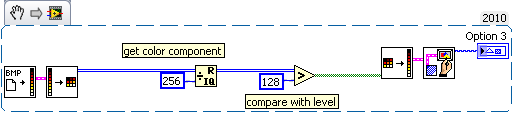
Your BMP is a 24bit image, so you have to check the 24bit output of the image conversion routine. Then you simply check a single color component (as it's a gray level pic) for your comparison level:

GerdW
using LV2016/2019/2021 on Win10/11+cRIO, TestStand2016/2019
03-31-2011 08:40 AM
- Mark as New
- Bookmark
- Subscribe
- Mute
- Subscribe to RSS Feed
- Permalink
- Report to a Moderator
You are a life saver that was driving me nuts
