- Subscribe to RSS Feed
- Mark Topic as New
- Mark Topic as Read
- Float this Topic for Current User
- Bookmark
- Subscribe
- Mute
- Printer Friendly Page
Problem converting a string to array, and back again!

 russelldav
05-14-2008 10:18 AM - edited 05-14-2008 10:19 AM
- Mark as New
- Bookmark
- Subscribe
- Mute
- Subscribe to RSS Feed
- Permalink
- Report to a Moderator
Message Edited by russelldav on 05-14-2008 10:19 AM

 andre.buurman@c
05-14-2008 10:26 AM
- Mark as New
- Bookmark
- Subscribe
- Mute
- Subscribe to RSS Feed
- Permalink
- Report to a Moderator
André (CLA, CLED)
 smercurio_fc
05-14-2008 10:26 AM - edited 05-14-2008 10:28 AM
- Mark as New
- Bookmark
- Subscribe
- Mute
- Subscribe to RSS Feed
- Permalink
- Report to a Moderator

Message Edited by smercurio_fc on 05-14-2008 10:28 AM

 GerdW
GerdW

05-14-2008 10:28 AM
- Mark as New
- Bookmark
- Subscribe
- Mute
- Subscribe to RSS Feed
- Permalink
- Report to a Moderator
as long as there is a coercion dot on the "u8 array to string" you will have problems receivin g correct values!
GerdW
using LV2016/2019/2021 on Win10/11+cRIO, TestStand2016/2019
 JeffOverton
05-14-2008 10:34 AM - edited 05-14-2008 10:34 AM
- Mark as New
- Bookmark
- Subscribe
- Mute
- Subscribe to RSS Feed
- Permalink
- Report to a Moderator
Message Edited by JeffOverton on 05-14-2008 11:34 AM

 rpursley8
05-14-2008 10:51 AM - edited 05-14-2008 10:59 AM
- Mark as New
- Bookmark
- Subscribe
- Mute
- Subscribe to RSS Feed
- Permalink
- Report to a Moderator
Message Edited by rpursley8 on 05-14-2008 11:59 AM
05-14-2008 11:47 AM - edited 05-14-2008 11:51 AM
- Mark as New
- Bookmark
- Subscribe
- Mute
- Subscribe to RSS Feed
- Permalink
- Report to a Moderator
Message Edited by russelldav on 05-14-2008 11:49 AM
Message Edited by russelldav on 05-14-2008 11:49 AM
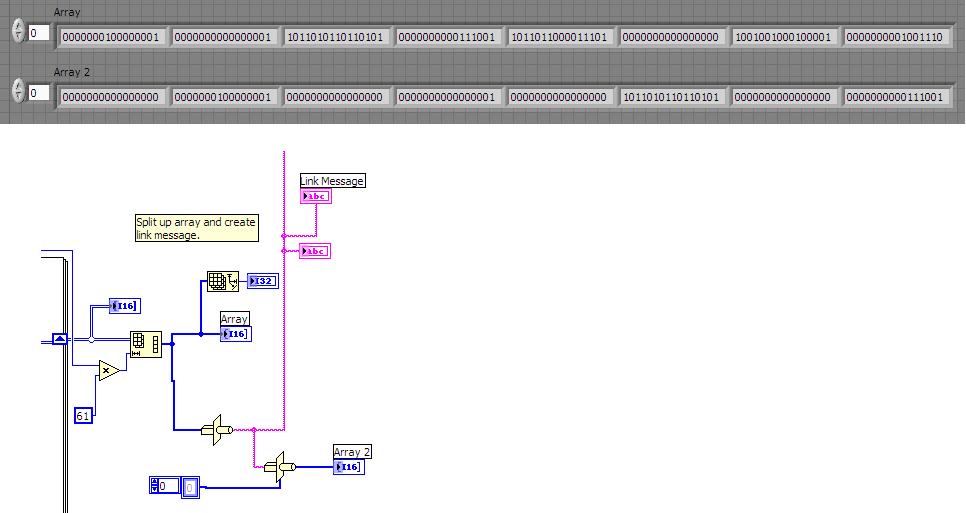
Edit: I just noticed in "Array 2" the correct data is there, it's just separated by a word that equals 0.
Message Edited by russelldav on 05-14-2008 11:51 AM
05-14-2008 11:53 AM
- Mark as New
- Bookmark
- Subscribe
- Mute
- Subscribe to RSS Feed
- Permalink
- Report to a Moderator
JeffOverton - thanks for providing an example. I can't open anything newer than 7.1 though I'm sorry.
smercurio_fc
05-14-2008 12:08 PM
- Mark as New
- Bookmark
- Subscribe
- Mute
- Subscribe to RSS Feed
- Permalink
- Report to a Moderator
Wonder if this is a 7.1 issue? I don't recall there be something specific to this.

 altenbach
05-14-2008 12:08 PM - edited 05-14-2008 12:09 PM
- Mark as New
- Bookmark
- Subscribe
- Mute
- Subscribe to RSS Feed
- Permalink
- Report to a Moderator
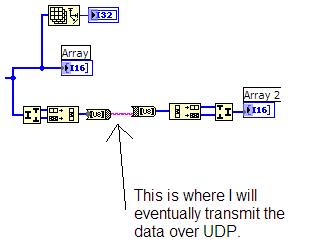
Typecast is the only reasonable way to do all this. As type, you just create a diagram constant of an empty I16 array an all will be correct on the receiving end.
russelldav wrote:
I can't use the example where the "type" is defined by linking to the original Array, as eventually the two arrays will be in different VIs on different PCs.
A coercion dot means that the datatype is different to what the function expects and an implicit conversion is taking place. Press ctrl+h to enable the context help and then hover over the wire going to the function. See if it is really a U8 array.
russelldav wrote:
How can I clear the coercion dot on my original example (at the top of page 1)? What does it mean anyway?
Message Edited by altenbach on 05-14-2008 10:09 AM


