- Subscribe to RSS Feed
- Mark Topic as New
- Mark Topic as Read
- Float this Topic for Current User
- Bookmark
- Subscribe
- Mute
- Printer Friendly Page
- « Previous
- Next »
Power factor graph

 GerdW
GerdW

05-06-2010 02:28 PM
- Mark as New
- Bookmark
- Subscribe
- Mute
- Subscribe to RSS Feed
- Permalink
- Report to a Moderator
Hi EduU,
usually you should attach your tries (even with errors) before someone will give you a working solution...
But I'm so kind 
GerdW
using LV2016/2019/2021 on Win10/11+cRIO, TestStand2016/2019

 Henrik_Volkers
05-07-2010 04:14 AM
- Mark as New
- Bookmark
- Subscribe
- Mute
- Subscribe to RSS Feed
- Permalink
- Report to a Moderator
Whereever in the world you have seen such a power-scale?
What is the math behind it to (in limes) equal 1 to -1???
All you have is a phase angle! where the PF represents the relative real part of the complex power. BTW how does the powerfactor look like if your load (asume a motor) turns into a source (generator)?
However here we go
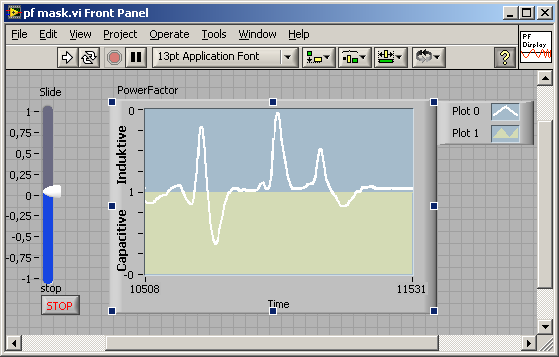
Henrik
LV since v3.1
“ground” is a convenient fantasy
'˙˙˙˙uıɐƃɐ lɐıp puɐ °06 ǝuoɥd ɹnoʎ uɹnʇ ǝsɐǝld 'ʎɹɐuıƃɐɯı sı pǝlɐıp ǝʌɐɥ noʎ ɹǝqɯnu ǝɥʇ'


05-07-2010 09:35 AM
- Mark as New
- Bookmark
- Subscribe
- Mute
- Subscribe to RSS Feed
- Permalink
- Report to a Moderator
Yes, henrik you are right!
I know why but I couldn't made it in labview
could you attach your Vi, to 8.6?
I don't have the labview 2009 yet x(
Thanks!
and GerdW thanks for the example... for sure I'm not able to find it my self haha
I'm only a beginner!
05-11-2010 07:37 AM
- Mark as New
- Bookmark
- Subscribe
- Mute
- Subscribe to RSS Feed
- Permalink
- Report to a Moderator
hey Henrik Volkers
Could you attach this vi for me in 8.6 version?
or anyone can download it and convert to me?
Thanks

 jwdz
jwdz
05-11-2010 08:03 AM
- Mark as New
- Bookmark
- Subscribe
- Mute
- Subscribe to RSS Feed
- Permalink
- Report to a Moderator
EduU 写:hey Henrik Volkers
Could you attach this vi for me in 8.6 version?
or anyone can download it and convert to me?
Thanks
8.6
labview@263.net
我的个人网站:LabVIEW——北方客栈 http://www.labview365.com
欢迎加入《LabVIEW编程思想》组——http://decibel.ni.com/content/groups/thinking-in-labview
05-11-2010 08:09 AM
- Mark as New
- Bookmark
- Subscribe
- Mute
- Subscribe to RSS Feed
- Permalink
- Report to a Moderator

 AustinPeter
01-19-2014 11:07 AM
- Mark as New
- Bookmark
- Subscribe
- Mute
- Subscribe to RSS Feed
- Permalink
- Report to a Moderator
Hello,
So I the same type of issue with this, I have created the graph and the data to attach so that my raw data now fits perfectly onto the graph.
The issue I now have it putting that graph into a pdf report. Obviously when I convert the graph to image data it doesn't contrain the scale numbers that I have manually added for the 0,1, 0
I have converted the data as obviously you need the graph ideally to have 1 in the middle then have 0 at the top and 0 at the bottom but have it go minus -0.9 etc down. Anyway, i have solved the numbering, I just intersted to know if anyone has found a way of just taking a snap shot of an area of pixels on the front diagram, ie the area where the graph is and then converted that into an image to use on a report?
Would be very useful if anyone could point me in the direction of some code that does that.
Thanks
Peter
- « Previous
- Next »
