ni.com is currently undergoing scheduled maintenance.
Some services may be unavailable at this time. Please contact us for help or try again later.
- Subscribe to RSS Feed
- Mark Topic as New
- Mark Topic as Read
- Float this Topic for Current User
- Bookmark
- Subscribe
- Mute
- Printer Friendly Page
Plugin to Edit Cluster Order

 Gregory
08-07-2017 12:35 PM - edited 08-07-2017 12:37 PM
- Mark as New
- Bookmark
- Subscribe
- Mute
- Subscribe to RSS Feed
- Permalink
- Report to a Moderator
Hi all, sometimes when working with large clusters I want to re-order the elements. If it is farther down in the order that requires clicking on each previous element one by one. Some would say I should avoid these large clusters to begin with, but I am not here to argue that point, I just want to share a plugin which allows you to drag and drop the cluster elements around, similar to re-ordering a case structure.
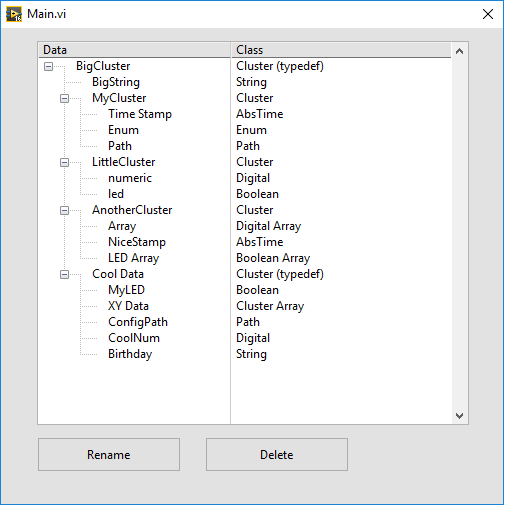
If you'd like to try it and give feedback, unzip the attached folder and copy the VI and subVI folder to your <LabVIEW 20XX>\resource\dialog\QuickDrop\plugins folder and you can launch it from quickdrop. The default is ctrl+O for Cluster Order. Please try it out on test files or copies of files first, because I'm sure there are many use cases I have not explored yet and there will be unforeseen consequences.
The utility was made with LV 2016. It should launch if you select the cluster and press ctrl+space ctrl+O from a .vi or .ctl file. However, if you select a cluster which is not typedef'd and part of a larger typedef'd cluster, it will not work.

 .aCe.
.aCe.

08-07-2017 12:51 PM
- Mark as New
- Bookmark
- Subscribe
- Mute
- Subscribe to RSS Feed
- Permalink
- Report to a Moderator
Hey Greg,
Useful plugin in my opinion.
You should post it here: http://forums.ni.com/t5/Quick-Drop-Enthusiasts/gp-p/grp-1251

08-07-2017 01:39 PM
- Mark as New
- Bookmark
- Subscribe
- Mute
- Subscribe to RSS Feed
- Permalink
- Report to a Moderator
I should have mentioned, this will set autosizing to "arrange vertically" for any cluster you edit because that is my personal preference.

 Kevin_Price
08-07-2017 03:43 PM
- Mark as New
- Bookmark
- Subscribe
- Mute
- Subscribe to RSS Feed
- Permalink
- Report to a Moderator
Pretty cool, but figured it was worth mentioning that you don't *necessarily* need to click through all earlier elements one-by-one. For fairly simple reorderings, you can just type the appropriate starting field # in the box and click the element that you want to have that field #.
For example, let's suppose you have a cluster of 25 elements and realize you need to add another element. So you put it in the cluster where it becomes the 26th element (index #25). However, you'd like to organize it with other similar items by ordering it to be element index #19.
In the standard cluster "Reorder ..." dialog, you don't have to click on elements 0 to 18 in order before assigning your new element as #19. You can just type "19" in the box and click the new element to assign it directly. Immediately, all elements previously #'ed 19-24 increment by 1 to occupy positions 20-25. And that's all. You're done.
Your drag-and-place is niftier, but there are some simple & common cases that the existing dialog handles pretty well. Just an FYI for future readers.
-Kevin P
08-07-2017 04:11 PM
- Mark as New
- Bookmark
- Subscribe
- Mute
- Subscribe to RSS Feed
- Permalink
- Report to a Moderator
It's an FYI to me too! Thank you for this tip, I wish I had known it earlier!
