- Subscribe to RSS Feed
- Mark Topic as New
- Mark Topic as Read
- Float this Topic for Current User
- Bookmark
- Subscribe
- Mute
- Printer Friendly Page
OMUDClass.cpp using Modbus communication

 ChristianLiinHa
09-29-2021 02:57 PM - edited 09-29-2021 03:01 PM
- Mark as New
- Bookmark
- Subscribe
- Mute
- Subscribe to RSS Feed
- Permalink
- Report to a Moderator
Hi there.
I dont know how, but now my labview code is giving me this error.
Basically any ideas? 🙂
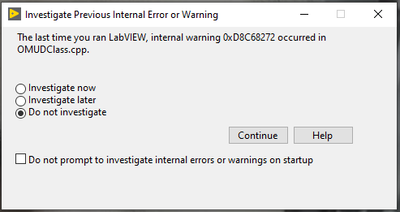
When I click "Investigate now" it generates a error-log, with this informations:
####
#Date: 29. sep 2021 08:47:13
#OSName: Windows 10 Enterprise
#OSVers: 10.0
#OSBuild: 19043
#AppName: LabVIEW
#Version: 20.0f1 32-bit
#AppKind: FDS
#AppModDate: 7/29/2020 19:10 GMT
#LabVIEW Base Address: 0x00EA0000
InitExecSystem() call to GetCurrProcessNumProcessors() reports: 12 processors
InitExecSystem() call to GetNumProcessors() reports: 12 processors
InitExecSystem() will use: 12 processors
starting LabVIEW Execution System 2 Thread 0 , capacity: 24 at [3715742835,37161922, (08:47:15,371619225 2021:09:29)]
starting LabVIEW Execution System 2 Thread 1 , capacity: 24 at [3715742835,37161922, (08:47:15,371619225 2021:09:29)]
starting LabVIEW Execution System 2 Thread 2 , capacity: 24 at [3715742835,37161922, (08:47:15,371619225 2021:09:29)]
starting LabVIEW Execution System 2 Thread 3 , capacity: 24 at [3715742835,37161922, (08:47:15,371619225 2021:09:29)]
starting LabVIEW Execution System 2 Thread 4 , capacity: 24 at [3715742835,37161922, (08:47:15,371619225 2021:09:29)]
starting LabVIEW Execution System 2 Thread 5 , capacity: 24 at [3715742835,37161922, (08:47:15,371619225 2021:09:29)]
starting LabVIEW Execution System 2 Thread 6 , capacity: 24 at [3715742835,37161922, (08:47:15,371619225 2021:09:29)]
starting LabVIEW Execution System 2 Thread 7 , capacity: 24 at [3715742835,37161922, (08:47:15,371619225 2021:09:29)]
starting LabVIEW Execution System 2 Thread 8 , capacity: 24 at [3715742835,37161922, (08:47:15,371619225 2021:09:29)]
starting LabVIEW Execution System 2 Thread 9 , capacity: 24 at [3715742835,37161922, (08:47:15,371619225 2021:09:29)]
starting LabVIEW Execution System 2 Thread 10 , capacity: 24 at [3715742835,37161922, (08:47:15,371619225 2021:09:29)]
starting LabVIEW Execution System 2 Thread 11 , capacity: 24 at [3715742835,37161922, (08:47:15,371619225 2021:09:29)]
<DEBUG_OUTPUT>
29-09-2021 16:51:58.343
DWarn 0xD8C68272: Reserve count (1) should be the same as the number of top-level reservers (2). [LinkIdentity "Device Data Model.lvclass" [ My Computer]
E:\builds\2020patch\source\UDClass\OMUDClass.cpp(1959) : DWarn 0xD8C68272: Reserve count (1) should be the same as the number of top-level reservers (2). [LinkIdentity "Device Data Model.lvclass" [ My Computer]
minidump id: 855745c3-f388-47d9-b037-fa49e0fa60ac
$Id: //labview/branches/2020patch/dev/source/UDClass/OMUDClass.cpp#1 $
</DEBUG_OUTPUT>
0x010FC479 - LabVIEW <unknown> + 0
0x7B7CFB09 - mgcore_SH_20_0 <unknown> + 0
0x7B7D090C - mgcore_SH_20_0 <unknown> + 0
0x01F5A8F4 - LabVIEW <unknown> + 0
0x01FA8461 - LabVIEW <unknown> + 0
0x016C59C1 - LabVIEW <unknown> + 0
0x016C5BF7 - LabVIEW <unknown> + 0
0x01F5AB12 - LabVIEW <unknown> + 0
0x01F5AB54 - LabVIEW <unknown> + 0
0x01F5B511 - LabVIEW <unknown> + 0
0x01F5A8F4 - LabVIEW <unknown> + 0
0x01FA8461 - LabVIEW <unknown> + 0
0x016C59C1 - LabVIEW <unknown> + 0
0x016C567E - LabVIEW <unknown> + 0
0x016C55F8 - LabVIEW <unknown> + 0
0x016C4E7C - LabVIEW <unknown> + 0
0x024A3CF3 - LabVIEW <unknown> + 0
0x024A388D - LabVIEW <unknown> + 0
0x024A3824 - LabVIEW <unknown> + 0
0x024A1522 - LabVIEW <unknown> + 0
0x024A12A6 - LabVIEW <unknown> + 0
0x0108DB86 - LabVIEW <unknown> + 0
0x01093C40 - LabVIEW <unknown> + 0
0x01649ECB - LabVIEW <unknown> + 0
0x0164AE42 - LabVIEW <unknown> + 0
0x0164D651 - LabVIEW <unknown> + 0
0x0204E149 - LabVIEW <unknown> + 0
0x02053B26 - LabVIEW <unknown> + 0
0x02053088 - LabVIEW <unknown> + 0
0x0237C71A - LabVIEW <unknown> + 0
0x0238F452 - LabVIEW <unknown> + 0
0x024309F3 - LabVIEW <unknown> + 0
0x0237E3C1 - LabVIEW <unknown> + 0
0x0237C9EE - LabVIEW <unknown> + 0
0x7682EDEB - USER32 <unknown> + 0
0x76825DAA - USER32 <unknown> + 0
It is regarding using two many processors? 🙂

09-29-2021 03:50 PM
- Mark as New
- Bookmark
- Subscribe
- Mute
- Subscribe to RSS Feed
- Permalink
- Report to a Moderator
DWarns aren't something to necessarily be concerned about (I think you can go into Tools>Options>Environment to simply ignore this prompt).
When do you receive this error (I'm guessing it's either on LabVIEW open or close)? If I remember correctly, OMUDClass generally deals with loading LabVIEW classes so you may want to try mass compiling the Modbus library source files to start.
09-29-2021 04:26 PM
- Mark as New
- Bookmark
- Subscribe
- Mute
- Subscribe to RSS Feed
- Permalink
- Report to a Moderator
@Jacobson-ni wrote:
DWarns aren't something to necessarily be concerned about (I think you can go into Tools>Options>Environment to simply ignore this prompt).
When do you receive this error (I'm guessing it's either on LabVIEW open or close)? If I remember correctly, OMUDClass generally deals with loading LabVIEW classes so you may want to try mass compiling the Modbus library source files to start.
I get the error when I starting up Labview, yes 🙂
How to "mass compiling"? 🙂
09-29-2021 04:39 PM
- Mark as New
- Bookmark
- Subscribe
- Mute
- Subscribe to RSS Feed
- Permalink
- Report to a Moderator
Tools > Advanced > Mass Compile. You'll need to select a folder which will probably be either "<LabVIEW>\vi.lib\Modbus" or "<LabVIEW>\vi.lib\NI\Modbus Library".
