ni.com is currently undergoing scheduled maintenance.
Some services may be unavailable at this time. Please contact us for help or try again later.
- Subscribe to RSS Feed
- Mark Topic as New
- Mark Topic as Read
- Float this Topic for Current User
- Bookmark
- Subscribe
- Mute
- Printer Friendly Page
Newbie Array Problems
Solved!
 QMESAR
04-25-2018 01:10 AM - edited 04-25-2018 01:14 AM
- Mark as New
- Bookmark
- Subscribe
- Mute
- Subscribe to RSS Feed
- Permalink
- Report to a Moderator
Hi All .
I am new to LabVIEW and have done a basic course however I have some issue with Arrays,Please help me understand this.
I am building an array with 10 elements (0-9) which gets populated with u8 data (for a CAN message Data)
this array gets send over USB to the CAN HW .this all works perfectly when each element does not contain a 0(zero) value ,
The problem is that once there is an 0 in a element all the Elements after the one containing the 0(zero) is not updated or populate with the new data,
as can be seen from the prints below .
my question how to force the array to always use and populate all elements or how is this handled in LabVIEW .
Here is the array when all elements are non zero

The data received and send correctly by the CAN message(in Hex)
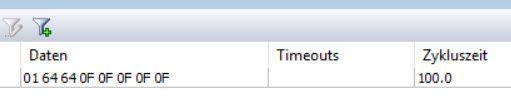
Once there is a 0 in an element all elements after the 0 never gets updates the


The array building just for testing my error
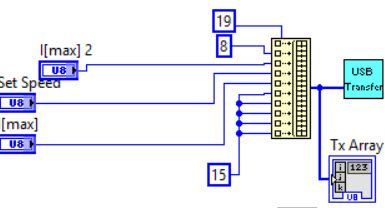
I appreciate any help or information
Kind Regards
QMESAR
Learning is an endless process but needs to start some where
Solved! Go to Solution.

 GerdW
GerdW

04-25-2018 01:33 AM
- Mark as New
- Bookmark
- Subscribe
- Mute
- Subscribe to RSS Feed
- Permalink
- Report to a Moderator
Hi qmesar,
The problem is that once there is an 0 in a element all the Elements after the one containing the 0(zero) is not updated or populate with the new data
This looks like a problem of the "USB Transfer" subVI or the hardware you use: the array is built correctly in your "main" VI…
As you don't supply any information for both items we cannot help you with detailed explanations!
GerdW
using LV2016/2019/2021 on Win10/11+cRIO, TestStand2016/2019
04-25-2018 01:46 AM
- Mark as New
- Bookmark
- Subscribe
- Mute
- Subscribe to RSS Feed
- Permalink
- Report to a Moderator
@GerdW wrote:
This looks like a problem of the "USB Transfer" subVI or the hardware you use: the array is built correctly in your "main" VI…
Dear GerdW.
Thank you very much for your answer,I appreciate this.
I expected the supplied Vi from the HW manufacturer I will inform them and see if they can help with the sub VI,as for the HW I am 99% sure it is working correctly as using my own firmware in C on the unit CAN is doing all as expected.
Kind Regards
QMESAR
Learning is an endless process but needs to start some where

 Yamaeda
04-25-2018 02:33 AM
- Mark as New
- Bookmark
- Subscribe
- Mute
- Subscribe to RSS Feed
- Permalink
- Report to a Moderator
Could it be a case of the USB transfer assuming 0-terminated array, like a C-style string? Does 0 require some special handling? In some systems e.g. 0 could be a special character sign require some transformation (though you'd think the USB Transfer should handle that).
/Y

04-25-2018 03:13 AM
- Mark as New
- Bookmark
- Subscribe
- Mute
- Subscribe to RSS Feed
- Permalink
- Report to a Moderator
Hi Yamaeda
Thank you for your comments .
I would think the USB handle the array as it is bytes in U8 however I have no contacted the supplier I was afraid it me doing something stupid in LabVIEW and wanted to make sure with you guys first ,I will report back once I have more information
Kind Regards
QMESAR
Learning is an endless process but needs to start some where
05-04-2018 10:46 AM
- Mark as New
- Bookmark
- Subscribe
- Mute
- Subscribe to RSS Feed
- Permalink
- Report to a Moderator
Hi All
Just to report back on this topic,
As you all mentioned I handle the Array correctly the supplier has fixed a bug in the supplied dll and sub Vi for the USB Transfer
all is working fine now
Thank once again for all the help
Regards
QMESAR
Learning is an endless process but needs to start some where
