- Subscribe to RSS Feed
- Mark Topic as New
- Mark Topic as Read
- Float this Topic for Current User
- Bookmark
- Subscribe
- Mute
- Printer Friendly Page
New VI Object - Variant Constant [VI Scripting]
Solved!
 Jimmy_Page
05-17-2014 03:07 PM
- Mark as New
- Bookmark
- Subscribe
- Mute
- Subscribe to RSS Feed
- Permalink
- Report to a Moderator
Hi Everybody,
I write very important program for me and i have one problem.
I use VI Scripting component and i try generate variant constant. I use special function like New VI Object to this task. This look very simple, but....
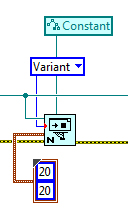
This implementation returns "error 1054 occured at New VI Object in Main.vi. Possible reason: The specified object was not found".
I think that class "constant" for variant is good. The owner of variant must be cluster. I tried to change owner for example block diagram, but this is not work too.
Maybe someone can help me to solve this problem?
I will be very gratefull.
Solved! Go to Solution.

 tst
tst

05-18-2014 01:54 AM
- Mark as New
- Bookmark
- Subscribe
- Mute
- Subscribe to RSS Feed
- Permalink
- Report to a Moderator
If you run the code with the class as Generic, you'll see that the variant is actually a control. I don't know if there's a way to create a constant directly, but in scripting, there are often two useful ways to do what you want:
- Do what you what you would do manually. In this case, you can create the variant as a control, get its Terminal reference and call the Change to Constant method on that.
- Create a VI which already has the code you want (in this case a variant constant), then open that VI and copy-paste its code into the place you want it to be. This is particuarly useful if you want to skip doing a long series of scripting moves.
___________________
Try to take over the world!

 rolfk
rolfk
05-18-2014 06:37 PM
- Mark as New
- Bookmark
- Subscribe
- Mute
- Subscribe to RSS Feed
- Permalink
- Report to a Moderator
Most likely you try to place a constant on a frontpanel refnum. That can't work. You need a diagram (or subdiaggrram) refnum as owner refnum in order to place a constant on it.

