- Subscribe to RSS Feed
- Mark Topic as New
- Mark Topic as Read
- Float this Topic for Current User
- Bookmark
- Subscribe
- Mute
- Printer Friendly Page
NXG-style controls sizing/positioning glitches

 raphschru
02-28-2023 11:58 AM
- Mark as New
- Bookmark
- Subscribe
- Mute
- Subscribe to RSS Feed
- Permalink
- Report to a Moderator
I noticed 2 sizing/positioning issues with the NXG-style controls that have increment/decrement buttons such as the Text Ring, Enum and Numeric controls. I think both problems are linked, which is why I put them in a single topic.
1. Unwanted box resizing when showing/hiding the increment/decrement buttons
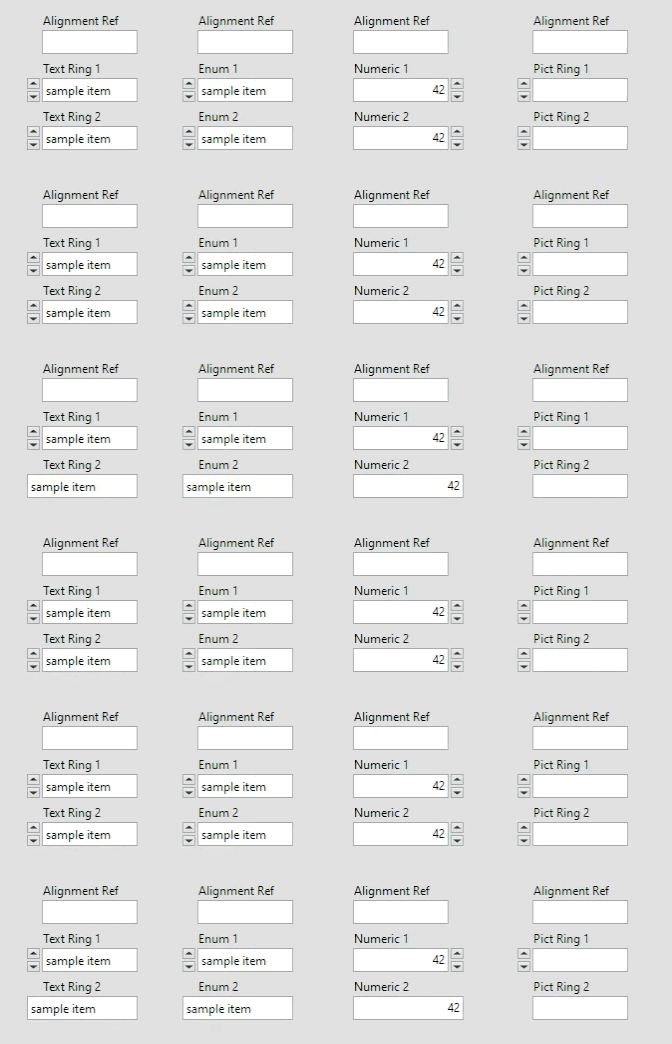
When toggling the increment/decrement buttons visibility manually or programmatically, the white entry box is also resized. This messes up control alignment and is not consistent with controls from other styles.
I don't see why someone would want that behavior. When I set the property "Increment/Decrement Visible?" to false, I expect it to hide the buttons, not resize the box. If I wanted to resize the box, I would use the "Width" property. Notice that the Picture Ring behaves correctly, which is why I think this behaviour with the enum/ring/numeric is not expected…
2. Bad update from type definitions
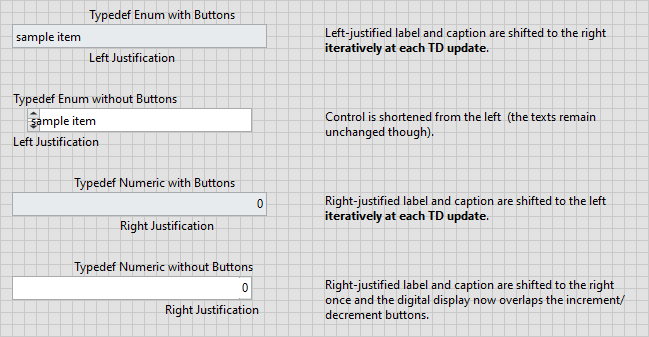
NXG-style enum/ring/numeric controls can also have sizing/positioning glitches when updated from a type definition. It appears when the control in the typedef has visible increment/decrement buttons and the linked control has not, and vice-versa.
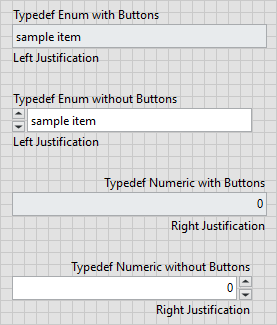
Here is an example with enum and numeric typedefs both with and without the buttons:
Before typedef updates:
After typedef updates:
Attached is a project with VIs that reproduce the problems.
For the second one, I've created a script that simulates a typedef update, so you can easily observe the glitches and reset the controls to their original states.
11-22-2025 11:15 AM - edited 11-22-2025 11:27 AM
- Mark as New
- Bookmark
- Subscribe
- Mute
- Subscribe to RSS Feed
- Permalink
- Report to a Moderator
Here is also an animation for issue #2 and a more detailed explanation of what is happening:
![[Bug] NXG-style controls sizing positioning glitches.gif](https://forums.ni.com/t5/image/serverpage/image-id/351856i073AA8871EF8597E/image-size/large?v=v2&px=999 "[Bug] NXG-style controls sizing positioning glitches.gif")
Here we have NXG enums and digitals that we update via a type definition.
At each update of the typedefs, the instance controls act weirdly:
- Labels and captions are shifting
- Increment/decrement buttons overlap the control or vice-versa
It seems to only appear when the increment/decrement buttons visibility on the instance is the opposite from that of its typedef.
I'm reporting it now, since I did not back then, and the bugs are still present in LV2025 Q3.
Regards,
Raphaël.

 zou
zou
11-24-2025 01:47 PM
- Mark as New
- Bookmark
- Subscribe
- Mute
- Subscribe to RSS Feed
- Permalink
- Report to a Moderator
> Notice that the Picture Ring behaves correctly, which is why I think this behaviour with the enum/ring/numeric
> is not expected…
Picture Ring is different. Notice when you change enum/ring/numeric from control to indicator (i.e. "change direction") enum/ring/numeric background color will change automatically.
If you replace the frame component of enum/ring/numeric with the frame of the Picture Ring, it will fix the sizing glitches. But you also lost the background color auto change feature.
 BertMcMahan
11-24-2025 02:47 PM
- Mark as New
- Bookmark
- Subscribe
- Mute
- Subscribe to RSS Feed
- Permalink
- Report to a Moderator
I don't have a solution to your problem but I have to ask, what tool did you use to make annotated gifs that easily?
11-24-2025 03:29 PM - edited 11-24-2025 03:31 PM
- Mark as New
- Bookmark
- Subscribe
- Mute
- Subscribe to RSS Feed
- Permalink
- Report to a Moderator
@BertMcMahan wrote:
what tool did you use to make annotated gifs that easily?
I always use ScreenToGif. You can even select only a subset of frames on which to apply the drawing tool.
Also, I use the "KGy SOFT - Default" encoding, which is way better than the default one from ScreenToGif.
By the way 😂
https://forums.ni.com/t5/LabVIEW/Why-do-NXG-and-System-buttons-behave-like-this/m-p/4452831#M1314966

 Darren
11-24-2025 04:24 PM
- Mark as New
- Bookmark
- Subscribe
- Mute
- Subscribe to RSS Feed
- Permalink
- Report to a Moderator
I have filed Bug 3561180 to LabVIEW R&D on the Fuse control bugs described in this thread.
BertMcMahan
11-24-2025 04:29 PM
- Mark as New
- Bookmark
- Subscribe
- Mute
- Subscribe to RSS Feed
- Permalink
- Report to a Moderator
@raphschru wrote:
@BertMcMahan wrote:
what tool did you use to make annotated gifs that easily?
I always use ScreenToGif. You can even select only a subset of frames on which to apply the drawing tool.
Also, I use the "KGy SOFT - Default" encoding, which is way better than the default one from ScreenToGif.
By the way 😂
https://forums.ni.com/t5/LabVIEW/Why-do-NXG-and-System-buttons-behave-like-this/m-p/4452831#M1314966

good grief xD
zou
12-03-2025 01:14 PM
- Mark as New
- Bookmark
- Subscribe
- Mute
- Subscribe to RSS Feed
- Permalink
- Report to a Moderator
@zou wrote:
> Notice that the Picture Ring behaves correctly, which is why I think this behaviour with the enum/ring/numeric
> is not expected…
Picture Ring is different. Notice when you change enum/ring/numeric from control to indicator (i.e. "change direction") enum/ring/numeric background color will change automatically.
If you replace the frame component of enum/ring/numeric with the frame of the Picture Ring, it will fix the sizing glitches. But you also lost the background color auto change feature.
On the other hand, if you replace the frame component of the Pict Ring with the frame of numeric, that will enable Pict Ring change color automatically when change direction.

