- Subscribe to RSS Feed
- Mark Topic as New
- Mark Topic as Read
- Float this Topic for Current User
- Bookmark
- Subscribe
- Mute
- Printer Friendly Page
.NET constructor node reporting no public constructors
Solved!
 gosenbach
03-18-2014 03:39 PM
- Mark as New
- Bookmark
- Subscribe
- Mute
- Subscribe to RSS Feed
- Permalink
- Report to a Moderator
Hi all.
I am trying to make a .NET call to Microsoft.Win32.RegistryKey within mscorlib(2.0.0.0). MSDN shows that there are several properities and methods available to use. However when attempting to create a .NET constructor in LabVIEW, RegisrtyKey is displaying "This class contains no public constructors."
I would like to call the method for GetSubKeyNames.
If anyone has any ideas, I would appriciate some assistance. Thank you in advance.
Solved! Go to Solution.

 aputman
03-18-2014 03:51 PM
- Mark as New
- Bookmark
- Subscribe
- Mute
- Subscribe to RSS Feed
- Permalink
- Report to a Moderator
Use the Windows Registry VIs in the Connectivity sub-menu.
03-18-2014 04:19 PM
- Mark as New
- Bookmark
- Subscribe
- Mute
- Subscribe to RSS Feed
- Permalink
- Report to a Moderator
Yes, but those only me to get the data from a key if I already know the entire path to the key if my understanding is correct.
In my suitiation, I need to be able to recursivly search through all the subkeys for keys with a specific names, and then get the values to those.
Is there a way to do that with the built in VIs that I am overlooking?
Thanks.

 tyk007
03-18-2014 04:22 PM
- Mark as New
- Bookmark
- Subscribe
- Mute
- Subscribe to RSS Feed
- Permalink
- Report to a Moderator
Have you read through the documentation for the RegistryKey class?
http://msdn.microsoft.com/en-us/library/microsoft.win32.registrykey(v=vs.110).aspx
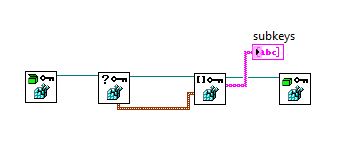
The documentation states that there is no public constructor for this class - you have to request an instance using one of the static methods. You can see the static methods listed with "S" symbol next to them. The one you are after is probably RegistryKey.OpenBaseKey() method. Use and Invoke node and specify this static method. You can then call other methods on the returned object, including the GetSubKeyNames() instance method.
Or, as the last poster mentioned, just use the in-built LabVIEW functions if your need is simple enough.
03-18-2014 04:28 PM
- Mark as New
- Bookmark
- Subscribe
- Mute
- Subscribe to RSS Feed
- Permalink
- Report to a Moderator
Ahh.. ok, I see.. I need to be using the invoke node linked to the class rather than the .NET constructor. Let me give that a shot. Thanks.
aputman
03-18-2014 04:31 PM
- Mark as New
- Bookmark
- Subscribe
- Mute
- Subscribe to RSS Feed
- Permalink
- Report to a Moderator
This returns the top level keys in the registry. You could design a VI that searches thru the registry for keys you need.
03-18-2014 04:39 PM
- Mark as New
- Bookmark
- Subscribe
- Mute
- Subscribe to RSS Feed
- Permalink
- Report to a Moderator
Perfect. I can work with that. Thanks!

 nottilie
03-19-2014 03:03 AM
- Mark as New
- Bookmark
- Subscribe
- Mute
- Subscribe to RSS Feed
- Permalink
- Report to a Moderator
Hi
I have had often the problem in .NET that I did not find the proper objects or it was said (non creatable object)
In this case it is possible to use a constant and then browse to the proper .NET class entry.
In the attchement I have given an example for the registry key you asked before.
I know that you already have a solution of this spesific problem but you may have a .NET command in future where the solution is not as easy as shown before.
Here you can see an alternative by .NET usage
Gernot Hanel
IONICON Analytik Gesellschaft m.b.H.

03-19-2014 10:15 AM
- Mark as New
- Bookmark
- Subscribe
- Mute
- Subscribe to RSS Feed
- Permalink
- Report to a Moderator
That is awesome and tricky nottilie. Thanks!

 kmurphs
12-12-2021 03:49 AM - edited 12-12-2021 03:51 AM
- Mark as New
- Bookmark
- Subscribe
- Mute
- Subscribe to RSS Feed
- Permalink
- Report to a Moderator
This is indeed an awesome trick. I was thinking about doing the same thing, I just did not know where to get that constant.
So thank you and kudos, that's been really helpful.
I have been able to use this approach to get LabVIEW to activate a command prompt window, and send some keys (for a use case I have).

