- Subscribe to RSS Feed
- Mark Topic as New
- Mark Topic as Read
- Float this Topic for Current User
- Bookmark
- Subscribe
- Mute
- Printer Friendly Page
.NET Framework assembly LabVIEW NXG

 Muaadh7
05-28-2020 07:19 AM
- Mark as New
- Bookmark
- Subscribe
- Mute
- Subscribe to RSS Feed
- Permalink
- Report to a Moderator
Hello,
I have a problem and I ask for your help.
I would like to use a NuGet *.dll (Microsoft.Data.SqlClient.dll; https://www.nuget.org/packages/Microsoft.Data.SqlClient/1.1.3).
I have installed the *.dll on my computer. But I can't find or select the *.dll in the .NET assembly of NXG (see image 1).

On classic LabVIEW I can see or use that (see image 2).
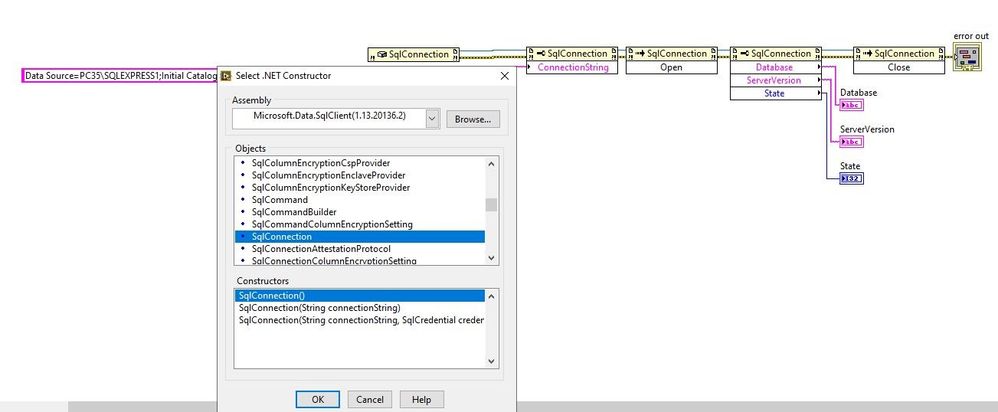
Now my question: Is there a way to add the *.dll to LabVIEW NXG ?.
Can you please help me with this?
Thanks for your help.
Muaadh

 nottilie
06-24-2020 05:34 AM
- Mark as New
- Bookmark
- Subscribe
- Mute
- Subscribe to RSS Feed
- Permalink
- Report to a Moderator
I am not 100% sure but I think I have read that you have to add the .NET dll to the GAC otherwise it is not working with NXG.
You can try it by using this documentation.
https://docs.microsoft.com/en-us/dotnet/framework/app-domains/install-assembly-into-gac
IONICON Analytik Gesellschaft m.b.H.
 S.Stock
07-05-2020 12:42 PM
- Mark as New
- Bookmark
- Subscribe
- Mute
- Subscribe to RSS Feed
- Permalink
- Report to a Moderator
They should really concider adding a "browse..." button for selecting .dll files the same way as for LabVIEW 2020, so you don't have to know how to add files to the GAC.
I have myself now used alot of time trying to add a .dll file to GAC, both with Powershell and Developer Command Prompt (gacutil), without any success, so I gave up and went back to LabVIEW 2020 😞!
"Science is about knowing, while engineering is about doing"

 minusmagis
11-02-2020 09:59 AM - edited 11-02-2020 10:00 AM
- Mark as New
- Bookmark
- Subscribe
- Mute
- Subscribe to RSS Feed
- Permalink
- Report to a Moderator
Hey,
I had the same problem and following the suggestions from nottilie i ended up being able to add the .dll files to the GAC. Here's how I did it:
I installed the community version of Visual Studio 2019 (https://visualstudio.microsoft.com/es/downloads/)
Then I run (As Admin!!) the Developer Command Prompt for VS 2019 (it seems to be different than the command prompt).
Link on how to find it: (https://docs.microsoft.com/en-us/dotnet/framework/tools/developer-command-prompt-for-vs).
Then inside the cmd you change the directory to the directory where you have your .dll files (cd C:\".DLL DIRECTORY HERE")
And in there you add each .dll file by typing: gacutil /i "The_dll_File_you_want_to_add.dll
And that is it 🙂 it worked for me and NXG now recognizes the .dll in the .net interface.
(in case you have a lot of .dll like you can copy them all on an excel with a newline character at the end and paste the whole thing on the cmd and it will execute each and every operation separately)
PS: this is the python script I used to extract all the names of the files:
import os

dir_list = os.listdir('C:\Program Files\Thorlabs\Kinesis')

for item in dir_list:
    if '.dll' in item:
        print('gacutil /i '+str(item))
Cheers 🙂
 wftmac
03-08-2021 07:20 PM
- Mark as New
- Bookmark
- Subscribe
- Mute
- Subscribe to RSS Feed
- Permalink
- Report to a Moderator
Hello,
Is the dll generated by labview? I use sn.exe to achieve a snk file, and insert it when I use labview to generate a net assembly. But when I use gacutil.exe to register it to GAC, error says "Failed to verify strong name signature". How to solve it?
minusmagis
03-09-2021 04:53 AM
- Mark as New
- Bookmark
- Subscribe
- Mute
- Subscribe to RSS Feed
- Permalink
- Report to a Moderator
Hi,
In my case the Dll files are provided by the manufacturer, so I cannot help with that.
Best
