- Subscribe to RSS Feed
- Mark Topic as New
- Mark Topic as Read
- Float this Topic for Current User
- Bookmark
- Subscribe
- Mute
- Printer Friendly Page
Moving average of 2d array.
Solved!
 Pa1_korea
04-03-2017 10:12 PM
- Mark as New
- Bookmark
- Subscribe
- Mute
- Subscribe to RSS Feed
- Permalink
- Report to a Moderator
Hii Friends,
Can anyone help me to go through this problem.
I have a task wherein, i need to implement the following steps.
1) Open a existing spreadsheet file( consisting of p and s columns)
2) Remove peaks of s column by selecting a certain value and then removing the corresponding p column values.
3) I then need to take the moving average of both the p and s columns with interval 10. By this i mean, if i have the following points say
x avg(x) with interval 10
1 N/A
2 N/A
3 N/A
4 N/A
5 N/A
6 N/A
7 N/A
8 N/A
9 N/A
10 (average of 1 to 10) = 5.5
11 (average of 2 to 11) = 6.5
12 (average of 3 to 12) = 7.5
. .
. .
. .
I have been able to complete the first two steps
I have seen examples of 1d array moving averagin. Since the array is a 2d one, i am slightly confused on how to take the moving average of both the columns at once.
can anyone suggest me a way forward.
Attaching the excel and the VI.
Thanking you.
Pa1
Solved! Go to Solution.

 PalanivelThiruv
04-04-2017 12:57 AM
- Mark as New
- Bookmark
- Subscribe
- Mute
- Subscribe to RSS Feed
- Permalink
- Report to a Moderator
If you need to take the Moving average of P and S Columns Separately, Index this columns into two 1D array and do a running average by taking the array subset where the offset should start from 0 to N and the Length remains same Assume 10
Hope this will help you!
Palanivel Thiruvenkadam | பழனிவேல் திருவெங்கடம்
LabVIEW™ Champion |Certified LabVIEW™ Architect |Certified TestStand Developer
Kidlin's Law -If you can write the problem down clearly then the matter is half solved.
-----------------------------------------------------------------------------------------------------------------
04-04-2017 12:59 AM
- Mark as New
- Bookmark
- Subscribe
- Mute
- Subscribe to RSS Feed
- Permalink
- Report to a Moderator
Thanks PalaniveIT for your reply.. can you show me a screenshot of how to index the columns into 2 different arrays..
04-04-2017 01:40 AM
- Mark as New
- Bookmark
- Subscribe
- Mute
- Subscribe to RSS Feed
- Permalink
- Report to a Moderator
I gave a try..is it the right way to do array indexing?
PalanivelThiruv
04-04-2017 01:44 AM
- Mark as New
- Bookmark
- Subscribe
- Mute
- Subscribe to RSS Feed
- Permalink
- Report to a Moderator
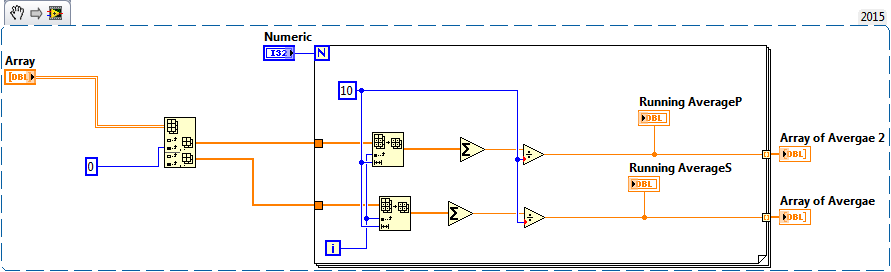
If you are acquiring data continuously instead of Loop can be eliminated the indexing can be Maintained in Acquiring Loop or using shift register
Palanivel Thiruvenkadam | பழனிவேல் திருவெங்கடம்
LabVIEW™ Champion |Certified LabVIEW™ Architect |Certified TestStand Developer
Kidlin's Law -If you can write the problem down clearly then the matter is half solved.
-----------------------------------------------------------------------------------------------------------------

 GerdW
GerdW
04-04-2017 02:19 AM
- Mark as New
- Bookmark
- Subscribe
- Mute
- Subscribe to RSS Feed
- Permalink
- Report to a Moderator
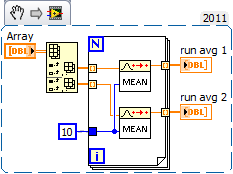
HI,
a solution based on ready-to-use functions in LabVIEW:
GerdW
using LV2016/2019/2021 on Win10/11+cRIO, TestStand2016/2019
