- Subscribe to RSS Feed
- Mark Topic as New
- Mark Topic as Read
- Float this Topic for Current User
- Bookmark
- Subscribe
- Mute
- Printer Friendly Page
Modbus serial communication in LabVIEW

 vile9495
05-03-2018 01:59 AM
- Mark as New
- Bookmark
- Subscribe
- Mute
- Subscribe to RSS Feed
- Permalink
- Report to a Moderator
Hi all,
How to write single register (with the function code is 06) in the LabVIEW?
I made an example and in this example, for the function code 06, my slave didn't get byte 5 and byte 6.
Thank you!

 pincpanter
05-03-2018 02:18 AM
- Mark as New
- Bookmark
- Subscribe
- Mute
- Subscribe to RSS Feed
- Permalink
- Report to a Moderator
The Data array (U16) is empty. Set the first element to the desired register value.
-------------------
LV 7.1, 2011, 2017, 2019, 2021

 jay0909
05-03-2018 02:34 AM
- Mark as New
- Bookmark
- Subscribe
- Mute
- Subscribe to RSS Feed
- Permalink
- Report to a Moderator
Hi,
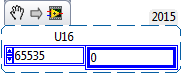
Initialise the Register array index up to 65535 with '0'.

05-03-2018 03:06 AM
- Mark as New
- Bookmark
- Subscribe
- Mute
- Subscribe to RSS Feed
- Permalink
- Report to a Moderator
Thank you for your help.
This is my simulation result after checking 2 frames 03 and 06.
For function code 03, the results are very accurate.
For function code 06, I was having problems at byte 5 and 6.
Can you help me edit the diagram in LabVIEW?
Thank you!
 pincpanter
05-03-2018 03:27 AM
- Mark as New
- Bookmark
- Subscribe
- Mute
- Subscribe to RSS Feed
- Permalink
- Report to a Moderator
For command 6, bytes 5-6 would contain the register value you want to write. What do you expect to receive?
-------------------
LV 7.1, 2011, 2017, 2019, 2021
05-03-2018 03:40 AM
- Mark as New
- Bookmark
- Subscribe
- Mute
- Subscribe to RSS Feed
- Permalink
- Report to a Moderator
For example, I want to write the value is 0001 (byte 5,6) on the address register is 0001 (byte 3,4). So, I couldn't receive the value on the transfer frame.
Thank you for you help!
pincpanter
05-03-2018 04:07 AM
- Mark as New
- Bookmark
- Subscribe
- Mute
- Subscribe to RSS Feed
- Permalink
- Report to a Moderator
I already answered. The blue array named Data in the Modbus Command cluster must contain the register value(s) you want to write.
Click on element 0 and input 1, or, even better, use a Bundle By Name node to set the value. You are now setting to 1 the Quantity member instead, which is only relevant when doing multiple registers or coils read/write, for example the Write Multiple Registers command.
-------------------
LV 7.1, 2011, 2017, 2019, 2021
