- Subscribe to RSS Feed
- Mark Topic as New
- Mark Topic as Read
- Float this Topic for Current User
- Bookmark
- Subscribe
- Mute
- Printer Friendly Page
Match pattern string

 Vindhyachal.Tak
12-26-2015 07:48 AM
- Mark as New
- Bookmark
- Subscribe
- Mute
- Subscribe to RSS Feed
- Permalink
- Report to a Moderator
I have aattached VI. trying to make a basic calculator. (staretd making it, first I want to get correct string from user.)
When user enter decimal(.), it should not be able to enter decimal again.
I have made code in which a string match pattern is used to check if decimal is already present. if present then do not add it otherwise add it.
Although whenever I press decimal, match pattern always return true. Don't know why?

 Dennis_Knutson
12-26-2015 07:57 AM
- Mark as New
- Bookmark
- Subscribe
- Mute
- Subscribe to RSS Feed
- Permalink
- Report to a Moderator
Dennis_Knutson
12-26-2015 08:22 AM
- Mark as New
- Bookmark
- Subscribe
- Mute
- Subscribe to RSS Feed
- Permalink
- Report to a Moderator
12-26-2015 09:14 AM
- Mark as New
- Bookmark
- Subscribe
- Mute
- Subscribe to RSS Feed
- Permalink
- Report to a Moderator
I want to make a calculator as in windows. for learning purpose

 altenbach

12-26-2015
12:28 PM
- last edited on
07-11-2025
04:49 PM
by
 Content Cleaner
- Mark as New
- Bookmark
- Subscribe
- Mute
- Subscribe to RSS Feed
- Permalink
- Report to a Moderator
- The terminals of latch action buttons belong inside their respective event cases.
- The string belongs into a shift register. No need for local variables
- The character "." has a special meaning. You need to escape it. See the help. Use "\." as search term instead, then append "." to the string if needed.
- You can delete the timeout case.
- There is no event for the "2" button.

12-31-2015 08:14 AM
- Mark as New
- Bookmark
- Subscribe
- Mute
- Subscribe to RSS Feed
- Permalink
- Report to a Moderator
I cannot use string roll over. Since I am making a calculator as in windows 10. Right now I am making standard version of calc as on windows(Alt+1 press on window calc to open standard version)
If I keep on entering string as such, then it can enter can alphabet A-z,0-9.
In attached VI, currently I have made a part where user can enter string upto 16 places (as in window calc)
Now problem is string eneterd in my VI can be any for example: +0.968, +098.8, -9.89
Now I have to display 0.968,+98.8,-9.89 for above strings.
1. How to do that?
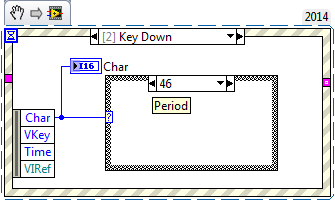
2. Currently I can enter numbers by clicking on VI butons only. How can I enter them by pressing button on keyboard also?

 Gregory
12-31-2015 09:15 AM
- Mark as New
- Bookmark
- Subscribe
- Mute
- Subscribe to RSS Feed
- Permalink
- Report to a Moderator
You can use the Key Down event with a case structure: