- Subscribe to RSS Feed
- Mark Topic as New
- Mark Topic as Read
- Float this Topic for Current User
- Bookmark
- Subscribe
- Mute
- Printer Friendly Page
Match Regular Expression Function input string format

 MoAgha
02-09-2014 01:48 AM
- Mark as New
- Bookmark
- Subscribe
- Mute
- Subscribe to RSS Feed
- Permalink
- Report to a Moderator
Hi,
I am new to labview and was having some difficulties using the Match Regular Experssion Function.
I am using labview to communicate with a sensor. I have installed the NI device driver to do so. The output of my sensor is in the format,
X20
R40 P20 A123. The numbers in this case are arbitrary. I am trying to use Match Regular Expression Function to display and perform mathematical operations on the numbers. I am having difficulties formatting the input string on the Match Regular Expression Function. Could you please give me some tips on how to format the example I provided.
Thank

 ben64
ben64
02-09-2014 07:18 AM
- Mark as New
- Bookmark
- Subscribe
- Mute
- Subscribe to RSS Feed
- Permalink
- Report to a Moderator
@MoAgha wrote:
Hi,
I am new to labview and was having some difficulties using the Match Regular Experssion Function.
I am using labview to communicate with a sensor. I have installed the NI device driver to do so. The output of my sensor is in the format,
X20
R40 P20 A123. The numbers in this case are arbitrary. I am trying to use Match Regular Expression Function to display and perform mathematical operations on the numbers. I am having difficulties formatting the input string on the Match Regular Expression Function. Could you please give me some tips on how to format the example I provided.
Thank
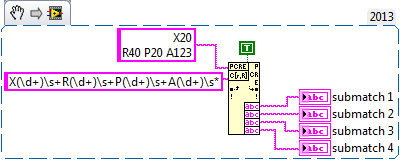
Here is a way to do it if the format is constant (X R P A followed by a positive integer number).
Ben64

ben64
02-09-2014 08:04 AM
- Mark as New
- Bookmark
- Subscribe
- Mute
- Subscribe to RSS Feed
- Permalink
- Report to a Moderator
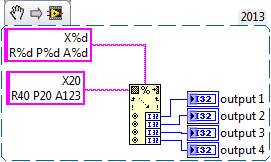
Alternately, if the format is fix you can use the scan from string function and convert directly to integers.
Ben64