LabVIEW
- Iscriversi a feed RSS
- Contrassegnare la discussione come nuova
- Contrassegnare la discussione come letta
- Sposta questo Discussione per l'utente corrente
- Preferito
- Iscriversi
- Disattiva notifiche
- Pagina in versione di stampa
MCP23017, I2C LabView HELP PLEASE.
Risolto!

in data 08-04-2020 12:12 PM
- Contrassegnare come Nuovo
- Preferito
- Iscriversi
- Disattiva notifiche
- Iscriversi a feed RSS
- Evidenziare
- Stampare
- Segnalare contenuto inappropriato
Great catch! that definitely needed to change but it didn't fix everything, same error code.
in data 08-04-2020 12:47 PM
- Contrassegnare come Nuovo
- Preferito
- Iscriversi
- Disattiva notifiche
- Iscriversi a feed RSS
- Evidenziare
- Stampare
- Segnalare contenuto inappropriato
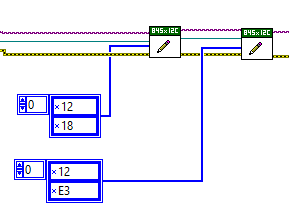
My biggest confusion is when I use the "Write.vi" I'm putting in an array and I'm assuming it's supposed to tell it the register A or B (x12) and the I/O direction (x18) but what I'm wondering is am I allowed to put two values? How does it know which value is the register and which is the data?

 crossrulz

in data 08-04-2020 01:08 PM
- Contrassegnare come Nuovo
- Preferito
- Iscriversi
- Disattiva notifiche
- Iscriversi a feed RSS
- Evidenziare
- Stampare
- Segnalare contenuto inappropriato
In an I2C write, the first value is the register and the second is the value to write to that register. If you want to read a register, you need to use the I2C Write Read and just write the register.
There are only two ways to tell somebody thanks: Kudos and Marked Solutions
Unofficial Forum Rules and Guidelines
"Not that we are sufficient in ourselves to claim anything as coming from us, but our sufficiency is from God" - 2 Corinthians 3:5
in data 08-04-2020 01:21 PM
- Contrassegnare come Nuovo
- Preferito
- Iscriversi
- Disattiva notifiche
- Iscriversi a feed RSS
- Evidenziare
- Stampare
- Segnalare contenuto inappropriato
Interesting, I'll trust ya cause I cant find any documentation that says that. Do you think it matters if the array is a column or a row (vertical or horizontal).
crossrulz
in data 08-04-2020 02:04 PM
- Contrassegnare come Nuovo
- Preferito
- Iscriversi
- Disattiva notifiche
- Iscriversi a feed RSS
- Evidenziare
- Stampare
- Segnalare contenuto inappropriato
@GeneralDynamic wrote:
Interesting, I'll trust ya cause I cant find any documentation that says that.
Read the documentation on your device. It clearly states to write the register and then the value using a "Rewrite". All that means is you write the register and then the value in a single write message (as far as the LabVIEW API is concerned).
@GeneralDynamic wrote:
Do you think it matters if the array is a column or a row (vertical or horizontal).
In LabVIEW, it is just a 1D array. There are no rows or columns. When you get into 2D arrays, then you can worry about that stuff.
There are only two ways to tell somebody thanks: Kudos and Marked Solutions
Unofficial Forum Rules and Guidelines
"Not that we are sufficient in ourselves to claim anything as coming from us, but our sufficiency is from God" - 2 Corinthians 3:5
in data 08-04-2020 02:08 PM
- Contrassegnare come Nuovo
- Preferito
- Iscriversi
- Disattiva notifiche
- Iscriversi a feed RSS
- Evidenziare
- Stampare
- Segnalare contenuto inappropriato
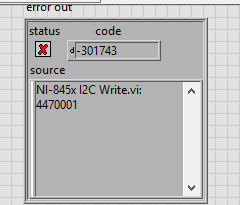
I'm completely lost with getting my code to work. I'm trying to write some data to a Port Expander (Part Number: MCP23S17) but nothing seems to work. I'm using a USB-8451 I2C module from NI to provide the controlling but i'm trying to code it in LabVIEW.
If i understand the protocol right then it is as followed:
1. Write to the correct Device & Register Address and define the I/O direction first.
2. Then write to the Device and Register Address with the actual data control.
Device Address: 0100100 (7-bit) because the LSB is R/W and the code will take care of this bit.


 Bob_Schor
in data 08-05-2020 08:05 AM
- Contrassegnare come Nuovo
- Preferito
- Iscriversi
- Disattiva notifiche
- Iscriversi a feed RSS
- Evidenziare
- Stampare
- Segnalare contenuto inappropriato
@GeneralDynamic wrote:
What do you mean the I2C example that ships with LabVIEW? How can I get this?
Go to Help, Find Examples. In the "Search" option, type I2C. Click on what it finds. I've attached the 2019 845x "General I2C Write" VI as a Snippet -- it has no "hidden states", so you should be able to manually reproduce it. I've never used I2C (but have used the SPI examples, and "think I understand SPI"), so I can't offer much additional help (like why there are references to EEPROMs). Some of the other examples might be more appropriate. I'll note that writing code for the SPI version of your chip was pretty straight-forward.

Bob Schor
in data 08-05-2020 06:17 PM
- Contrassegnare come Nuovo
- Preferito
- Iscriversi
- Disattiva notifiche
- Iscriversi a feed RSS
- Evidenziare
- Stampare
- Segnalare contenuto inappropriato
I figured it out! I was able to command my RF switches!! I definitely had some coding issues that you helped with.
Bob_Schor
in data 08-05-2020 09:18 PM
- Contrassegnare come Nuovo
- Preferito
- Iscriversi
- Disattiva notifiche
- Iscriversi a feed RSS
- Evidenziare
- Stampare
- Segnalare contenuto inappropriato
How about a brief explanation of how you fixed it? Someone else might, as you did, start using this Chip and want to use I2C, and be as confused as you were about how to get started. What step did you add, what change did you make? Was it simply that you left out a step that was explained in the Example?
Bob Schor
in data 08-06-2020 10:14 AM
- Contrassegnare come Nuovo
- Preferito
- Iscriversi
- Disattiva notifiche
- Iscriversi a feed RSS
- Evidenziare
- Stampare
- Segnalare contenuto inappropriato
Okay I'll put something together and upload some material. Part of it was code related and how to initialize/configure the chip but the final missing piece was hardware related where I missed connecting a GND wire from the NI-8451 device's terminal block.
