- Subscribe to RSS Feed
- Mark Topic as New
- Mark Topic as Read
- Float this Topic for Current User
- Bookmark
- Subscribe
- Mute
- Printer Friendly Page
Limiting plot by timestamp from a SQL DB using POST method - LV 2016 & NXG 3.0
Solved!
 Granado_93
02-28-2019 10:08 AM
- Mark as New
- Bookmark
- Subscribe
- Mute
- Subscribe to RSS Feed
- Permalink
- Report to a Moderator
Hello guys,
I am trying to update a chart limiting by timestamp. I am sending a SQL string from my webvi to my webserver.
The string is correct, i tested isolated, but when I sent from my webvi to my webser I get the following errors.
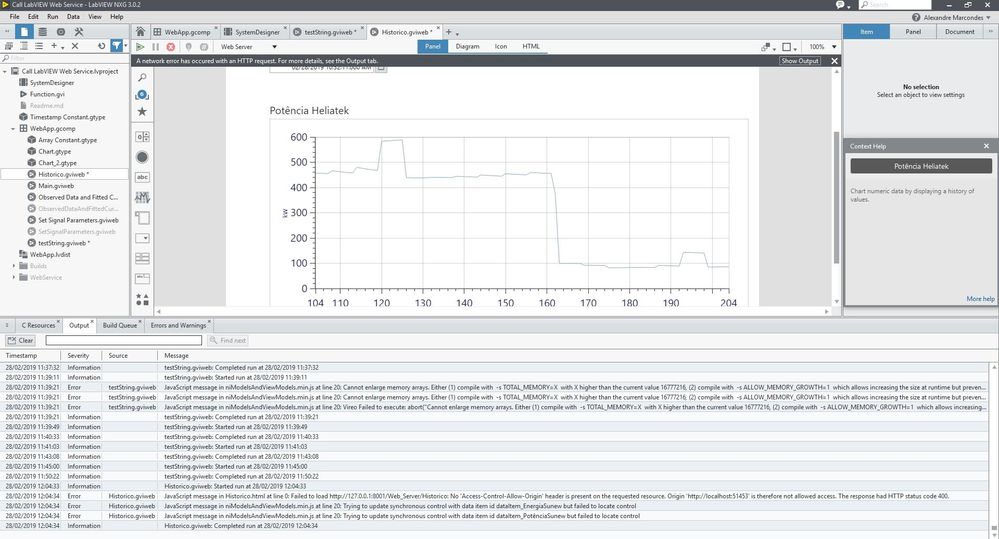

Solved! Go to Solution.

 MilanR
02-28-2019 03:49 PM
- Mark as New
- Bookmark
- Subscribe
- Mute
- Subscribe to RSS Feed
- Permalink
- Report to a Moderator
Hi Granado_93,
I think the issue may be similar to one we discussed before in the LabVIEW 2016 Web Server and web page with Labview NXG 3.0 post. In the example provided it looks like the Historico.vi needs to be marked as Streaming and to enable Use headers and Buffered.

One thing to point out is that it can be dangerous to accept and run SQL statements from a web page. A WebVI running in a webpage on your computer is no different than any other web page you visit in a web browser. It is possible for a malicious web page to send an SQL statement to your LabVIEW Web Service that can do unexpected operations.
Some best practices are to not send SQL queries from your WebVI to the Web Service but instead send specific parameters that you sanitize on the LabVIEW Web Service. For example in this case your SQL query has two timestamps as parameters. Instead of building the sql query in the WebVI and sending it to the LabVIEW Web Service you can send the two timestamps, parse them to make sure they are valid timestamps, and build / run the SQL query in the LabVIEW Web Service.
Milan
03-01-2019 05:44 AM
- Mark as New
- Bookmark
- Subscribe
- Mute
- Subscribe to RSS Feed
- Permalink
- Report to a Moderator
Hi MilanR,
I changed the output type to stream as you told. But it did not work yet. I have the same error that I had in the previous exemple.
NGX still complains that CORS is not presented on the request source, even though I had the CORS block on my web server.
Am I missing something else?
regards
03-01-2019 07:01 AM
- Mark as New
- Bookmark
- Subscribe
- Mute
- Subscribe to RSS Feed
- Permalink
- Report to a Moderator
Hello MilanR,
I did the modifications as follows 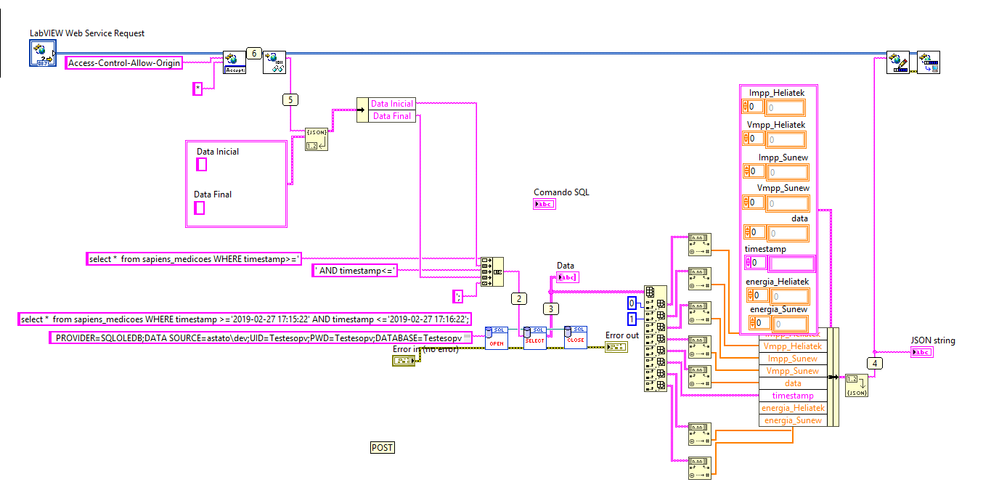
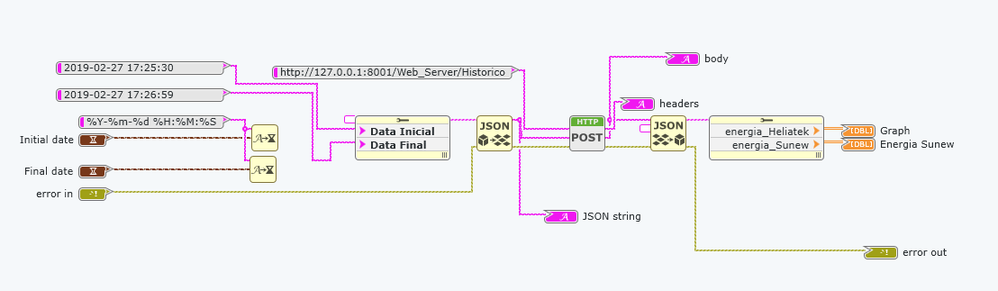
I tested and my web server don't receive nothing from my webvi.
MilanR
03-01-2019 01:16 PM
- Mark as New
- Bookmark
- Subscribe
- Mute
- Subscribe to RSS Feed
- Permalink
- Report to a Moderator
Hi Granado_93,
Looking at the Historico.vi Web Resource more closely I see two issues. The first is that the Historico.vi is configured to respond to GET requests but the WebVI is sending a POST request. If the Historico.vi should respond to the WebVI as is then it should be changed to respond to POST requests.
The second issue is that the Historico.vi does not have the LabVIEW Web Service Request control connected to the connector pane. You have to have the class reference connected to the connector pane to be used by the LabVIEW Web Service.
Milan
03-01-2019 01:58 PM
- Mark as New
- Bookmark
- Subscribe
- Mute
- Subscribe to RSS Feed
- Permalink
- Report to a Moderator
Hi MilanR
It should be POST, I think I changed to test something else.
BUt you were right about the LabVIEW Web Service Request control. I connected the control to the connector pane and send two string as timestamp and it works as I wish it.
Thank you for your help!
