Labview control stepper motor with raspberry pi 4
해결 완료!
 sefanoulis7
날짜: 04-10-2021 06:32 AM
- 신규로 표시
- 북마크
- 구독
- 소거
- RSS 피드 구독
- 강조
- 인쇄
- 부적절한 컨텐트 신고
I try to control a nema 17 stepper motor with Raspberry Pi but i failed. I use LINX Toolkit for connecting my Raspberry pi 4. There is no problem with connection between LabVIEW and Raspberry but despite any error in block diagram it is not control the motor. When the program runs, the event structure does not pass from timeout to start subplot. Please help me. I have also tried using arduino and have been successful.
해결되었습니다! 솔루션으로 이동.


So how have you programmed the Raspberry PI ?
What program are you running on the PI that connects to your LabVIEW code?
Where are the running ? on your host PC or the PI?
You do know that the PI is a computer by it self, and that Arduino is not a computer.
The PI runs the linux operating system.
You did not attach your project file, please do that also.
날짜: 04-18-2021 04:58 AM
- 신규로 표시
- 북마크
- 구독
- 소거
- RSS 피드 구독
- 강조
- 인쇄
- 부적절한 컨텐트 신고
I haven't created a code for stepper motor control. I just tried to control it on Labview. I also use LINX, not linux, makerhub plugin. I just want to control the stepper motor by sending a signal from Labview to raspberry pi pins.
What LabVIEW version are you using ?
Is it the Community Edition ?
And yes I know your are trying to use LINX, that is a plugin to LabVIEW.
Linux is a operating system, just like windows. And your Raspberry PI is running Linux as its OS.
To be able to control the pins on the PI, there needs to be a program running on the PI that LabVIEW/LINX can talk with.
When you use LINX with an Arduino, you also need to download some firmware to the Arduino board before LINX can work with the board.
날짜: 04-18-2021 04:26 PM
- 신규로 표시
- 북마크
- 구독
- 소거
- RSS 피드 구독
- 강조
- 인쇄
- 부적절한 컨텐트 신고
Yes we are using the community edition. We can establish a healthy connection between LINX and Raspberry, but we cannot activate the GPIO pins on Raspberry. What is your suggestion for this? What kind of code should we run on Raspberry?
In addition, when we connected raspberry to labview, we started it by getting information from the led blinking panel, but we could not manage the stepper motor control.
How does your LabVIEW project look like ?
Can you attach it?
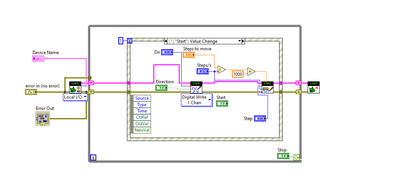

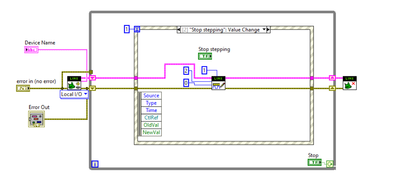
Sorry, but that is not your project, that is a blockdiagram of a vi.
I think you need to learn about LabVIEW on a Raspberry PI.
LabVIEW with Raspberry PI is NOT like with Arduino.
Take a look here: https://lavag.org/topic/21550-labview-2020-community-edition-on-raspberry-3-b-v12/
Or here: https://www.mediamongrels.com/make-ing-with-labview-raspberry-pi-part-1-introduction/
Also there are a NI course on the Commuinity Edition: https://education.ni.com/training/resources/1407/
날짜: 04-20-2021 01:53 PM
- 신규로 표시
- 북마크
- 구독
- 소거
- RSS 피드 구독
- 강조
- 인쇄
- 부적절한 컨텐트 신고
There is no need to be a project as you said, only stepper motor can be controlled with vi. I looked through the links you shared and tried most of the suggested actions there before, but still failed. Can I control a stepper motor using only vi?
No you can't, and you will never be able to.
Please take the time to read the links with a open mind.
Do a small program with the PI using the links information, but without your stepper motor.
First hint, you need a project. Pro tip, you always need a project. Do not develop LabVIEW code without a project.
