- Subscribe to RSS Feed
- Mark Topic as New
- Mark Topic as Read
- Float this Topic for Current User
- Bookmark
- Subscribe
- Mute
- Printer Friendly Page
Labview + Python = Runtime Error R6034

 cassaniti
06-17-2019 09:16 AM
- Mark as New
- Bookmark
- Subscribe
- Mute
- Subscribe to RSS Feed
- Permalink
- Report to a Moderator
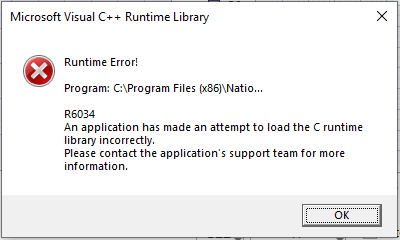
Each time I call a Python script from LabView the following error prompts. After pressing ok the python script runs without any problems and labview as well.
The LabView runtime engine is the 2018 32-bit, Python called is 2.7, Windows 10 64 bit
Do you know how to correct the error?
Thank you in advance!

06-21-2019 08:51 AM
- Mark as New
- Bookmark
- Subscribe
- Mute
- Subscribe to RSS Feed
- Permalink
- Report to a Moderator
Hi cassaniti,
Just to initialize the troubleshooting and conversation here,
What was the order of installing - LabVIEW, Python?
Did you try reinstalling SW?
Was this the status from the beginning of trying calling Python script with LabVIEW, or it came after some update?
What is the version of Python (32vs64, patch version)
Hope this helps.
Regards,
CTA, CLA
Helping (sharing) is caring!
If the post was helpful - Kudo it.
If the post answered your question - Mark it as Solution.
06-21-2019 08:59 AM
- Mark as New
- Bookmark
- Subscribe
- Mute
- Subscribe to RSS Feed
- Permalink
- Report to a Moderator
Python 2.7 32 bit. Labview was updated last year from version 2015 to version 2018, python was installed somewhen in between. I didn't try to reinstall anything yet. Still trying to figure out what is wrong there...

 paul.r
06-21-2019 09:26 AM
- Mark as New
- Bookmark
- Subscribe
- Mute
- Subscribe to RSS Feed
- Permalink
- Report to a Moderator
I assume you are using the Python node and not some other method of communicating with Python? Does this error occur regardless of what Python script you are running? Can you run the python examples that ship with LabVIEW, or do you get the same error there?
07-01-2019 01:10 AM
- Mark as New
- Bookmark
- Subscribe
- Mute
- Subscribe to RSS Feed
- Permalink
- Report to a Moderator
Using the python node, it occours regardless of what python script I run. I will try with the python example shipped with Labview but I think that it happens with it too..

 SabariSaravanan
07-01-2019 02:25 AM
- Mark as New
- Bookmark
- Subscribe
- Mute
- Subscribe to RSS Feed
- Permalink
- Report to a Moderator
If share your vi/snippet here, accordingly folks could give solution for that.

 NicoCabezas
07-07-2020 09:06 AM
- Mark as New
- Bookmark
- Subscribe
- Mute
- Subscribe to RSS Feed
- Permalink
- Report to a Moderator
I had the same problem last week using a Labview Application in a computer of our labs. After debuging this problem, I could realize that the Python script of this App used several modules that in my computer (Development Mode) have a newer version as the installed modules in the computer of our lab. I made a little program with the Python Node and a Python-test script in it only with the sections of imports. After commenting several lines of this test script I could find that the problem came when I imported the "pandas" module. I just make an update of this module and then all was solved.
