- Subscribe to RSS Feed
- Mark Topic as New
- Mark Topic as Read
- Float this Topic for Current User
- Bookmark
- Subscribe
- Mute
- Printer Friendly Page
Labview Append Report Text VI
Solved!
 Andelaus
03-25-2020 10:37 AM
- Mark as New
- Bookmark
- Subscribe
- Mute
- Subscribe to RSS Feed
- Permalink
- Report to a Moderator
Hi
Is there a way to get labview "Labview Append Report Text VI " to select a particular sheet in my ecxel document, i have a ecxel document with two sheets, an i can only get it to write in the first sheet, and that is working correctly.
I can't find a guide that addresses this.
Is there anyone who can help 😁
Solved! Go to Solution.

 cstorey
03-25-2020 12:37 PM
- Mark as New
- Bookmark
- Subscribe
- Mute
- Subscribe to RSS Feed
- Permalink
- Report to a Moderator
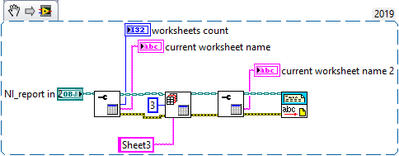
You need to use the Excel Get Worksheet VI to set the current worksheet, then use the Append Report Text to that worksheet. Call the sheet either by number or by name (not both).
See..
03-26-2020 05:41 AM
- Mark as New
- Bookmark
- Subscribe
- Mute
- Subscribe to RSS Feed
- Permalink
- Report to a Moderator
Thank you, i will try that right away 😁
03-26-2020 06:23 AM
- Mark as New
- Bookmark
- Subscribe
- Mute
- Subscribe to RSS Feed
- Permalink
- Report to a Moderator
It was incredibly simple to do, I don't understand that I didn't see it myself.
But thanks for the quick reply 👍
