- Subscribe to RSS Feed
- Mark Topic as New
- Mark Topic as Read
- Float this Topic for Current User
- Bookmark
- Subscribe
- Mute
- Printer Friendly Page
Label and Caption Graphics Question
Solved!
 Dave@Ventec
05-05-2011 11:22 AM
- Mark as New
- Bookmark
- Subscribe
- Mute
- Subscribe to RSS Feed
- Permalink
- Report to a Moderator
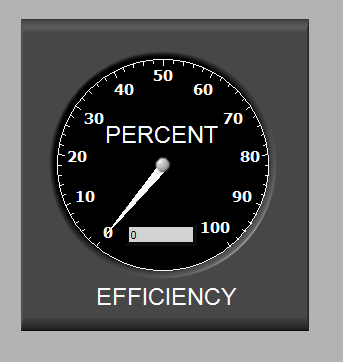
I must be missing something because I can not get the small white boarder to disappear from the gauge label and caption. I've tried every property node option - except apparently the correct one. Can someone help get rid of the white boarder around "PERCENT" which is the label and "EFFICIENCY" which is the caption?
Solved! Go to Solution.

 aeastet
05-05-2011 12:04 PM
- Mark as New
- Bookmark
- Subscribe
- Mute
- Subscribe to RSS Feed
- Permalink
- Report to a Moderator
do you have a copt of the control. I can probably get it to work for you.
GHSP
05-05-2011 12:51 PM
- Mark as New
- Bookmark
- Subscribe
- Mute
- Subscribe to RSS Feed
- Permalink
- Report to a Moderator
Attached... Sometimes it is the little things that drive me crazy!
Many Thanks.
Dave
 Darin.K
05-05-2011 12:53 PM
- Mark as New
- Bookmark
- Subscribe
- Mute
- Subscribe to RSS Feed
- Permalink
- Report to a Moderator
Just break out the paintbrush and color the background of the label and caption transparent.
aeastet
05-05-2011 12:57 PM
- Mark as New
- Bookmark
- Subscribe
- Mute
- Subscribe to RSS Feed
- Permalink
- Report to a Moderator
Here is the updated control with the background transparent.


GHSP
05-05-2011 01:10 PM
- Mark as New
- Bookmark
- Subscribe
- Mute
- Subscribe to RSS Feed
- Permalink
- Report to a Moderator
Now I know about transparency. Thank you for your prompt help! David

 JÞB
JÞB
05-05-2011 01:55 PM
- Mark as New
- Bookmark
- Subscribe
- Mute
- Subscribe to RSS Feed
- Permalink
- Report to a Moderator
Yup nice work Dave! great explaination Bill!
"Should be" isn't "Is" -Jay
