- Subscribe to RSS Feed
- Mark Topic as New
- Mark Topic as Read
- Float this Topic for Current User
- Bookmark
- Subscribe
- Mute
- Printer Friendly Page
LabView .NET callback bug?

 alzyx
alzyx
08-17-2018
03:48 AM
- last edited on
12-20-2024
05:39 PM
by
 Content Cleaner
- Mark as New
- Bookmark
- Subscribe
- Mute
- Subscribe to RSS Feed
- Permalink
- Report to a Moderator
I'm running LV2018,
and I'm currently forced, once I run my program, to restart the whole Labview if I want to edit my subVIs (the main VI remains editable): the subVI run icon' arrow changes to an arrow with a thin border around it, and nothing I tested from the board suggestions changes this (ctrl-m, change in the VI properties...)
I discovered here that it could be a known bug (the program I'm modifying uses in fact .NET), but the suggested workaround doesnt work for me...
Do you happen to know if this bug still exists in LV2018, and if there are different workarounds? It's really a pain to restart LV at each test run!

 Artem.SPb
08-17-2018 04:27 AM
- Mark as New
- Bookmark
- Subscribe
- Mute
- Subscribe to RSS Feed
- Permalink
- Report to a Moderator
How does this not work? there are errors, or something else?
I do not have LV18, but yesterday I solved a similar problem on LV16 and just checked that in LV 17 this method also exists.
08-17-2018 06:28 AM
- Mark as New
- Bookmark
- Subscribe
- Mute
- Subscribe to RSS Feed
- Permalink
- Report to a Moderator
quite simply, it runs and exits silently,
and returning (or re-opening, it's the same) to my subVI, it's still un-editable!
Artem.SPb
08-17-2018 06:44 AM
- Mark as New
- Bookmark
- Subscribe
- Mute
- Subscribe to RSS Feed
- Permalink
- Report to a Moderator
Show your example (in LV16/17)
08-17-2018 07:10 AM - edited 08-17-2018 07:13 AM
- Mark as New
- Bookmark
- Subscribe
- Mute
- Subscribe to RSS Feed
- Permalink
- Report to a Moderator
@Artem.SPb ha scritto:
Show your example (in LV16/17)
ouch... as I said in a previous post, it is a rather big project! - not mine, but by the camera's producers (Thorlabs).
I include the two routines I'm working on (TLSC is the main, OnImageFrameAvailable the subVI that becomes uneditable)
The whole project is free to download here link
P.S. I hope it works on LV16/17 - I'm running LV18
Artem.SPb
08-17-2018 07:18 AM
- Mark as New
- Bookmark
- Subscribe
- Mute
- Subscribe to RSS Feed
- Permalink
- Report to a Moderator
Please, use file->save fo previous...
I can't open this files in LV16/17
08-17-2018 07:39 AM
- Mark as New
- Bookmark
- Subscribe
- Mute
- Subscribe to RSS Feed
- Permalink
- Report to a Moderator
here they are, sorry...
Artem.SPb
08-17-2018 07:54 AM
- Mark as New
- Bookmark
- Subscribe
- Mute
- Subscribe to RSS Feed
- Permalink
- Report to a Moderator
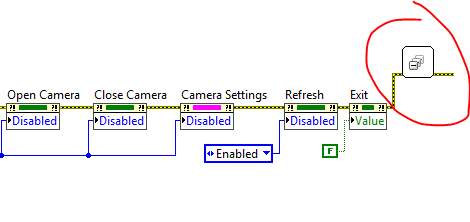
Without drivers for camera I can't run it, but I don't see garbage collector in "close" case.
Try place my vi like here
08-17-2018 08:54 AM
- Mark as New
- Bookmark
- Subscribe
- Mute
- Subscribe to RSS Feed
- Permalink
- Report to a Moderator
that was my mistake, I understood from the workaround page that you could do it in another VI (1. Drop an invoke node in an empty VI... ).
I put it where you said and I'm halfway there:
- if I put a breakpoint and step in the "close" case, on the unregistering process, then on the GC, then continue, at program's end my subVI is still editable!
- but if dont break&step, it behaves like before: un-editable
very confusing
Artem.SPb
08-17-2018 09:06 AM
- Mark as New
- Bookmark
- Subscribe
- Mute
- Subscribe to RSS Feed
- Permalink
- Report to a Moderator
Looks like your "finish" VIs need more time, but works at background.
When you use Step into, VIs have enough time.
Try to set long "wait" before GC.
If if will help, you need to check driver's status before finish work (and call GC)
