- Subscribe to RSS Feed
- Mark Topic as New
- Mark Topic as Read
- Float this Topic for Current User
- Bookmark
- Subscribe
- Mute
- Printer Friendly Page
LabVIEW hang in Serial communication !!
Solved!
 ajapyy
08-06-2014 07:44 AM
- Mark as New
- Bookmark
- Subscribe
- Mute
- Subscribe to RSS Feed
- Permalink
- Report to a Moderator
hi.
I use pl2303HXA (usb to UART converter) in my design and send data from micro to pc in LabVIEW 2013 x86.
when i tried in CODEVISION terminal, every thing is OK and each micro send to PC, in Hypertermial or CODEVISION terminal is correctly received.
but when I run LabVIEW, it work few second and Communication suddenly abrupt and LabVIEW has hang. u can see that in below image that I capture from my decktop. Why LabVIEW hang ?

image is front panel of my VI.
whenever it hang, I must restart LabVIEW and test again. in meanwhile I must said that hang is randomly occur.
Thanks.
Solved! Go to Solution.

 Dennis_Knutson
08-06-2014 08:06 AM
- Mark as New
- Bookmark
- Subscribe
- Mute
- Subscribe to RSS Feed
- Permalink
- Report to a Moderator

 billko
08-06-2014 08:08 AM
- Mark as New
- Bookmark
- Subscribe
- Mute
- Subscribe to RSS Feed
- Permalink
- Report to a Moderator
What kind of baud rate is that?
(Mid-Level minion.)
My support system ensures that I don't look totally incompetent.
Proud to say that I've progressed beyond knowing just enough to be dangerous. I now know enough to know that I have no clue about anything at all.
Humble author of the CLAD Nugget.
08-06-2014 08:53 AM
- Mark as New
- Bookmark
- Subscribe
- Mute
- Subscribe to RSS Feed
- Permalink
- Report to a Moderator
baudrate is ok. I changed it to 115200 but LabVIEW hang again !!
This is image from my Control panel.
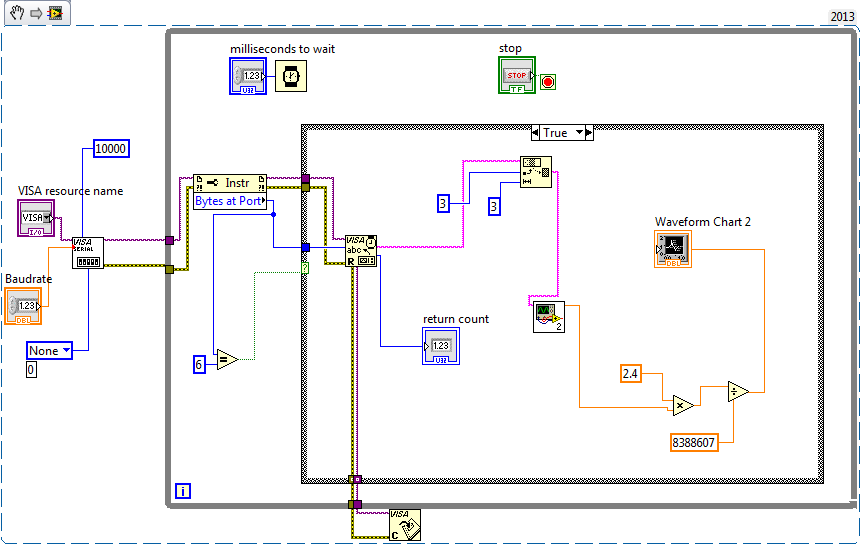
Sub VI in above image get a 24 bit 2's Complement hex string and it's output is DBL number which can be positive or negative. Sub VI is shown below :

Sub VI work correct and in my opinion problem is not from that.
my OS is Win7 x86 and LabVIEW is 2013 x86.
VISA is installed full and correct.
I send Data with little delay approximatlly less than 0.5ms. Communication is Right in Other terminals like Hyperterminal but in LabVIEW work few second and suddnly hang and I must restart LabVIEW and Micro to continue.
Data Sendig from Micro is continusly and Idle time isn't exist.
 nyc_(is_out_of_
08-06-2014 09:01 AM - edited 08-06-2014 09:02 AM
- Mark as New
- Bookmark
- Subscribe
- Mute
- Subscribe to RSS Feed
- Permalink
- Report to a Moderator
I don't see a Write.

 JensG69
08-06-2014 09:30 AM
- Mark as New
- Bookmark
- Subscribe
- Mute
- Subscribe to RSS Feed
- Permalink
- Report to a Moderator
Is your communication really using a Termination Character? You did not deactivate it on the serial configuration VI.
Regards, Jens
billko
08-06-2014 09:34 AM
- Mark as New
- Bookmark
- Subscribe
- Mute
- Subscribe to RSS Feed
- Permalink
- Report to a Moderator
The hang isn't "random". It's telling you that you don't understand how to communicate with the equipment. I see you are using bytes at port AND using a termination character (on by default in the serial config). Use one or the other, but not both.
(Mid-Level minion.)
My support system ensures that I don't look totally incompetent.
Proud to say that I've progressed beyond knowing just enough to be dangerous. I now know enough to know that I have no clue about anything at all.
Humble author of the CLAD Nugget.
08-06-2014 11:09 AM
- Mark as New
- Bookmark
- Subscribe
- Mute
- Subscribe to RSS Feed
- Permalink
- Report to a Moderator
First of all I must appreciate your's reply 😉
as you said I deactivate termination character and run my VI again.
it's run correctly longer than previous mode but yet has same problem and hang again !!
it's new image from my VI :
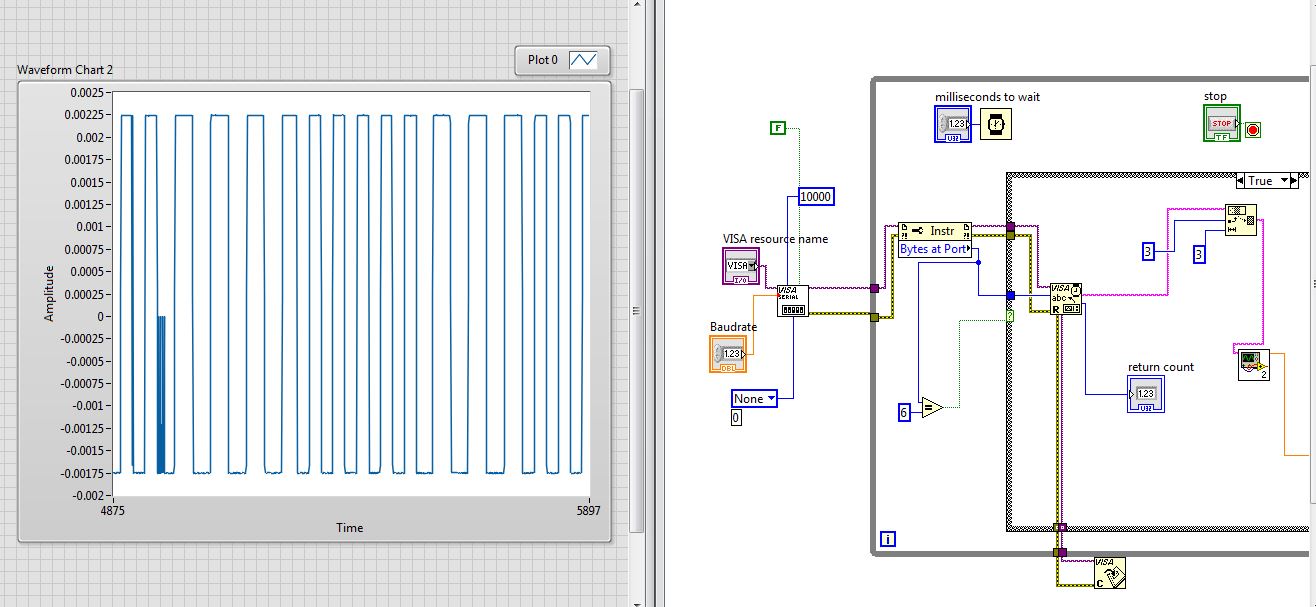
as you see above, problem which was hang in receive still is !! 
Dennis_Knutson
08-06-2014 11:24 AM
- Mark as New
- Bookmark
- Subscribe
- Mute
- Subscribe to RSS Feed
- Permalink
- Report to a Moderator
08-06-2014 11:36 AM
- Mark as New
- Bookmark
- Subscribe
- Mute
- Subscribe to RSS Feed
- Permalink
- Report to a Moderator
How I can connect an error out indicator to my VI ?
6 is not my hero number  , in micro I send 6 byte every time to PC and I set this point in byte as port .
your offer is I append a byte to my Protocol and send 7 byte in every Communication with a termination character like 'A' in end of my Protocol ?
