- Subscribe to RSS Feed
- Mark Topic as New
- Mark Topic as Read
- Float this Topic for Current User
- Bookmark
- Subscribe
- Mute
- Printer Friendly Page
LabVIEW code generation failed to execute.

 Inti77
05-23-2014 04:41 PM
- Mark as New
- Bookmark
- Subscribe
- Mute
- Subscribe to RSS Feed
- Permalink
- Report to a Moderator
Hello, I'm having a problem that already was posted. When I'm trying to change a resistor value on the "sensor de presiones" VI, I get the error that is mentioned in the subject.
I read on other posts that a possible cause would be that some drivers were installed incorrectly, so I uninstalled and then installed again both LabVIEW and NI-DAQmx9.9 (in that order) and I still get the same error, so I can't change that value.
Screenshots of the situation were attached.
Please, any help is appreciated.
Thanks a lot!

 fromm8
05-26-2014 10:55 AM
- Mark as New
- Bookmark
- Subscribe
- Mute
- Subscribe to RSS Feed
- Permalink
- Report to a Moderator
Hello Inti77
Could you tell me what hardware you are using? I cannot see that in the picture.
I can see that you are creating an analog input task for current, where are you connecting 400 and 400? I mean, you are connecting those constants to a couple of inputs, which ones?
Regards
Frank R.

 Yamaeda
05-26-2014 12:10 PM
- Mark as New
- Bookmark
- Subscribe
- Mute
- Subscribe to RSS Feed
- Permalink
- Report to a Moderator
Do you have LV Professional or the Application module?
/Y

05-26-2014 01:29 PM
- Mark as New
- Bookmark
- Subscribe
- Mute
- Subscribe to RSS Feed
- Permalink
- Report to a Moderator
Hi Frank, thanks for asking.
I'm using a NI USB 6008 that is connected to a pressure sensor, which gives current and I need to convert it into pressure.
I believe that the 400's are cutoff frequencies. I didn't write the block diagram, someone else did.
I changed those values and got an error related to cutoff frequencies. Hence my guess.
05-26-2014 01:33 PM
- Mark as New
- Bookmark
- Subscribe
- Mute
- Subscribe to RSS Feed
- Permalink
- Report to a Moderator
Hi Yamaeda, thanks for asking.
I'm not sure, all I know is that I'm using the LabView 2012 full developement system.
fromm8
05-26-2014 01:41 PM
- Mark as New
- Bookmark
- Subscribe
- Mute
- Subscribe to RSS Feed
- Permalink
- Report to a Moderator
Inti77
I do not understand what inputs you are using exactly, there are not inputs for cutoff freq.
Could you share your VI, so I could try to reproduce the behavior?
Regards
Frank R.
05-26-2014 01:44 PM
- Mark as New
- Bookmark
- Subscribe
- Mute
- Subscribe to RSS Feed
- Permalink
- Report to a Moderator
There you go 🙂
Thanks for helping me!
fromm8
05-26-2014 02:17 PM
- Mark as New
- Bookmark
- Subscribe
- Mute
- Subscribe to RSS Feed
- Permalink
- Report to a Moderator
Inti77
I was able to run you code successfully. I also was able to chane the resistor value. I did change the resource name and channel name.
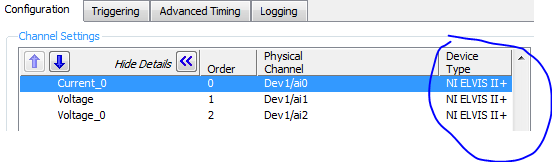


You said you have an usb-6008, and here you have other device type. I selected a real usb-6008 and that code ran fine. If you are selecting there a correct channel of the 6008 and you still see the same error, you probably have a problem with the installation of your software.
Regards
Frank R.
05-26-2014 05:18 PM
- Mark as New
- Bookmark
- Subscribe
- Mute
- Subscribe to RSS Feed
- Permalink
- Report to a Moderator
Thanks a lot for your help Frank.
I have the correct NI USB 6008 device type, so it is a problem with the software installation. When I first spotted this error, I uninstalled and then installed again the software.
Any ideas on how would I fix that?
You've been very helpful, thanks again 🙂
fromm8
05-27-2014 10:39 AM
- Mark as New
- Bookmark
- Subscribe
- Mute
- Subscribe to RSS Feed
- Permalink
- Report to a Moderator
Hello Inti77
You could test it in a different computer. Remember that you can uninstall our software and windows does not request to restart the PC. If you install the new software again you probably are not removing corrupted files. I am saying that the re-installation maybe did not work well.
Regards
Frank R.
