- Subscribe to RSS Feed
- Mark Topic as New
- Mark Topic as Read
- Float this Topic for Current User
- Bookmark
- Subscribe
- Mute
- Printer Friendly Page
LabVIEW PPL Version not visible in Windows Explorer

 python007
07-18-2023 03:32 AM
- Mark as New
- Bookmark
- Subscribe
- Mute
- Subscribe to RSS Feed
- Permalink
- Report to a Moderator
Hi all
I'm new to PPL's and i tried to deploy a PPL to a prodcution machine with windows 10 and only LabVIEW Runtime installed.
Know i wan't to verify that i have the correct PPL-Version on the Production machine but the Version-Property is not visible:
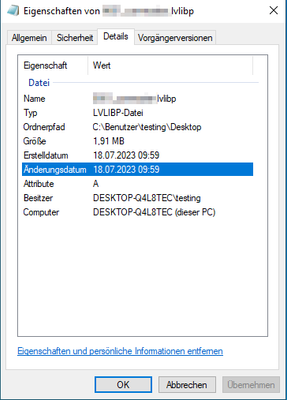
On the development machine with Full LabVIEW installed the version-property is visible.
Is it because *.lvlibp is a unknown filetype?
How to solve this behaviour?
Best regards
07-25-2023 06:54 AM
- Mark as New
- Bookmark
- Subscribe
- Mute
- Subscribe to RSS Feed
- Permalink
- Report to a Moderator
Hello to all
Is my question not clear or is there no solution?
Best regards

 crossrulz

07-25-2023 07:24 AM
- Mark as New
- Bookmark
- Subscribe
- Mute
- Subscribe to RSS Feed
- Permalink
- Report to a Moderator
There is a hidden gem that you can use to get the version information from your PPL: <LabVIEW>\vi.lib\Platform\fileVersionInfo.llb\FileVersionInfo.vi
I have not tried it on a deployment machine yet, but you could make a very simple utility to get all of the PPL and executable files to check their version.
There are only two ways to tell somebody thanks: Kudos and Marked Solutions
Unofficial Forum Rules and Guidelines
"Not that we are sufficient in ourselves to claim anything as coming from us, but our sufficiency is from God" - 2 Corinthians 3:5
07-27-2023 01:17 AM
- Mark as New
- Bookmark
- Subscribe
- Mute
- Subscribe to RSS Feed
- Permalink
- Report to a Moderator
Thanks Knight Of NI for your reply
That is a solution but that couldn't be that i have to write a extra utility to get the *.lvlipb Version.
Is there a other Solution?
Best regards
