ni.com is currently undergoing scheduled maintenance.
Some services may be unavailable at this time. Please contact us for help or try again later.
- Subscribe to RSS Feed
- Mark Topic as New
- Mark Topic as Read
- Float this Topic for Current User
- Bookmark
- Subscribe
- Mute
- Printer Friendly Page
[LabVIEW Bug Report] Graph Copy Data doesn't copy annotations properly

 X.
X.
04-02-2017 05:32 PM
- Mark as New
- Bookmark
- Subscribe
- Mute
- Subscribe to RSS Feed
- Permalink
- Report to a Moderator
Not being very lucky with the Copy Data method of graphs lately.
Take the following graph (from the attached VI):
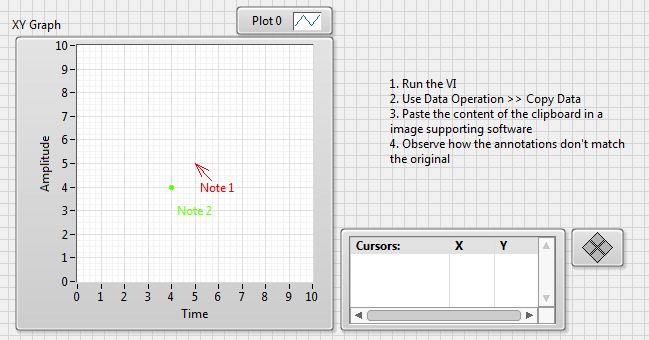
and try to copy its image data to paste it into some other software (Word, Powerpoint, Paint, Preview, whatever) by invoking Data Operation >> Copy Data.
I get this:
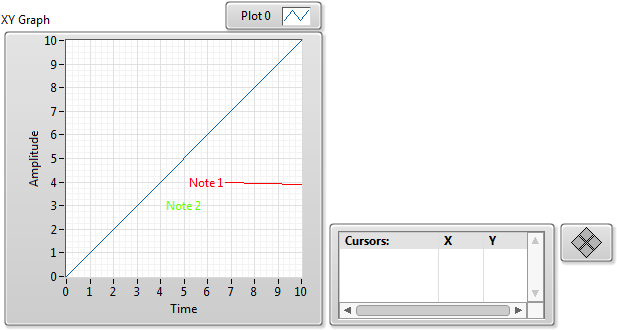
An annotation with an arrow goes haywire and one without simply disappears (no anchoring point displayed).
Tested in LabVIEW 2016 64 bits, Windows 7.
- Tags:
- X_Bug_Report
04-02-2017 05:36 PM
- Mark as New
- Bookmark
- Subscribe
- Mute
- Subscribe to RSS Feed
- Permalink
- Report to a Moderator
04-05-2017 11:55 AM
- Mark as New
- Bookmark
- Subscribe
- Mute
- Subscribe to RSS Feed
- Permalink
- Report to a Moderator
CAR 640243 was filed for that bug, which has some other variants.
For instance an annotation in a XY graph needs to be associated with a plot, or it won't be displayed in the image generated by "Copy Data".
If associated with a plot (which is not possible in my case, but could be a workaround in some cases), it cannot be positioned using the XY coordinates, but only the plot element index...
- Tags:
- CAR_640243

04-07-2017 02:13 PM
- Mark as New
- Bookmark
- Subscribe
- Mute
- Subscribe to RSS Feed
- Permalink
- Report to a Moderator
According to the CAR there's a workaround of using a Waveform graph which will copy the annotations correctly or using a "get image" invoke node (Picture on attached vi) to display an image of the graph that copies properly.
Would that work for your application?
04-07-2017 06:30 PM
- Mark as New
- Bookmark
- Subscribe
- Mute
- Subscribe to RSS Feed
- Permalink
- Report to a Moderator
Sure, the functionality can be emulated. However, the purpose of the post was not to look for a workaround but bring the attention of NI on the bug. Mission accomplished, over and out. Anyone willing to discuss workaround is most welcome.
