LabVIEW
- Inscrever-se no RSS Feed
- Marcar tópico como novo
- Marcar tópico como lido
- Flutuar este Tópico do usuário atual
- Favorito
- Inscrever-se
- Emudecer
- Página amigável para impressora
*LRN? and binary block data
Resolvido!
 _natalie_
em 01-05-2022 04:18 PM
- Marcar como novo
- Favorito
- Inscrever-se
- Emudecer
- Inscrever-se no RSS Feed
- Realçar
- Imprimir
- Relatar conteúdo como inapropriado
Hello,
I am using a Keysight E4990A Impedance Analyzer. I would like to be able to save and recall setups. I've used the *LRN? command in the past on other instruments to do this. On those instruments, a text file was output with a chain of commands. With the analyzer, binary block data is returned after the *LRN? query.
I am able to receive a response using this command, but I can't figure out how to "reuse" it so that I can load or bring up the setup later. I have been reading about binary blocks and the IEEE 745 format.
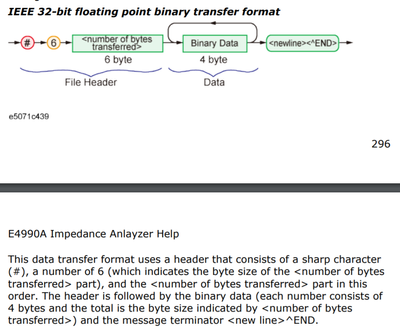
Using the *LRN? commands, I receive the following text. I see the # symbol, the number 6 and 6 bytes in the header. Everything including and after the :SYST:SET must be the binary data if I understand everything correctly.
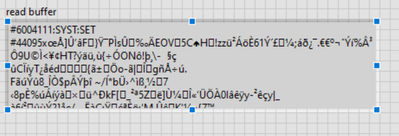
Now, if I manually save the setup and lookup up the setup file on the analyzer (saved as a .sta file), the data saved in the file starts after the #6004111:SYST:SET #44095. I do not understand where the #44095 data came from. I understand that it's necessary to use SYST:SET with the correct binary block to update the settings.
If I add the #44095, I'm told there is...
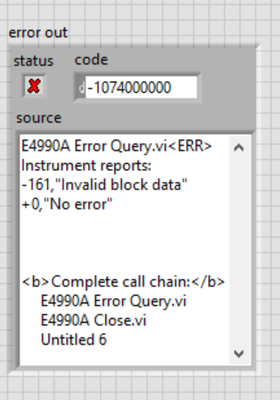
If I try to calculate the size, assuming the #4 means the number of bytes and the other integers represent the size of the binary data, I get the same error (using the System Set VI).
I have attached the manual, and the VIs I have built.
Any help is greatly appreciated.
Thanks
PS - I am using LabVIEW 2016
Solucionado! Ir para Solução.

 crossrulz

em 01-05-2022 07:54 PM
- Marcar como novo
- Favorito
- Inscrever-se
- Emudecer
- Inscrever-se no RSS Feed
- Realçar
- Imprimir
- Relatar conteúdo como inapropriado
This is a common thing for Agilent/Keysight devices to transmit large data in a binary format. But then you need to know how large the data is. So Agilent/Keysight use a datablock format. The datablock format is a #, then an ASCII character to state how many characters are in the length (so 4 means there are 4 characters to state the length), then the length of the data in an ASCII numeric format ("4095" indicates there are 4095 bytes in the data), and finally the data which is the size as determined in the length section of the header.
But you will also need to send a New Line character to terminate the block.
There are only two ways to tell somebody thanks: Kudos and Marked Solutions
Unofficial Forum Rules and Guidelines
"Not that we are sufficient in ourselves to claim anything as coming from us, but our sufficiency is from God" - 2 Corinthians 3:5
em 01-07-2022 02:17 PM
- Marcar como novo
- Favorito
- Inscrever-se
- Emudecer
- Inscrever-se no RSS Feed
- Realçar
- Imprimir
- Relatar conteúdo como inapropriado
Thanks crossrulz!
I had made a couple of mistakes in my code. I wasn't reading all of the data before saving it, I was saving it as a text file and not a binary file, and I wasn't setting up the header properly when sending it back to the instrument with the :SYST:SET command.

 Apitech_DT
em 04-28-2022 01:38 PM
- Marcar como novo
- Favorito
- Inscrever-se
- Emudecer
- Inscrever-se no RSS Feed
- Realçar
- Imprimir
- Relatar conteúdo como inapropriado
Hi, I'm having similar issues with two different types of keysight scopes, i can receive lrn strings ok but having issues sending them back. Would it be possible to see the working code ? Cheers
em 04-28-2022 01:45 PM
- Marcar como novo
- Favorito
- Inscrever-se
- Emudecer
- Inscrever-se no RSS Feed
- Realçar
- Imprimir
- Relatar conteúdo como inapropriado
Sure, I am using LabVIEW 2016. What are you using?
Apitech_DT
em 04-29-2022 02:26 AM
- Marcar como novo
- Favorito
- Inscrever-se
- Emudecer
- Inscrever-se no RSS Feed
- Realçar
- Imprimir
- Relatar conteúdo como inapropriado
Hi, I'm on 2021 but I do have 2015 and 2020 as well, many thanks Dave
em 04-29-2022 12:25 PM
- Marcar como novo
- Favorito
- Inscrever-se
- Emudecer
- Inscrever-se no RSS Feed
- Realçar
- Imprimir
- Relatar conteúdo como inapropriado
I believe you can open these with LabVIEW 2020/2021. Let me know how it goes.
Apitech_DT
em 04-29-2022 04:56 PM
- Marcar como novo
- Favorito
- Inscrever-se
- Emudecer
- Inscrever-se no RSS Feed
- Realçar
- Imprimir
- Relatar conteúdo como inapropriado
Hi Natalie
That was really useful, so I was reading the learn string back ok and storing as a binary file, but when i was trying to resend it back, I was not sending the # followed by the length of the string to be sent before sending the learn string. Once I took that bit from your code it worked first time. Cant thank you enough Dave
em 05-02-2022 11:27 AM
- Marcar como novo
- Favorito
- Inscrever-se
- Emudecer
- Inscrever-se no RSS Feed
- Realçar
- Imprimir
- Relatar conteúdo como inapropriado
Happy it worked for you!
