ni.com is currently undergoing scheduled maintenance.
Some services may be unavailable at this time. Please contact us for help or try again later.
- Subscribe to RSS Feed
- Mark Topic as New
- Mark Topic as Read
- Float this Topic for Current User
- Bookmark
- Subscribe
- Mute
- Printer Friendly Page
Interactive filter propositions with listboxes
Solved!
 haha1234
11-12-2018 10:32 AM
- Mark as New
- Bookmark
- Subscribe
- Mute
- Subscribe to RSS Feed
- Permalink
- Report to a Moderator
Hello, I am trying to find a way for users to filter data by clicking on what they want / what they don't want.
I've achieved that thanks to 3 listboxes. Two of them are linked : when the user select one parameter name, it's different possible values appears in the second list box.
My problem is due to default values : when the VI is started several times, a given value is highlighted in blue on the listbox, but when the user clicks add, this value is not reported in the filter
Maybe I should clear the highlighted cell at VI start (but how ?). Or maybe should I work on listbox actual values instead of event "new value" ?
thank you in advance
best regards
Solved! Go to Solution.

 Artem.SPb
11-13-2018 02:17 AM
- Mark as New
- Bookmark
- Subscribe
- Mute
- Subscribe to RSS Feed
- Permalink
- Report to a Moderator
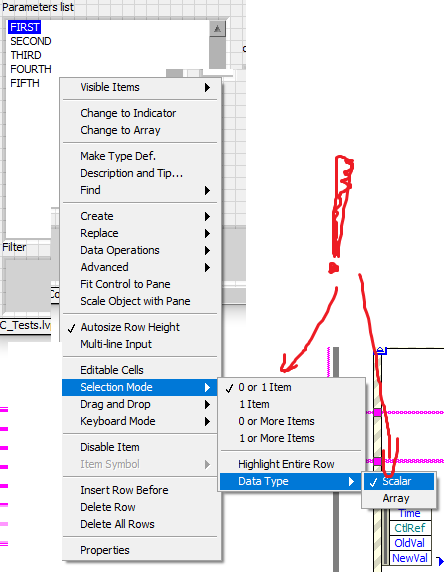
Change selection mode:
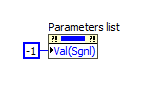
And you can clear selection by -1
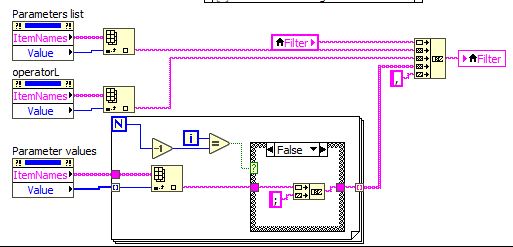
And finally you can build string without local variables
11-14-2018 09:24 AM
- Mark as New
- Bookmark
- Subscribe
- Mute
- Subscribe to RSS Feed
- Permalink
- Report to a Moderator
Thanks, the Val(Sgn) tips works perfectly for clearing selection at startup of the selection pop-up.
