- Subscribe to RSS Feed
- Mark Topic as New
- Mark Topic as Read
- Float this Topic for Current User
- Bookmark
- Subscribe
- Mute
- Printer Friendly Page
Insert into array and view output

 pecan204
07-10-2007 10:04 AM
- Mark as New
- Bookmark
- Subscribe
- Mute
- Subscribe to RSS Feed
- Permalink
- Report to a Moderator

 Jorge_Amaral
07-10-2007 10:15 AM
- Mark as New
- Bookmark
- Subscribe
- Mute
- Subscribe to RSS Feed
- Permalink
- Report to a Moderator
The "Run" arrow broken indicates presence of an error. If click on it, Labview explains the error.
If you do that, it say that the "insert into array.vi" has bad wired connections. And this happens because you don't have the position conected.
I've attached the corrected vi. You can only open it if you have the labview 8.2.
www.mcm-electronics.com
PORTUGAL
 PJS
PJS
07-10-2007 10:27 AM
- Mark as New
- Bookmark
- Subscribe
- Mute
- Subscribe to RSS Feed
- Permalink
- Report to a Moderator
Second- You can only insert an element some where into the array, In your example, you initalize the array to 4 elements, so you can only insert a new element at indecies 0-4 (because you will end up with a 5 element array), remember LabVIEW is base 0, so your first index in the array is element index 0.
I hope this gets you started. I have attached a commented updated example. I realize someone may have responded before me, but I tried to update your example to make things easier to see.
Paul

 Dennis_Knutson
07-10-2007 10:28 AM
- Mark as New
- Bookmark
- Subscribe
- Mute
- Subscribe to RSS Feed
- Permalink
- Report to a Moderator
07-10-2007 11:05 AM
- Mark as New
- Bookmark
- Subscribe
- Mute
- Subscribe to RSS Feed
- Permalink
- Report to a Moderator

 altenbach

07-10-2007 11:32 AM - edited 07-10-2007 11:32 AM
- Mark as New
- Bookmark
- Subscribe
- Mute
- Subscribe to RSS Feed
- Permalink
- Report to a Moderator
- grow the array by one (most likely allocating a new copy in memory)
- move all elements above the insert point up by one index position.
- place the new element at the insert point
This is a very expensive operation and can become very confusing quickly. Because the elements change indices you get a different result depending on the order in which you insert elements.

Message Edited by altenbach on 07-10-2007 09:34 AM


07-11-2007 09:18 AM
- Mark as New
- Bookmark
- Subscribe
- Mute
- Subscribe to RSS Feed
- Permalink
- Report to a Moderator
Thanks for the comment. I tried the repalce array subset and included a loop to experiment. Where the integer goes into the the component specifying the index is an error. But it seems to me that the integer i of a for loop should be a consistent data type for an array subset index?
Thanks
Ken

 GerdW
GerdW
07-11-2007 09:32 AM
- Mark as New
- Bookmark
- Subscribe
- Mute
- Subscribe to RSS Feed
- Permalink
- Report to a Moderator
this error is due to 'auto-indexing' enabled on your for-loop output.
See attached vi on how to use 'replace array subset' inside the loop.
GerdW
using LV2016/2019/2021 on Win10/11+cRIO, TestStand2016/2019
07-11-2007 09:42 AM
- Mark as New
- Bookmark
- Subscribe
- Mute
- Subscribe to RSS Feed
- Permalink
- Report to a Moderator
GerdW
07-11-2007 10:07 AM - edited 07-11-2007 10:07 AM
- Mark as New
- Bookmark
- Subscribe
- Mute
- Subscribe to RSS Feed
- Permalink
- Report to a Moderator
well, you didn't say so before...
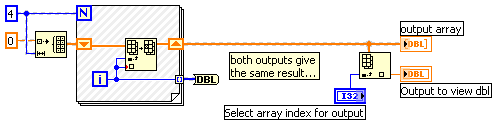
Message Edited by GerdW on 07-11-2007 05:07 PM
GerdW
using LV2016/2019/2021 on Win10/11+cRIO, TestStand2016/2019

