- Subscribe to RSS Feed
- Mark Topic as New
- Mark Topic as Read
- Float this Topic for Current User
- Bookmark
- Subscribe
- Mute
- Printer Friendly Page
Initializing Column Size of Array
Solved!
 neunited
09-20-2017 11:55 AM - edited 09-20-2017 12:01 PM
- Mark as New
- Bookmark
- Subscribe
- Mute
- Subscribe to RSS Feed
- Permalink
- Report to a Moderator
Hello,
I have a comma delimited text file which is initialised into an array using the VI below.
The issue is that I have to place additional commas in order to make the array larger to provide additional empty columns.
For example:
Dog, Cat, Rabbit, , , ,
This script provides an array which is 7 columns wide.
Is it possible for the initialization of the array to be formatted automatically with LabVIEW functions without having to use additional commas in the text file to be set to 7 commas?
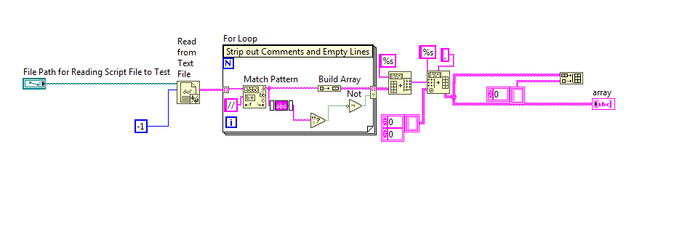
Would appreciate any feedback you may have
Many Thanks
Solved! Go to Solution.

 aputman
09-20-2017 12:06 PM
- Mark as New
- Bookmark
- Subscribe
- Mute
- Subscribe to RSS Feed
- Permalink
- Report to a Moderator
Use the Initialize Array VI to create an array of size 7 and replace a subset of that array with the data from your file. Use the Read From Spreadsheet function to make that part of your code cleaner.

 RavensFan

09-20-2017 12:08 PM
- Mark as New
- Bookmark
- Subscribe
- Mute
- Subscribe to RSS Feed
- Permalink
- Report to a Moderator
Or just read the array then use Insert Into Array to insert empty columns.
09-20-2017 12:23 PM
- Mark as New
- Bookmark
- Subscribe
- Mute
- Subscribe to RSS Feed
- Permalink
- Report to a Moderator
Hi RavensFan,
Did you mean like this?
 RavensFan
09-20-2017 12:30 PM
- Mark as New
- Bookmark
- Subscribe
- Mute
- Subscribe to RSS Feed
- Permalink
- Report to a Moderator
Yes. The only thing you might have to do is to make sure the index you are inserting into is either in the middle of the array, or is equal to the size of the array so that it will add the column to the end. (i.e., you can't insert a column at column #7 if you only have 3 columns in the array.) And remember that row and column indices start at 0. So a 7 column array has columns at indices 0, 1, 2, 3, .... 6.

 altenbach
09-20-2017 02:00 PM
- Mark as New
- Bookmark
- Subscribe
- Mute
- Subscribe to RSS Feed
- Permalink
- Report to a Moderator
Can you attach a simple text file and a simple script file. All this seems overly complicated.

 paul_cardinale
09-20-2017 02:07 PM
- Mark as New
- Bookmark
- Subscribe
- Mute
- Subscribe to RSS Feed
- Permalink
- Report to a Moderator
Try using the built-in function: Spreadsheet String to Array
altenbach
09-20-2017 02:11 PM
- Mark as New
- Bookmark
- Subscribe
- Mute
- Subscribe to RSS Feed
- Permalink
- Report to a Moderator
"Read from spreadsheet" file will give you as many columns as defined with the line containing the most commas. If you want more columns, do as suggested.
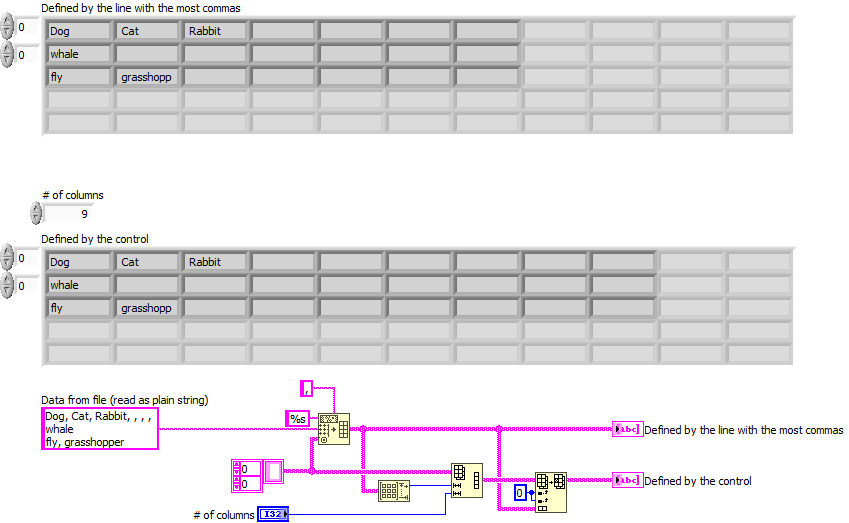
("read from spreadsheet file (string)" replaces the "spreadsheet string to array" in the image code)
09-20-2017 02:49 PM
- Mark as New
- Bookmark
- Subscribe
- Mute
- Subscribe to RSS Feed
- Permalink
- Report to a Moderator
Hi Altenbach,
Thanks very much for illustrating that example, it was spot on for what I want to achieve.
I attached another example VI for others to check out in case they have a similar problem.
Many Thanks
altenbach
09-20-2017 03:03 PM
- Mark as New
- Bookmark
- Subscribe
- Mute
- Subscribe to RSS Feed
- Permalink
- Report to a Moderator
@neunited wrote:
I attached another example VI for others to check out in case they have a similar problem.
That is not really useful unless you also give us a datafile. Still seems very convoluted.
