- Subscribe to RSS Feed
- Mark Topic as New
- Mark Topic as Read
- Float this Topic for Current User
- Bookmark
- Subscribe
- Mute
- Printer Friendly Page
Incorrect timestamp control value
Solved!
 SoulReaver
02-27-2013 02:26 AM
- Mark as New
- Bookmark
- Subscribe
- Mute
- Subscribe to RSS Feed
- Permalink
- Report to a Moderator
After placing Timestamp control on my panel, I've changed it's properties to display only time, as I don't need date part.
Value shown on this control is, as expected, 00:00:00, but if I press up button I get 01:00:01, 01:00:02, ..., or if I press down button, I get 00:59:59, 00:59:58 and so on. If I write 01:00:00 inside a text box of the control, it automatically switches back to 00:00:00. If I change timestamp value to double, I get 0 for 00:00:00, -1 for 00:59:59, and 1 for 1:00:01.
So it seems as if this control uses 01:00:00 as a base time. Inside it's properties I've found minimum value of 01:00:00,000 1600-01-01. Changing it to 00:00:00 doesn't give expected result.
Is there any way for this control to work properly as a normal time span control ?
Solved! Go to Solution.

 Ranjeet_Singh
02-27-2013 02:42 AM
- Mark as New
- Bookmark
- Subscribe
- Mute
- Subscribe to RSS Feed
- Permalink
- Report to a Moderator
I dont think so, becasue i am getting proper values. What time zone you are using ?
See the attachment
Kudos are always welcome if you got solution to some extent.
I need my difficulties because they are necessary to enjoy my success.
--Ranjeet
02-27-2013 03:03 AM - edited 02-27-2013 03:17 AM
- Mark as New
- Bookmark
- Subscribe
- Mute
- Subscribe to RSS Feed
- Permalink
- Report to a Moderator
I am in +1 timezone. I didn't write about it, but I've already tried switching timezone, with no result.
As an attachment, I am posting simple example, that is also shown on a picture below. Set of 3 controls shows result of new control put on a panel, that wasn't touched and 2 other controls with pressed buttons, up or down. As you can see, walue of 00:00:00,000 (this time I didn't remove date time and the fraction part) in the background equals to 01:00:00.
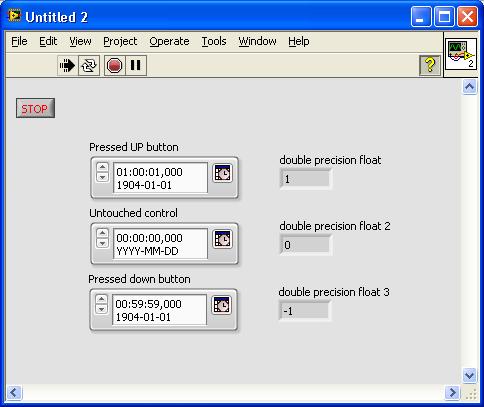

Edit:
I've found a solution, that will work for me on Stack Overflow.
I'll use numeric control with display format of relative time.
Ranjeet_Singh
02-27-2013 03:17 AM
- Mark as New
- Bookmark
- Subscribe
- Mute
- Subscribe to RSS Feed
- Permalink
- Report to a Moderator
What is your requirment ?
for me outputs are different as ofcoursre becasue of time zone difference
I think for 1 you want 00:00:01 right ?
Try this one. Enter 00:00:01 and run..
Let me know friend
Kudos are always welcome if you got solution to some extent.
I need my difficulties because they are necessary to enjoy my success.
--Ranjeet
02-27-2013 03:27 AM
- Mark as New
- Bookmark
- Subscribe
- Mute
- Subscribe to RSS Feed
- Permalink
- Report to a Moderator
Your example hasn't changed how the control work. Yes, if I put 00:00:00 or 00:00:00,000 into text field, pressing up will give me 00:00:01 but only until I don't reach value of 01:00:00.
Anyway, as I wrote above, I've found solution that satisfies me.
