- Subscribe to RSS Feed
- Mark Topic as New
- Mark Topic as Read
- Float this Topic for Current User
- Bookmark
- Subscribe
- Mute
- Printer Friendly Page
I want to append a row in each iteration to the excel file, please advise how can i do that?
Solved!
 Armik96
06-29-2017 09:16 PM
- Mark as New
- Bookmark
- Subscribe
- Mute
- Subscribe to RSS Feed
- Permalink
- Report to a Moderator
Hello,
I want to append a row of data to the end of the same excel sheet in each "for loop" iteration to and have the "row name" increasing each time( for example row1, row 2) how can i do that?
I use the append table to the row but it keeps replacing the last date in the row.
Thanks
Solved! Go to Solution.

 cbutcher

06-29-2017 09:36 PM
- Mark as New
- Bookmark
- Subscribe
- Mute
- Subscribe to RSS Feed
- Permalink
- Report to a Moderator
Can you show your existing code?
Also, do you mean an actual Excel sheet, or a simple CSV file?
Formatting the row name should be fairly straightforward - if this is the only thing happening in the loop just take the 'i' value and use Format to String. If you have a case structure and not every iteration leads to a write, then use a Shift Register and increment the value when you write it.
cbutcher
06-29-2017 09:54 PM
- Mark as New
- Bookmark
- Subscribe
- Mute
- Subscribe to RSS Feed
- Permalink
- Report to a Moderator
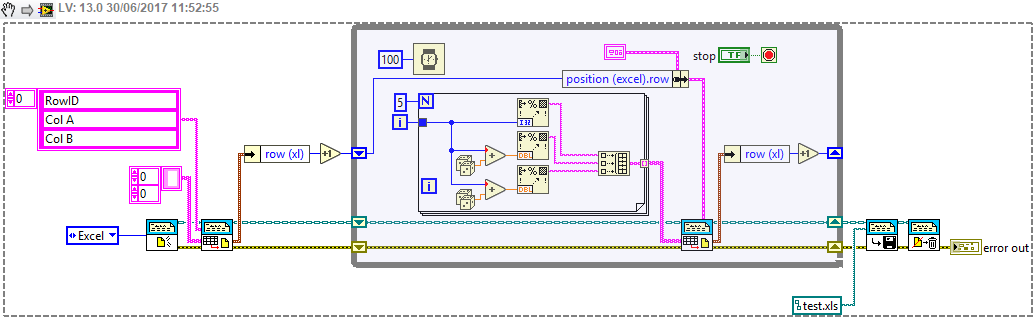
Actually, here's some code that I think does what you want.
Note that the row returned is the last row written, you need to increment it to avoid overwriting (which might have been your original problem)
06-30-2017 10:50 AM
- Mark as New
- Bookmark
- Subscribe
- Mute
- Subscribe to RSS Feed
- Permalink
- Report to a Moderator
Thanks for your help i think it could help. can you upload your code ?
cbutcher
06-30-2017 11:54 AM
- Mark as New
- Bookmark
- Subscribe
- Mute
- Subscribe to RSS Feed
- Permalink
- Report to a Moderator
It's a VI Snippet (see the version in the top left). You can drag it onto a block diagram from the browser or your harddrive. You can't copy and paste it though - then it just pastes a picture.
