- Subscribe to RSS Feed
- Mark Topic as New
- Mark Topic as Read
- Float this Topic for Current User
- Bookmark
- Subscribe
- Mute
- Printer Friendly Page
How to use matlab codes in a stand alone application without matlab license?

 amir_zargar@hot
11-24-2006 11:08 AM
- Mark as New
- Bookmark
- Subscribe
- Mute
- Subscribe to RSS Feed
- Permalink
- Report to a Moderator

 TiTou
TiTou
11-24-2006 11:38 AM - edited 11-24-2006 11:38 AM
- Mark as New
- Bookmark
- Subscribe
- Mute
- Subscribe to RSS Feed
- Permalink
- Report to a Moderator
There is a MatLab script node in the LabVIEW function palette (see screenshot of the help topic) but as you can see this structure is not in the "Base LabVIEW", you might need to purchase the FDS (Full Developpment System) or the PDS (Professionnal Developpment System) of LabVIEW...
Do you know which one you have ?
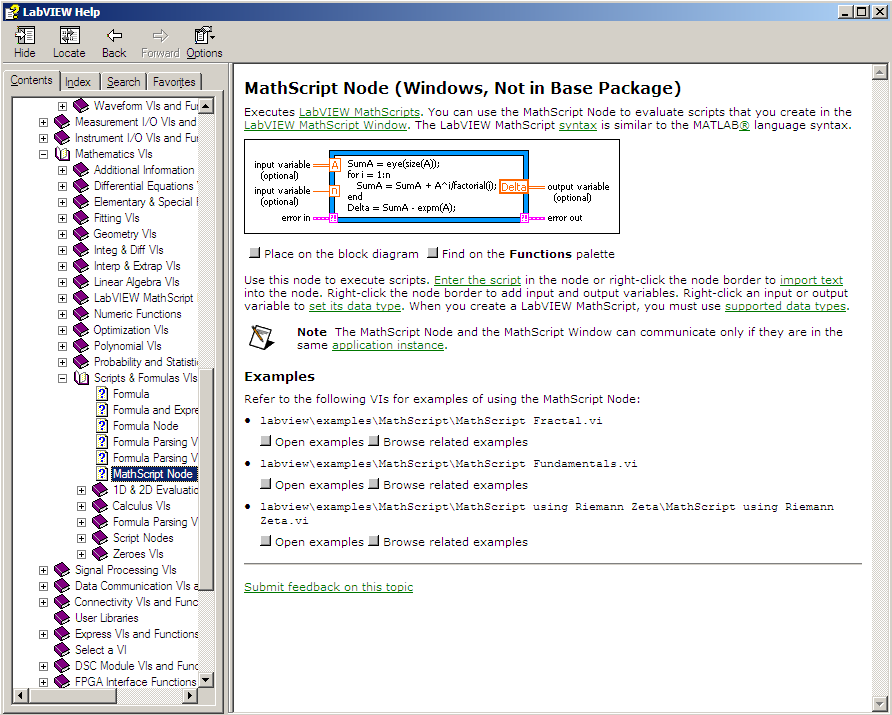
Hope this helps 😉
Message Edité par TiTou le 11-24-2006 06:38 PM
We have two ears and one mouth so that we can listen twice as much as we speak.
Epictetus

11-24-2006 01:11 PM
- Mark as New
- Bookmark
- Subscribe
- Mute
- Subscribe to RSS Feed
- Permalink
- Report to a Moderator
Hi, agian
so thanks, but i read somewhere in forum that mathscript is not working in run-time application, then i think i have to use really matlab and not machscript.

 Barp
Barp
11-27-2006 07:53 AM
- Mark as New
- Bookmark
- Subscribe
- Mute
- Subscribe to RSS Feed
- Permalink
- Report to a Moderator
11-29-2006 06:54 PM
- Mark as New
- Bookmark
- Subscribe
- Mute
- Subscribe to RSS Feed
- Permalink
- Report to a Moderator
Thank you Barp
today, i got V8.2, but now the problem is that i can't call my mathscript external functions (which i built by myself and saved them as *.m) because the runtime engine can not recognize the command "addpath", then does it mean that i have to forget the external functions?
thanks again
Amir

11-30-2006 10:49 AM
- Mark as New
- Bookmark
- Subscribe
- Mute
- Subscribe to RSS Feed
- Permalink
- Report to a Moderator
I found some information that may help this issue. See if the following info resolves your situation:
"The problem is that although you can save your function or script anywhere on your computer, the software by default only looks in the following folder:
C:\Documents and Settings\....\My Documents\LabVIEW Data
You should go in and physically specify the MathScript software to look into the directory where you saved your .m function or script. This can be done by selecting the MathScript Preferences from the File Menu in MathScript. The "path" section in the middle of the window specifies all of the directories where the MathScript software queries for functions and .m files. You can also change the default working directory in the section at the bottom of the window.
There is also a function, addpath, that can be used to add the path of a .m file. The syntax is as following:
addpath('path to file')
For more information on the addpath function, type "help addpath" into the command window of MathScript."Account Manager
National Instruments
11-30-2006 12:39 PM
- Mark as New
- Bookmark
- Subscribe
- Mute
- Subscribe to RSS Feed
- Permalink
- Report to a Moderator
12-01-2006 01:50 PM
- Mark as New
- Bookmark
- Subscribe
- Mute
- Subscribe to RSS Feed
- Permalink
- Report to a Moderator
User-defined functions ARE supported in the run-time engine. But as you discovered, the addpath function is not supported. For a list of all such functions, see the LabVIEW help topic "MathScript Functions Not Supported in the LabVIEW Run-Time Engine." However, it is not necessary to use the addpath function in order to call your user-defined function from a built executable. When building an executable that uses additional .m files you have written, simply add them to your project. When configuring the build specification, make sure to select "Enable MathScript support" in the Advanced settings. Remove any unsupported commands from the MathScript node (e.g. addpath) and build the executable. It should work correctly. By adding the .m files to the project, the application builder knows to include the appropriate compiled code with the application and to properly configure MathScript to find the compiled code in the executable.
For more information about MathScript, visit the MathScript forum.
Grant M.
Staff Software Engineer | LabVIEW Math & Signal Processing | National Instruments
