- Subscribe to RSS Feed
- Mark Topic as New
- Mark Topic as Read
- Float this Topic for Current User
- Bookmark
- Subscribe
- Mute
- Printer Friendly Page
- « Previous
- Next »
How to implement a button function to trigger several buttons
Solved!

08-31-2012 12:49 PM
- Mark as New
- Bookmark
- Subscribe
- Mute
- Subscribe to RSS Feed
- Permalink
- Report to a Moderator
@Ben wrote:
@bhl3302 wrote:
Hi Ben,
I am not quite sure about how to use property node "Value" of "read all" to read the other buttons and return T/F, could you tell me more detail about it?
It appears that read all has mechanical action set for "latch when..."
Ben
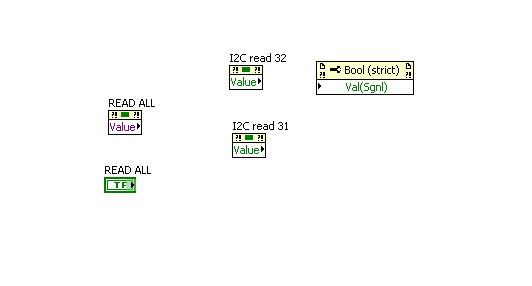
Hi Ben, I have changed the mechanical action set to "swicth when presses", then what should I do in the next setp? Thank you!

 Ben
Ben

08-31-2012 01:25 PM
- Mark as New
- Bookmark
- Subscribe
- Mute
- Subscribe to RSS Feed
- Permalink
- Report to a Moderator
@bhl3302 wrote:
...Hi Ben, I have changed the mechanical action set to "swicth when presses", then what should I do in the next setp? Thank you!
.... try something?
if you run into trouble post images of what you tried and what happened.
Ben
08-31-2012 01:38 PM
- Mark as New
- Bookmark
- Subscribe
- Mute
- Subscribe to RSS Feed
- Permalink
- Report to a Moderator
Hi Ben, I am using two methods in approching this but cannot make it.
(method 1) is like this, I changed "read all" to mechanical action "swicthing when pressed" and make the block diagram like this in a event case.

(method 2) is what you told me, use the property node "value" of "read all" button, but I do not know how to use this property node to read the other "read" button and return the T/F, could you teach me about this?
Ben
08-31-2012 01:46 PM
- Mark as New
- Bookmark
- Subscribe
- Mute
- Subscribe to RSS Feed
- Permalink
- Report to a Moderator
I will try to teach yo uhow to teach yourself.
Years ago when I was a wee-G-Babe one of my G-Daddies told me;
"Ben if you ever have to figure out how something works do a 'ctrl-n' "
Ctrl-n is the short-cut for "New VI".
So try creating a new VI and duplicate the code you are trying to figure out. Turn on execution highlighting (turn on the light bulb) and watch your code run. If you don't like what you see change it until you figure out what you need.
Again, if you try it out and still do not understand what is going on ask away.
Ben

 crossrulz
08-31-2012 02:08 PM - edited 08-31-2012 02:09 PM
- Mark as New
- Bookmark
- Subscribe
- Mute
- Subscribe to RSS Feed
- Permalink
- Report to a Moderator
I'm pretty sure you want to keep your READ ALL set to "Latch when Released". What Ben was telling you to do earlier was to read the other button's state and then write that value to their respective Value (Signaling).
Personally, I'd make a reference to each of the buttons you are trying to signal, build it into an array, and use a FOR loop.

There are only two ways to tell somebody thanks: Kudos and Marked Solutions
Unofficial Forum Rules and Guidelines
"Not that we are sufficient in ourselves to claim anything as coming from us, but our sufficiency is from God" - 2 Corinthians 3:5

 GregFreeman
08-31-2012 05:22 PM - edited 08-31-2012 05:25 PM
- Mark as New
- Bookmark
- Subscribe
- Mute
- Subscribe to RSS Feed
- Permalink
- Report to a Moderator
If you want one master button that does a read all, but you still want the other buttons available for their individual reads why not have a queued state machine, one state for each button press? Then, if you press the "master button" go through all the states for each button. If you press an individual button, just call that buttons state.
- « Previous
- Next »
