ni.com is currently undergoing scheduled maintenance.
Some services may be unavailable at this time. Please contact us for help or try again later.
- Subscribe to RSS Feed
- Mark Topic as New
- Mark Topic as Read
- Float this Topic for Current User
- Bookmark
- Subscribe
- Mute
- Printer Friendly Page
How to enable HS488

 Tom2372
06-19-2023 02:10 PM
- Mark as New
- Bookmark
- Subscribe
- Mute
- Subscribe to RSS Feed
- Permalink
- Report to a Moderator
Hello, may I ask how to enable HS488 to allow high-speed communication between PCIe-GPIB card and HS488 compatible instrument?
I learned that I should set a non-zero cable length in NI MAX. Is there something else I should do in LabVIEW, which I am using for programming?
Thank you.

 Bob_Schor

06-19-2023 02:59 PM
- Mark as New
- Bookmark
- Subscribe
- Mute
- Subscribe to RSS Feed
- Permalink
- Report to a Moderator
I suggest you search the Web with "HS488 LabVIEW" and take a look at the "hits" you get. You could also open MAX, expand "Devices and Interfaces" and "Software" and attach a screen shot so we can "see what you have". What version (year and 32/64 bittedness) of LabVIEW are you running? Have you tried running a Test Panel on the HS488 device and seeing whether you can get a response from the device?
Do you have a manual for the device you are trying to see? Can you attach a copy for us to see?
Bob Schor
07-18-2023 12:19 AM
- Mark as New
- Bookmark
- Subscribe
- Mute
- Subscribe to RSS Feed
- Permalink
- Report to a Moderator
Thanks, Bob.
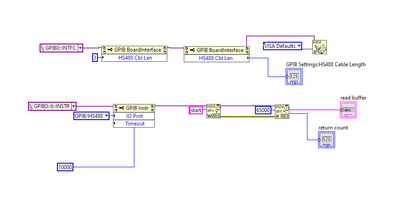
I am trying to use TNT4882-BQ chip to enable an HS488 communication between the host PC and my lab facility. Thus, I have no manual for the instrument now, and I am drafting it. 🙂
But the NI MAX was very helpful and I have figured out how to set the HS488 in LabVIEW. Just in case someone else wants to try, I attached my setting for the test. The handshake captured by a logic analyzer is also attached.