- Subscribe to RSS Feed
- Mark Topic as New
- Mark Topic as Read
- Float this Topic for Current User
- Bookmark
- Subscribe
- Mute
- Printer Friendly Page
How to Download Files from http?
Solved!
 hyzgbt
10-11-2019 03:50 AM
- Mark as New
- Bookmark
- Subscribe
- Mute
- Subscribe to RSS Feed
- Permalink
- Report to a Moderator
Solved! Go to Solution.

 cbutcher

10-11-2019
04:20 AM
- last edited on
11-06-2024
04:13 PM
by
 Content Cleaner
- Mark as New
- Bookmark
- Subscribe
- Mute
- Subscribe to RSS Feed
- Permalink
- Report to a Moderator
If you have a URL for a file you want to download, you can use the HTTP Client VIs to GET that resource.
Alternatives could include using "wget" or "curl" or similar from a command line using the System Exec node (but these are more brittle, and so should be a second choice).
10-11-2019 04:24 AM
- Mark as New
- Bookmark
- Subscribe
- Mute
- Subscribe to RSS Feed
- Permalink
- Report to a Moderator
how about use ''simple get'' from ''webDAV''?Thanks
cbutcher
10-11-2019 04:40 AM - edited 10-11-2019 04:48 AM
- Mark as New
- Bookmark
- Subscribe
- Mute
- Subscribe to RSS Feed
- Permalink
- Report to a Moderator
@hyzgbt wrote:
how about use ''simple get'' from ''webDAV''?Thanks
Yes, you could use those too. I found the palette you meant now. However, when I tried to replace the example below with the webDAV code, I was told that redirection was refused. So as in the case below, be careful for URLs that redirect you somewhere else...
Here's an example using the client VIs. I picked the target by random repository on GitHub, then going to releases.
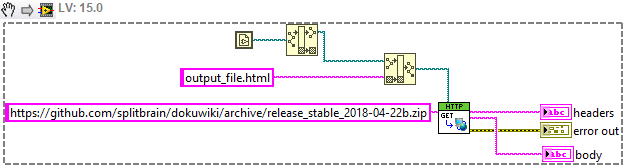
Interestingly, the file that comes out (output_file.html) just tells you you're being redirected to some other page to download it, so you don't really download the zip with this code...
Hopefully you have a real URL that you can GET.
10-11-2019 04:48 AM
- Mark as New
- Bookmark
- Subscribe
- Mute
- Subscribe to RSS Feed
- Permalink
- Report to a Moderator
Thank you very much!I will try it later
10-11-2019 06:56 AM
- Mark as New
- Bookmark
- Subscribe
- Mute
- Subscribe to RSS Feed
- Permalink
- Report to a Moderator
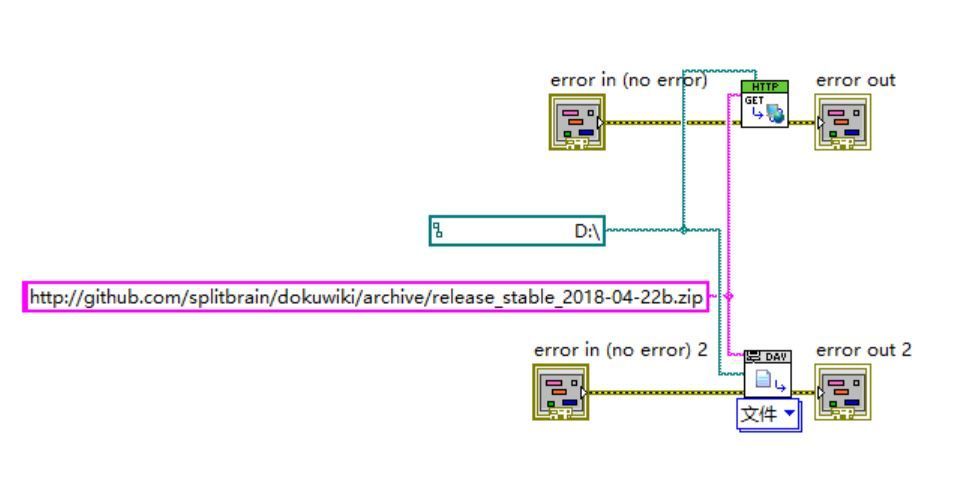
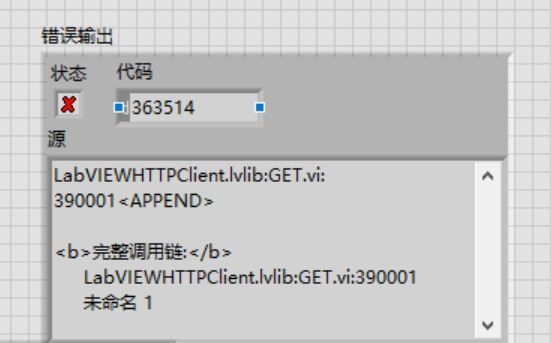
As picture,It have error when I used those,can you help me solve it?.After my customer send the url to me,I try it again.Thanks your help.
Best Regards
cbutcher
10-11-2019 09:37 AM
- Mark as New
- Bookmark
- Subscribe
- Mute
- Subscribe to RSS Feed
- Permalink
- Report to a Moderator
You have wired "D:\" as your path to a file. I suspect the error supports this conclusion, but I confess I can't accurately read it.
You need to give a filename, not a directory.
