- Subscribe to RSS Feed
- Mark Topic as New
- Mark Topic as Read
- Float this Topic for Current User
- Bookmark
- Subscribe
- Mute
- Printer Friendly Page
Highlighted Text Button Bug with NXG Style Controls in Current Gen LabVIEW 64-bit
Solved!
 croohcifer
06-04-2019 11:01 AM - edited 06-04-2019 11:02 AM
- Mark as New
- Bookmark
- Subscribe
- Mute
- Subscribe to RSS Feed
- Permalink
- Report to a Moderator
I'm using LabVIEW 2018 64-bit and started playing with the NXG controls. When you mouse over a Text Button, the NXG control highlights. When you then click the button, it retains that highlighted color (different than the ON state color). This does not happen when I use a Modern Style Text Button. See the attached example and the screenshots below.
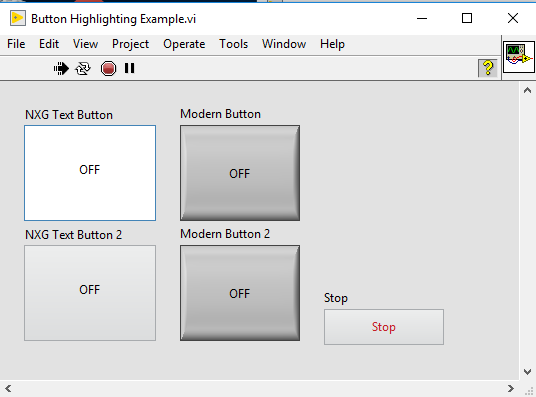
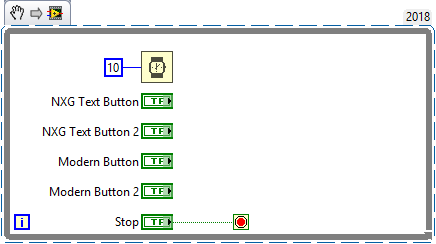
All buttons have the same mechanical action (latch when released). To get the front panel in the state shown, simply run the VI and then click the top two buttons in any order. Note that the NXG Text Button retains a highlighted color while the Modern Button does not. If you click both NXG buttons, both remain highlighted. To set the buttons back to normal color, you can resize the front panel window while it's running or tab through the controls. This does not happen in 32-bit LabVIEW 2018. I haven't tested other versions.
Solved! Go to Solution.
06-04-2019 11:07 AM
- Mark as New
- Bookmark
- Subscribe
- Mute
- Subscribe to RSS Feed
- Permalink
- Report to a Moderator
I've updated CAR 736213 on this issue with additional details, this also reproduces for me in LV 2019 64-bit, and doesn't affect 32-bit (as you noted).
Interestingly, if you resize the LV window the color goes back to what it should be.
06-04-2019 11:20 AM
- Mark as New
- Bookmark
- Subscribe
- Mute
- Subscribe to RSS Feed
- Permalink
- Report to a Moderator
Thanks, Craig! Glad to hear NI is already tracking this.

 eliasarnold
08-28-2019 08:30 AM
- Mark as New
- Bookmark
- Subscribe
- Mute
- Subscribe to RSS Feed
- Permalink
- Report to a Moderator
Hello,
just updated LabVIEW to LabVIEW 2019 (64-bit) and ran into the same issue. Is there already a solution or a reasonable workaround for this?
Would be quite nice.
Elias
 plus1etal
10-14-2019 03:30 PM
- Mark as New
- Bookmark
- Subscribe
- Mute
- Subscribe to RSS Feed
- Permalink
- Report to a Moderator
I found a workaround to this issue, if anyone is still dealing with it.
I noticed that when you try to "customize" an NXG button, there are 6 picture items instead of 4. The two extra items are just white, which I think is where the highlighting comes from. If you replace these last two items with the first two picture items (copy the first two items to the clipboard, then past from clipboard at same size for the last two items) then the button behaves as intended.
I attached an NXG button that has been modified this way.
eliasarnold
10-15-2019 03:22 AM
- Mark as New
- Bookmark
- Subscribe
- Mute
- Subscribe to RSS Feed
- Permalink
- Report to a Moderator
Thank you so much, this works pretty well!
 KiwiWires
05-05-2020 09:53 PM
- Mark as New
- Bookmark
- Subscribe
- Mute
- Subscribe to RSS Feed
- Permalink
- Report to a Moderator
Note: This bug also applies to the NXG checkbox.
Replacing the images worked for me too.
