- Subscribe to RSS Feed
- Mark Topic as New
- Mark Topic as Read
- Float this Topic for Current User
- Bookmark
- Subscribe
- Mute
- Printer Friendly Page
Hide items in Case Structure
Solved!
 jamison.suade
01-02-2015 03:50 AM
- Mark as New
- Bookmark
- Subscribe
- Mute
- Subscribe to RSS Feed
- Permalink
- Report to a Moderator
How can i hide the control indicators if not selected in the radio button. In the vi below, i want to hide the control indicators, difference, product, and quotient when i select addition in the radio button.
I want that only one control indicator displays while selecting a specific operation. When i press Addition,only,the Sum indicator must show up, while all the rest are hidden.
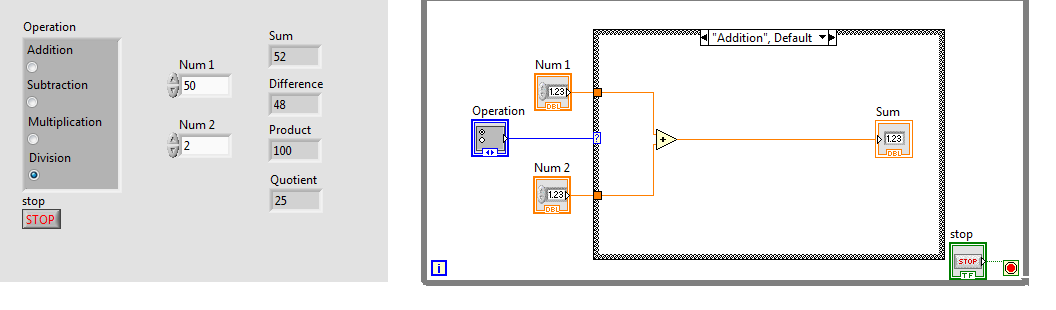
Solved! Go to Solution.

 P@Anand
01-02-2015 04:14 AM
- Mark as New
- Bookmark
- Subscribe
- Mute
- Subscribe to RSS Feed
- Permalink
- Report to a Moderator
Check the Control/Indicator's Property node "Visible". Wiring False/True to the input terminal makes the Control/Indicator Hide/Unhide.
The best solution is the one you find it by yourself
01-02-2015 04:56 AM
- Mark as New
- Bookmark
- Subscribe
- Mute
- Subscribe to RSS Feed
- Permalink
- Report to a Moderator
i didnt get your point, still finding a hard time
P@Anand
01-02-2015 05:04 AM
- Mark as New
- Bookmark
- Subscribe
- Mute
- Subscribe to RSS Feed
- Permalink
- Report to a Moderator
Right click the control>Create>Property Node>Visible. Drop this node and wire False to it and execute.
The best solution is the one you find it by yourself

 Vij@y
Vij@y
01-02-2015 05:17 AM
- Mark as New
- Bookmark
- Subscribe
- Mute
- Subscribe to RSS Feed
- Permalink
- Report to a Moderator
Hi gjjude,
Probably you might be seeking for this solution. Check the attached VI.
P@Anand
01-02-2015 05:24 AM
- Mark as New
- Bookmark
- Subscribe
- Mute
- Subscribe to RSS Feed
- Permalink
- Report to a Moderator
Vij@y wrote:
Hi gjjude,
Probably you might be seeking for this solution. Check the attached VI.
Additionally you could have done it in an Event structure.
The best solution is the one you find it by yourself
Vij@y
01-02-2015 05:32 AM
- Mark as New
- Bookmark
- Subscribe
- Mute
- Subscribe to RSS Feed
- Permalink
- Report to a Moderator
01-02-2015 05:37 AM
- Mark as New
- Bookmark
- Subscribe
- Mute
- Subscribe to RSS Feed
- Permalink
- Report to a Moderator
i cant see the attached VI
Vij@y wrote:
P@Anand wrote:
Vij@y wrote:
Hi gjjude,
Probably you might be seeking for this solution. Check the attached VI.
Additionally you could have done it in an Event structure.
Exactly ! But I just want him to learn on his way and then thought of suggesting Event structure.
01-02-2015 05:38 AM
- Mark as New
- Bookmark
- Subscribe
- Mute
- Subscribe to RSS Feed
- Permalink
- Report to a Moderator
Thanks i now get it
