- Subscribe to RSS Feed
- Mark Topic as New
- Mark Topic as Read
- Float this Topic for Current User
- Bookmark
- Subscribe
- Mute
- Printer Friendly Page
Help, there has to be a more efficient way!

 wyked
wyked
02-27-2007 03:16 PM
- Mark as New
- Bookmark
- Subscribe
- Mute
- Subscribe to RSS Feed
- Permalink
- Report to a Moderator

 Chris_Cilino

02-28-2007 04:26 PM - edited 02-28-2007 04:26 PM
- Mark as New
- Bookmark
- Subscribe
- Mute
- Subscribe to RSS Feed
- Permalink
- Report to a Moderator
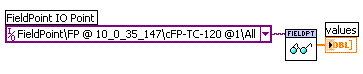
Message Edited by Chris_C. on 02-28-2007 04:26 PM

03-01-2007 06:23 AM
- Mark as New
- Bookmark
- Subscribe
- Mute
- Subscribe to RSS Feed
- Permalink
- Report to a Moderator
Chris_Cilino
03-02-2007 12:35 PM
- Mark as New
- Bookmark
- Subscribe
- Mute
- Subscribe to RSS Feed
- Permalink
- Report to a Moderator
wyked,
I stand corrected. You're right. You can't use the Fieldpoint API on a RT PIX platform. I thought about using shared variables to bind to the all channel might work but I don't see that happening either.... so at this point it looks like you can either use a for loop and change the text for the datasocket read or create a separate datasocket read for each channel of interest.
I found a discussion forum that reinforces these findings titled How to read All FP-Channels via DataSocket?
I think this would be a great suggestion though!
Chris C
03-06-2007 11:20 AM
- Mark as New
- Bookmark
- Subscribe
- Mute
- Subscribe to RSS Feed
- Permalink
- Report to a Moderator
Thanks again Chris, I tried the shared variable approach too and could not bind the variable to all of the channels. I'm concerned about putting the read in a loop to consecutively read all the channels as this would take awhile reading 64 channels and I could easily miss an alarm event while I was reading the rest of the channels. So basically it's sounding like I'm stuck with what I have done already?
Dan
Chris_Cilino
03-07-2007 01:05 PM
- Mark as New
- Bookmark
- Subscribe
- Mute
- Subscribe to RSS Feed
- Permalink
- Report to a Moderator
