- Subscribe to RSS Feed
- Mark Topic as New
- Mark Topic as Read
- Float this Topic for Current User
- Bookmark
- Subscribe
- Mute
- Printer Friendly Page
Help on Discrete Transfer Function Direct VI

 Jahy
Jahy
05-22-2015 06:53 PM
- Mark as New
- Bookmark
- Subscribe
- Mute
- Subscribe to RSS Feed
- Permalink
- Report to a Moderator
I want to make use of Discrete Transfer Function Direct VI of FPGA in my program. In order to make it function correctly, I use the Discrete Transfer Function Direct VI to realize a discrete integrator. The function of continuous integrator is 1/s, while the z-transform of 1/s is z/(z-1). A Discrete FP Transfer Function to TXP was used and the Numerator and Denominator were set to [0 1] and [-1 1], respectively. But the output of Discrete Transfer Function Direct VI is always 0.
I think there would be somthing wrong when I program the Discrete Transfer Function Direct. Can anyone here help me check the problem? Thank you.
Attachments are my program, in which DiscreteTF-RT.vi is RT program, DiscreteTF-FPGA is FPGA program.

05-26-2015 11:20 AM
- Mark as New
- Bookmark
- Subscribe
- Mute
- Subscribe to RSS Feed
- Permalink
- Report to a Moderator
Are you seeing something similar to what I posted? I'm seeing a result of 32,768 for the output of the Discrete Transfer Function Direct VI.
05-27-2015 05:32 PM
- Mark as New
- Bookmark
- Subscribe
- Mute
- Subscribe to RSS Feed
- Permalink
- Report to a Moderator
Thank you, diabeticdaniel. I see the same result of 32,768 for the output of the Discrete Transfer Function Direct VI. What kind of problem can cause this result?

 Gloorious_Leade
05-28-2015 07:25 PM
- Mark as New
- Bookmark
- Subscribe
- Mute
- Subscribe to RSS Feed
- Permalink
- Report to a Moderator
Hi Jahy,
My understanding is that when you run the RT VI, you receive a result of 32,768, and when you run the FPGA VI, you receive a result of 0. Is that correct?
Have you tried pulling the relevant functionality out of the CD & Sim loop to isolate it? Do you see the same result?
Staff Customer Engineer - CTA, CLD
05-29-2015 11:31 AM
- Mark as New
- Bookmark
- Subscribe
- Mute
- Subscribe to RSS Feed
- Permalink
- Report to a Moderator
Hi, Gloorious_Leader.
Thank you for your reply. I try to move the H(z) and its input out of CD&Sim loop, but the same result appeared.
I run the FPGA vi first, all the results are 0; then I run the RT vi, FPGA program can get the transfer function information from RT, the output of Discrete Transfer Function Direct in FPGA is still 0. but when I change the input from 0 to 1 in RT front panel, the outputDiscrete become 32768 immediately; while the outputContinuous is good.
Do you know what's wrong?
06-04-2015 11:44 PM
- Mark as New
- Bookmark
- Subscribe
- Mute
- Subscribe to RSS Feed
- Permalink
- Report to a Moderator
Anybody here can help me deal with this problem?
Gloorious_Leade06-05-2015 07:32 PM
- Mark as New
- Bookmark
- Subscribe
- Mute
- Subscribe to RSS Feed
- Permalink
- Report to a Moderator
Jahy,
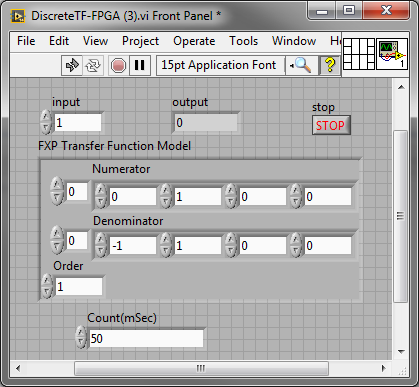
I believe this is expected behavior. The value 32768 is the maximum value of the output. The code is executing so fast it appears to reach this value instantaneously, but it actually doesn't. The FPGA module has an extra input value you might be overlooking. There's the Input control and the FXP Transfer Function Model. To match the values being passed in the RT function, you must set the FXP Transfer Function Model control to Numerator = [0 , 1], Denominator = [-1 , 1], and Order = 1.
This should result in the same output. Try slowing down your loop rate to actually observe the values being updated.
Staff Customer Engineer - CTA, CLD
06-09-2015 06:40 PM
- Mark as New
- Bookmark
- Subscribe
- Mute
- Subscribe to RSS Feed
- Permalink
- Report to a Moderator
Steve, thank you for your reply.
I follow your advice, and add a 'Loop Timer' in the while loop of FPGA, a 'Time Delay' in the Control & Simulation Loop in RT with 0.05s delays. Actually, through adjust the Count input of 'Loop Timer', the output of H(z) could be slowed down. But, it seems that the H(z) output is sensitive to the value of Count input. I try different values for the input, but still can't find the right one.
Do you have any other comments? Can you take a look at my programs, or help me correct my problem? Best wishes.
Gloorious_Leade06-10-2015 05:25 PM
- Mark as New
- Bookmark
- Subscribe
- Mute
- Subscribe to RSS Feed
- Permalink
- Report to a Moderator
I'm not sure I follow. Are you still getting different output values from the FPGA and RT code? Are you using these values in the FPGA code?
Staff Customer Engineer - CTA, CLD
06-12-2015 03:42 PM
- Mark as New
- Bookmark
- Subscribe
- Mute
- Subscribe to RSS Feed
- Permalink
- Report to a Moderator
Yes, Steve. I use these values.
I just run the FPGS code first, and then run the RT code. In the RT code, I set the values of Transfer Functuion Model. Then the values in FPGA front panel will appear like the one you show.
