ni.com is currently undergoing scheduled maintenance.
Some services may be unavailable at this time. Please contact us for help or try again later.
- Subscribe to RSS Feed
- Mark Topic as New
- Mark Topic as Read
- Float this Topic for Current User
- Bookmark
- Subscribe
- Mute
- Printer Friendly Page
Help controlling 83630B with SCPI Code
Solved!
 peteanater
06-22-2021 12:42 PM
- Mark as New
- Bookmark
- Subscribe
- Mute
- Subscribe to RSS Feed
- Permalink
- Report to a Moderator
Hello,
I'm currently trying to control my Agilent 83630B 10Mhz-26.5 Ghz 8360B Series Swept Signal Generator.
http://anlage.umd.edu/HP83620B_Users_Guide_08360-90127.pdf
I'm using a prologix GPIB to USB converter rev 6.4.1
http://prologix.biz/downloads/PrologixGpibUsbManual-6.0.pdf
I've linked the manuals for both devices.
I'm doing this all through a windows 10 Device. I have tried to connect through the VISA interactive application but I consistently get the "Visa ErrorCode: 0xBFFF0015 (-1073807339)" error or "VISA: (Hex 0xBFFF0015) Timeout expired before operation completed.". I have looked through the troubleshooting guide for that error code but I am confused and don't really know what I'm doing. Firstly I've looked through the manuals I've listed to find some information on baud rate, termination characters but I can't find this information.

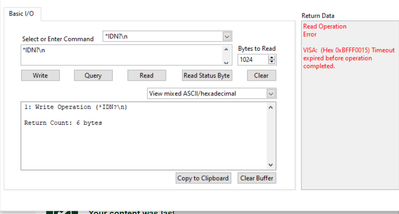
I've tried going through the keysight IO manger and it gives me the same issues. I believe I have installed the correct drivers to my adapter and successfully updated the firmware on the devices as the website recommends. I also believe I have the correct drivers eg NI-VISA and the NI-488 Driver. I'm not sure if I have my particular devices drivers since when I go to this link the drivers are not for windows 10
https://www.keysight.com/us/en/lib/software-detail/driver/vxiplugplay-driver-for-836xx-blseries-swep...
Any help is greatly appreciated.
Also I have gotten a USB connection (non GPIB) to work with a SIGLENT SDS 1104X-E and was able to successfully control that using python if that means anything for this GPIB case.
Solved! Go to Solution.

 RTSLVU
06-22-2021 03:41 PM - edited 06-22-2021 03:41 PM
- Mark as New
- Bookmark
- Subscribe
- Mute
- Subscribe to RSS Feed
- Permalink
- Report to a Moderator
@peteanater wrote:
I'm using a prologix GPIB to USB converter rev 6.4.1
http://prologix.biz/downloads/PrologixGpibUsbManual-6.0.pdf
Just a suggestion but maybe the Prologix USB to GPIB needs the "Tulip Driver" enabled in NI-MAX
=== Engineer Ambiguously ===
========================
06-22-2021 03:45 PM
- Mark as New
- Bookmark
- Subscribe
- Mute
- Subscribe to RSS Feed
- Permalink
- Report to a Moderator
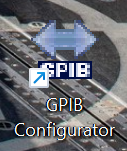
I fixed it! I believe it had to do with the address of the device and I needed to write some code to configure the adapter. I can't remember where I downloaded the GPIB Configurator from but this is what the icon I used looks like. and I'm pretty sure the website was this.http://prologix.biz/resources.html
I set the address to the same as my device and then I typed in the identifier command and it worked. I changed some other settings as well but I think the address was the main thing.
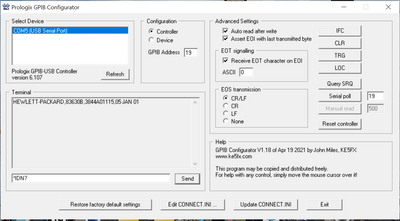
After I typed that in
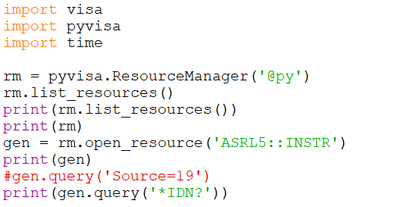
I ran this code on IDLE (A python IDE) and it produced the same results!
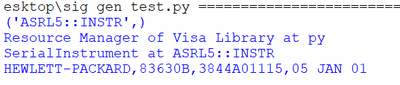
I hope this post will be informative to anyone in the future!
