- Subscribe to RSS Feed
- Mark Topic as New
- Mark Topic as Read
- Float this Topic for Current User
- Bookmark
- Subscribe
- Mute
- Printer Friendly Page
Getting a reference to a specific scrollbar

 GregFreeman

08-13-2020 01:18 PM - edited 08-13-2020 01:27 PM
- Mark as New
- Bookmark
- Subscribe
- Mute
- Subscribe to RSS Feed
- Permalink
- Report to a Moderator
I am able to use a property node in order to get a list of references to all objects on a pane, and then I am able to cast the reference to a scrollbar to find which references are scrollbars. But once I have a reference to the scrollbar, I have been unable to find a property that would tell me if I have a horizontal or vertical scrollbar reference. Is there any property that exists, or something that would help me distinguish them?
Just realized the all objects property on a pane doesn't give me a the scrollbars. So my question now becomes, how do I get a reference to a pane's scrollbar, and how do I tell which direction it is (horizontal/vertical)?
Thanks!

 FireFist-Redhaw
08-13-2020 02:46 PM
- Mark as New
- Bookmark
- Subscribe
- Mute
- Subscribe to RSS Feed
- Permalink
- Report to a Moderator
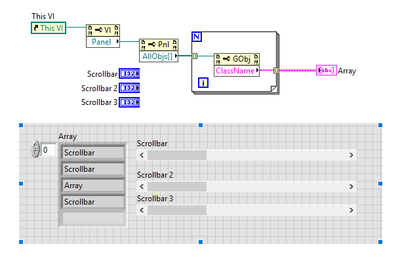
I get the references to the scrollbars using the objects property node, not sure why you aren't...
Saying "Thanks that fixed it" or "Thanks that answers my question" and not giving a Kudo or Marked Solution, is like telling your waiter they did a great job and not leaving a tip. Please, tip your waiters.
 mcduff
08-13-2020 03:57 PM
- Mark as New
- Bookmark
- Subscribe
- Mute
- Subscribe to RSS Feed
- Permalink
- Report to a Moderator
@GregFreeman wrote:
I am able to use a property node in order to get a list of references to all objects on a pane, and then I am able to cast the reference to a scrollbar to find which references are scrollbars. But once I have a reference to the scrollbar, I have been unable to find a property that would tell me if I have a horizontal or vertical scrollbar reference. Is there any property that exists, or something that would help me distinguish them?
Just realized the all objects property on a pane doesn't give me a the scrollbars. So my question now becomes, how do I get a reference to a pane's scrollbar, and how do I tell which direction it is (horizontal/vertical)?
Thanks!
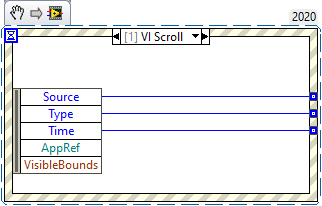
The event VI Scroll gives you an "AppRef" Refnum. There is an extensive amount of choices within that menu, but I don't think what you are looking for is in there. This may be another case where you need to roll your own scroll bars.
mcduff
FireFist-Redhaw08-13-2020 04:16 PM
- Mark as New
- Bookmark
- Subscribe
- Mute
- Subscribe to RSS Feed
- Permalink
- Report to a Moderator
If what you want is references to the two scrollbars that are part of the pane's window, I don't believe that is possible. As far as how to determine if a scrollbar is vertical or horizontal, use the Bounds property and compare the height and width. Unless something really weird is going on, a vertical scrollbar will have height >> width and vice versa for a horizontal scrollbar.
Saying "Thanks that fixed it" or "Thanks that answers my question" and not giving a Kudo or Marked Solution, is like telling your waiter they did a great job and not leaving a tip. Please, tip your waiters.
08-20-2020 06:54 PM
- Mark as New
- Bookmark
- Subscribe
- Mute
- Subscribe to RSS Feed
- Permalink
- Report to a Moderator
Yeah I was trying to get the built in scrollbars but I think I may actually not need them for the problem I was trying to solve. Would be good to know though either way
