ni.com is currently undergoing scheduled maintenance.
Some services may be unavailable at this time. Please contact us for help or try again later.
- Subscribe to RSS Feed
- Mark Topic as New
- Mark Topic as Read
- Float this Topic for Current User
- Bookmark
- Subscribe
- Mute
- Printer Friendly Page
Generate analog waveform based on data file
Solved!
 Need4Speed
11-29-2011 11:19 AM
- Mark as New
- Bookmark
- Subscribe
- Mute
- Subscribe to RSS Feed
- Permalink
- Report to a Moderator
I want to create an analog voltage output that follows a data file that I have(excel, csv, text(what ever is easiest)). The data file creates a waveform with equal time interval between steps (dT = .0034 sec). After the output steps through all the data points I want it to repeat continuously.
What is the best way to create the waveform from a data file?
Solved! Go to Solution.

 Dennis_Knutson
11-29-2011 12:41 PM
- Mark as New
- Bookmark
- Subscribe
- Mute
- Subscribe to RSS Feed
- Permalink
- Report to a Moderator
To create a waveform data type, calculate the dt by subtracting two values in column 1 and get the Y array from column 2. If you save the file as a comma separated or tab separated text file, then you can use the Read From Spreadsheet File. After getting a 2D array, you would use the index array and array subset functions.
Assuming you are going to use an NI DAQ card to output the signal, you can pass a waveform data type to a DAQmx Write and set it for confinuous generation.
11-30-2011 05:27 PM
- Mark as New
- Bookmark
- Subscribe
- Mute
- Subscribe to RSS Feed
- Permalink
- Report to a Moderator
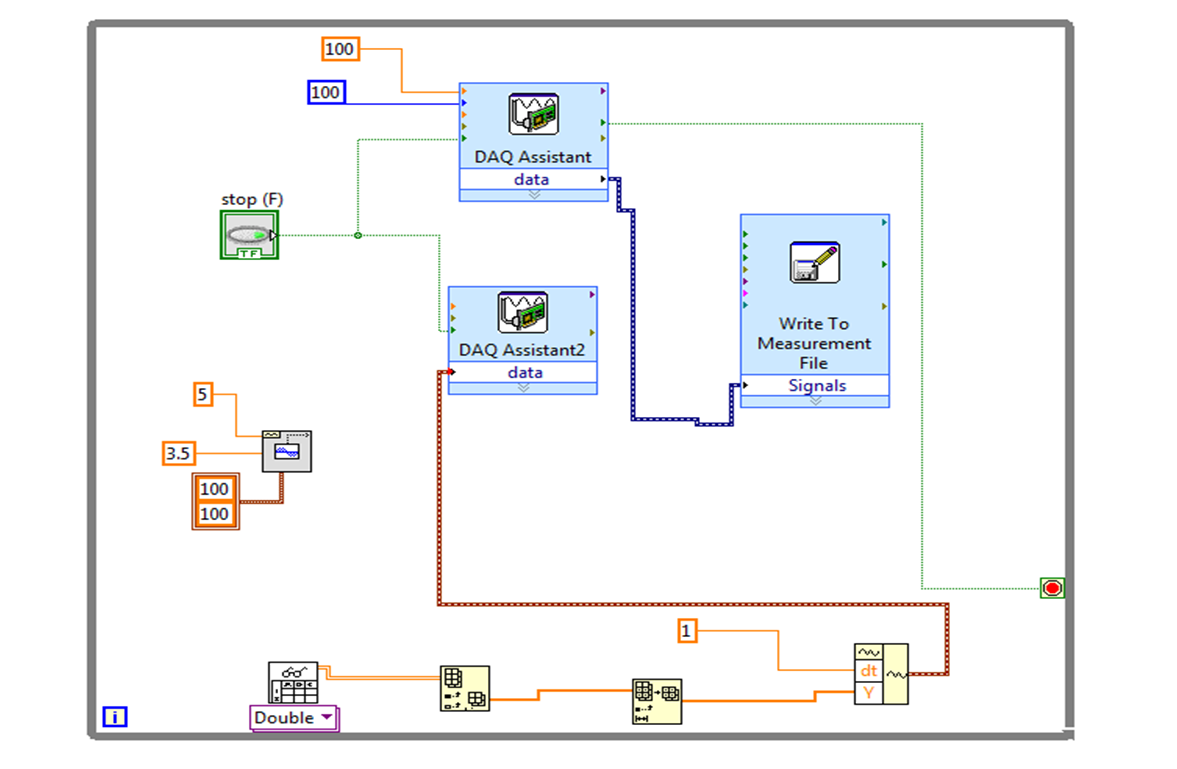
Dennis - This is what I setup as a small test file. I am reading voltage data on 5 channels and outputting a wave on one channel. I was using a sine form generator to prove my program and oscilloscope was working. I started to load read the spreadsheet and turn the array into an input for my waveform generator when I got lost. I do not understand the arrays in labview. I can only seem to get the first value of my CSV spreadsheet to appear. I simplified it to make my time interval a constant and just need to load the Y data and get it to repeat continuously.
Can you help me out?

12-01-2011 02:36 PM - edited 12-01-2011 02:37 PM
- Mark as New
- Bookmark
- Subscribe
- Mute
- Subscribe to RSS Feed
- Permalink
- Report to a Moderator
You seem to have a lot of things going on in that VI at once. I have simplified down an example to show how to output a wave continuously from a spreadsheet. Basically all the example does is remove a lot of code from the loop, so that you are not re-reading the data every time, rather, you read the data, then use what is loaded into memory each time.
Ryan
National Instruments
 db0101
01-04-2012 03:03 PM
- Mark as New
- Bookmark
- Subscribe
- Mute
- Subscribe to RSS Feed
- Permalink
- Report to a Moderator
Could you post the VI compatible with version 2010?
Thanks.
01-04-2012 03:10 PM
- Mark as New
- Bookmark
- Subscribe
- Mute
- Subscribe to RSS Feed
- Permalink
- Report to a Moderator
I actually ended up doing something slightly different. I dont have my laptop so i cant convert it but you can find a convsation request post and get someone too.
db0101
01-04-2012 03:56 PM
- Mark as New
- Bookmark
- Subscribe
- Mute
- Subscribe to RSS Feed
- Permalink
- Report to a Moderator
Can you post screen shots of your VI? - Thanks.
01-04-2012 06:05 PM
- Mark as New
- Bookmark
- Subscribe
- Mute
- Subscribe to RSS Feed
- Permalink
- Report to a Moderator
I dont have my laptop so i can't even open it right now. This board should be able to help you.
01-04-2012 06:24 PM
- Mark as New
- Bookmark
- Subscribe
- Mute
- Subscribe to RSS Feed
- Permalink
- Report to a Moderator
Need 4 Speed, here are the two VIs. I did have a broken arrow in the example, but the gist is there. The other VI would not save in a previous version, so I attatched a screenshot. All its doing is creating a task, so you should be able to reproduce this without too much trouble.
Let us know if you need more help!
National Instruments

 Nastaran3301ge
06-28-2017 03:28 PM
- Mark as New
- Bookmark
- Subscribe
- Mute
- Subscribe to RSS Feed
- Permalink
- Report to a Moderator
Hi could you please explain more what does this program do? When I run it in Lab-view, there is no graph or indicator in control panel .
