- Subscribe to RSS Feed
- Mark Topic as New
- Mark Topic as Read
- Float this Topic for Current User
- Bookmark
- Subscribe
- Mute
- Printer Friendly Page
Formula node
Solved!
 malkowki
08-28-2019 05:12 AM
- Mark as New
- Bookmark
- Subscribe
- Mute
- Subscribe to RSS Feed
- Permalink
- Report to a Moderator
Dear ,
I would like to use formula node to build a function that does the following:
y=16 + (x and1)*16 + log2[(x and1)*(2x-65535)+(65535-x)]
In Exel is quite straight forward as in the attachment.
any help how to translate it into Labview Formula node?
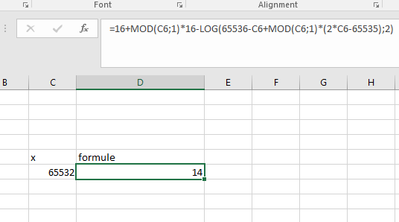
Solved! Go to Solution.

 GerdW
GerdW

08-28-2019 06:13 AM
- Mark as New
- Bookmark
- Subscribe
- Mute
- Subscribe to RSS Feed
- Permalink
- Report to a Moderator
Hi malkowki,
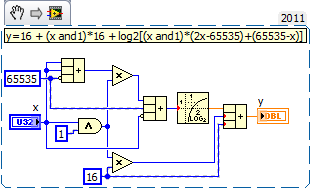
Like this?
Is "AND 1" the same as "MOD 1"? (My Excel doesn't know about MOD()…)
GerdW
using LV2016/2019/2021 on Win10/11+cRIO, TestStand2016/2019

 alexderjuengere
08-28-2019 08:10 AM
- Mark as New
- Bookmark
- Subscribe
- Mute
- Subscribe to RSS Feed
- Permalink
- Report to a Moderator
@malkowki wrote:
You can copy that almost directly to the formula node like this:
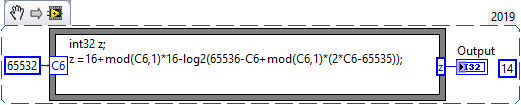
off-topic:
Gerd, die Excel-Funktion MOD(;) entspricht in der deutschen Version der Funktion REST(Zahl;Divisor)

08-28-2019
08:58 AM
- last edited on
08-08-2025
05:48 PM
by
 Content Cleaner
- Mark as New
- Bookmark
- Subscribe
- Mute
- Subscribe to RSS Feed
- Permalink
- Report to a Moderator
I the mean time I have found the solution just using the formula expression table from :
https://www.ni.com/docs/en-US/bundle/labview/page/formula-node-and-expression-node-functions.html
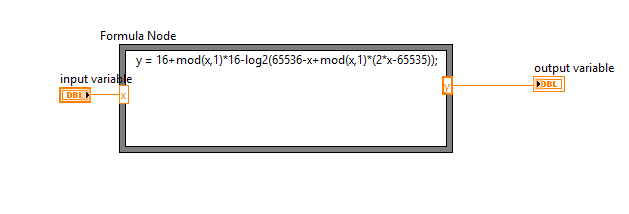
Thanks for your answers

 Yamaeda
08-28-2019 09:04 AM
- Mark as New
- Bookmark
- Subscribe
- Mute
- Subscribe to RSS Feed
- Permalink
- Report to a Moderator
Why would you do a "Mod 1"? That'd be the same as "Round towards -inf".
/Y


