- Subscribe to RSS Feed
- Mark Topic as New
- Mark Topic as Read
- Float this Topic for Current User
- Bookmark
- Subscribe
- Mute
- Printer Friendly Page
Formula Node label bug?
Solved!
 X.
X.
02-17-2012 04:53 PM
- Mark as New
- Bookmark
- Subscribe
- Mute
- Subscribe to RSS Feed
- Permalink
- Report to a Moderator
A last one for this week (hopefully)...
Drop a formula node on the BD and show its label:

Now resize the Formula Node from the top:
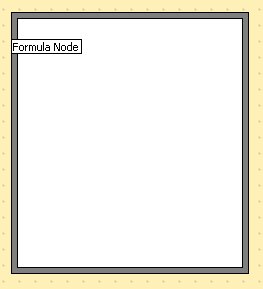
Oops! The formula node got stuck in its original position. I do not know of other objects label behaving like that.
Tested in LV 2011.
Solved! Go to Solution.
- Tags:
- bug
- X_Bug_Report
02-17-2012 05:17 PM
- Mark as New
- Bookmark
- Subscribe
- Mute
- Subscribe to RSS Feed
- Permalink
- Report to a Moderator
Well, sure enough, the MathScript Node shows the same feature...

 RavensFan

02-17-2012 05:19 PM
- Mark as New
- Bookmark
- Subscribe
- Mute
- Subscribe to RSS Feed
- Permalink
- Report to a Moderator
I can confirm it for LV 2011. Also LV 2009 and at least as far back as LV 8.2. I guess no one has ever felt the need to label a formula node AND resize it after doing so.
X = X +1 (another tally for X.) 

 altenbach
02-17-2012 05:43 PM
- Mark as New
- Bookmark
- Subscribe
- Mute
- Subscribe to RSS Feed
- Permalink
- Report to a Moderator
@Ravens Fan wrote:
I guess no one has ever felt the need to label a formula node AND resize it after doing so.
... and most people would probably resize from the bottom right anyway... 😄

02-17-2012 05:43 PM
- Mark as New
- Bookmark
- Subscribe
- Mute
- Subscribe to RSS Feed
- Permalink
- Report to a Moderator
I wonder where all the blue guys are hiding? Every one's busy working on the upcoming LV 2012 I suppose... which will mean more bugs and features to discover! Yeah...
😞
altenbach
02-17-2012 05:45 PM
- Mark as New
- Bookmark
- Subscribe
- Mute
- Subscribe to RSS Feed
- Permalink
- Report to a Moderator
@X. wrote:
I wonder where all the blue guys are hiding?
Well, it is late Friday afternoon in Austin. Happy Hour in progress 😄
02-17-2012 05:52 PM
- Mark as New
- Bookmark
- Subscribe
- Mute
- Subscribe to RSS Feed
- Permalink
- Report to a Moderator


02-20-2012 04:32 PM
- Mark as New
- Bookmark
- Subscribe
- Mute
- Subscribe to RSS Feed
- Permalink
- Report to a Moderator
This was reported to R&D (CAR# 339805) for further investigation. Thanks for the feedback!
Applications Engineer
National Instruments
- Tags:
- CAR
- CAR_339805
